

 FS2004 Civil Jet Aircraft
SGA UPS A300 Textures
This freeware package brings a carefully rendered UPS (United Parcel Service)…
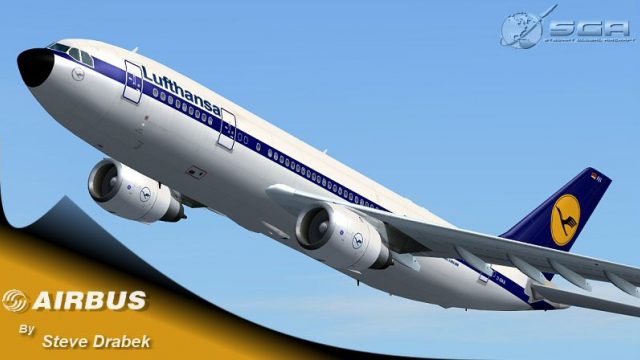
Lufthansa’s classic Airbus A300B4-200 livery arrives with crisp shading and a realistic fuselage profile, enhanced by dynamic reflective shine, correct lighting, opening passenger and cargo doors, and detailed wing views for flap and slat inspection in Microsoft Flight Simulator 2004. Requires the SGA A300B4-200 base aircraft.
 Rate
Rate
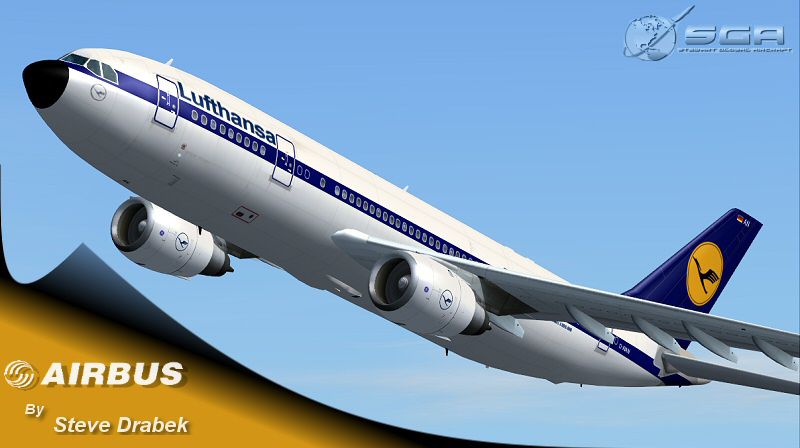
This freeware repaint showcases a Lufthansa Airbus A300 for Microsoft Flight Simulator 2004. It is meticulously crafted for the SGA A300B4-200 model and incorporates distinctive features—such as reflective exterior effects, pivoting wing surfaces, and a true-to-life fuselage profile—that make it stand out. Created by developer Steve Drabek, this repaint reproduces the classic Lufthansa color scheme with careful attention paid to shading and subtle design details.
Among the notable refinements, the texture set contains dynamic shine (meaning that lighting and environmental conditions modify the aircraft’s reflective surface in real time). The model additionally presents opening passenger and cargo doors for a more interactive handling experience. Flight deck vantage points and wing view perspectives enable enthusiasts to examine flaps and slats during various phases of flight. All of these attributes are brought together with correct lighting effects that align with real-world Airbus A300 configurations used by Lufthansa for medium-haul operations.

Screenshot of Lufthansa Airbus A300 in flight.
Before applying these textures, ensure you have downloaded and installed the SGA A300 base aircraft (sgaa3b42.zip) from the Fly Away Simulation mod library. After confirming that the core model is properly integrated, extract all contents of this repaint package into your main FS2004 installation directory. Make certain the "Use folder names" option is selected so that the repaint is placed in the correct location under Aircraft\SGA-A300B4-200\texture.LUF2.
Once the files are correctly positioned, open the aircraft.cfg file found in the SGA-A300B4-200 folder. Append a new [fltsim.XX] entry, placing it directly after the last existing flight-sim section and adjusting XX to the next sequential number. Below is the configuration snippet for your convenience:
[fltsim.XX]

title=SGA A300B4-200 Lufthansa

sim=a310

model=

panel=

sound=

texture=LUF2

kb_checklists=

kb_reference=

atc_airline=UPS

atc_flight_number=472

atc_id=N154UP

atc_heavy=1

ui_manufacturer=Airbus

ui_type=A300B4-200

ui_variation=Lufthansa Old Colors

description=Lufthansa repaint by Steve Drabek

visual_damage=1
Save the configuration file, close it, and then launch your simulator to access the repainted Lufthansa A300. The result should be a robust model portraying both exterior and interior details reflective of real A300 layouts. Lufthansa originally deployed the Airbus A300 across its European and intercontinental routes, so this repaint provides a faithful throwback to that historic era.
Free for all simmers · 2.13 MB · Scanned clean Oct 2026
Download speed: Free tier is capped at 0.5 Mbps. PRO members download at full line speed.
This file is a repaint — the package below is the base model it paints onto. Install it first, or the textures will have nothing to load onto.
FS9\Aircraft\, FS9\Addon Scenery\, FS9\Gauges\, or FS9\Effects\.readme.txt or README file. It tells you exactly where files go, what dependencies are needed, and any quirks specific to this add-on.The archive sga30lfo.zip has 22 files and directories contained within it.
This list displays the first 500 files in the package. If the package has more, you will need to download it to view them.
| Filename/Directory | File Date | File Size |
|---|---|---|
| Aircraft | 02.23.04 | 0 B |
| SGA_A300B4-200 | 03.15.04 | 0 B |
| EULA.doc | 02.13.04 | 28.00 kB |
| readme-install.txt | 03.15.04 | 1.79 kB |
| README.doc | 02.14.04 | 57.50 kB |
| texture.luf2 | 03.15.04 | 0 B |
| A300_600_B_L.BMP | 03.11.04 | 256.07 kB |
| A300_600_B_T.bmp | 03.14.04 | 4.00 MB |
| A300_A_L.BMP | 03.11.04 | 256.07 kB |
| A300_A_T.bmp | 03.14.04 | 4.00 MB |
| A300_B_L.BMP | 03.11.04 | 256.07 kB |
| A300_B_T.bmp | 03.14.04 | 4.00 MB |
| ENGINES_L.BMP | 02.09.04 | 64.07 kB |
| ENGINES_T.bmp | 03.14.04 | 1.00 MB |
| Thumbs.db | 03.03.04 | 15.00 kB |
| WINGS_L.BMP | 02.09.04 | 64.07 kB |
| WINGS_T.BMP | 03.14.04 | 1.00 MB |
| FILE_ID.DIZ | 03.15.04 | 361 B |
| 300lufo-release.jpg | 03.15.04 | 89.56 kB |
| 300lufo-release.gif | 03.15.04 | 6.89 kB |
| flyawaysimulation.txt | 10.29.13 | 959 B |
| Go to Fly Away Simulation.url | 01.22.16 | 52 B |
Only PRO members can place votes.
More FS2004 add-ons hand-picked based on this download.
FS2004 Civil Jet Aircraft
This freeware package brings a carefully rendered UPS (United Parcel Service)…
 FS2004 Civil Jet Aircraft
This freeware package adds a dedicated TNT cargo repaint to the Stewart Globa…
 FS2004 Civil Jet Aircraft
This package offers a specialized repaint of the Airbus A300 for FS2004, feat…
 FS2004 Civil Jet Aircraft
Model by SGA. Livery by Mutas Sibai. Screenshot of Lufthansa Airbus A300B2-1C…
 FS2004 Civil Jet Aircraft
The Lufthansa Airbus A300 has long been a pivotal wide-body aircraft in comme…
 FS2004 Civil Jet Aircraft
Textures only; requires LF3006.ZIP. Model by Harald Nehring and Frank Weiss. …
 FS2004 Civil Jet Aircraft
Model by Erick Cantu and Fraser Turner. Custom animations by Fraser Turner. T…
 FS2004 Civil Jet Aircraft
This paint kit includes layered textures for the fuselage in all three popula…
Read what other simmers think, or add your own.
