

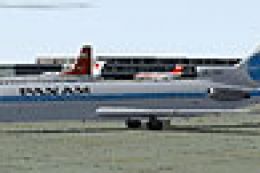
 FS2004 Civil Jet Aircraft
1980's Boeing 727-200 Texture Pack
Includes Pan American (Pan Am), Trans World Airways (TWA), Stering, Syrian Ar…
1980s Turkish Airlines Boeing 727-200 repaint brings a classic tri-jet look to Microsoft Flight Simulator 2004, matching period-correct titles, tail markings, and polished metal finish with subtle weathering. Designed for the AI Aardvark 727-200, it delivers a crisp exterior profile for retro AI traffic or nostalgic ramp scenes and requires the base model.
 Rate
Rate
This repaint for Microsoft Flight Simulator 2004 depicts the 1980s Turkish Airlines Boeing 727-200, reflecting the airline’s classic tri-jet colors from that era. The texture set, produced by R. Kreibich, utilizes the freeware AI Aardvark model (not included) to bring an authentic retro livery to life. Enthusiasts can enjoy a richly detailed exterior that showcases the narrow-body design of the Boeing 727, which served as a reliable workhorse for Turkish Airlines on various short- to medium-haul routes during the 1980s.
The Turkish Airlines 727-200 of the 1980s carried a bold and easily recognizable livery, reflecting the airline’s identity across European and regional destinations. This repaint captures the fuselage markings, tail art, and clean lines that defined the era. By using the AI Aardvark base, the aircraft’s external model accurately represents the iconic trijet layout with its rear-mounted engines and T-tail assembly, creating a faithful tribute to the real-world fleet of the time. Additionally, the aircraft’s streamlined form, together with the advanced avionics of that generation, delivered dependable performance during its tenure in the skies.
Since this package provides textures only, flight simmers must obtain the freeware AI Aardvark Boeing 727-200 model, which is available in the Fly Away Simulation mod library. The high-resolution textures applied by R. Kreibich accurately reflect the polished metallic surfaces and subtle weathering on the fuselage. AI Aardvark’s model includes features such as reflective mapping and intricate animations, ensuring that the repaint integrates seamlessly while maintaining crisp details from any angle in Microsoft Flight Simulator 2004.
For easy setup, decompress and place the contained folder into your “Flight Simulator 9\Aircraft\BAC 1-11 475” directory, or the folder where the AI Aardvark Boeing 727-200 is installed. Next, add the following lines to your aircraft.cfg file within the relevant aircraft’s directory:
[fltsim.XXX]

title=AIA 727-200 THY

sim=aia_727_200

model=reflective

panel=

sound=

texture=THY

kb_checklists=

kb_reference=

atc_id=

atc_airline=Turkish Airlines

ui_manufacturer=Boeing

ui_type=727-200

ui_variation=Turkish Airlines

description=AI Aardvark 727-200

atc_id_color=0000000000

visual_damage=1

atc_parking_types=GATE,RAMP
Be sure to replace XXX with the next available number in your aircraft.cfg. Afterward, you can select the newly installed Turkish Airlines repaint in your simulator interface. This workflow keeps your configurations organized, preventing any overlaps or conflicts in the aircraft list.
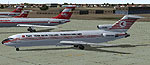
Screenshot displaying the classic 1980s livery with the tri-jet resting on the ramp.
This repaint fits seamlessly into AI traffic setups or manual flights for those who appreciate nostalgic liveries. As always, verify that you have the necessary AI Aardvark Boeing 727-200 base model installed. With those foundations in place, the attention to historical detail from R. Kreibich will offer an immersive 1980s flying experience in Microsoft Flight Simulator 2004’s virtual skies. Enjoy the vibrant heritage of Turkish Airlines within your simulator and explore the routes once flown by this enduring aircraft.
Free for all simmers · 237.12 KB · Scanned clean Oct 2026
Download speed: Free tier is capped at 0.5 Mbps. PRO members download at full line speed.
FS9\Aircraft\, FS9\Addon Scenery\, FS9\Gauges\, or FS9\Effects\.readme.txt or README file. It tells you exactly where files go, what dependencies are needed, and any quirks specific to this add-on.The archive text_thy.zip has 5 files and directories contained within it.
This list displays the first 500 files in the package. If the package has more, you will need to download it to view them.
| Filename/Directory | File Date | File Size |
|---|---|---|
| AIA_727_200_L.bmp | 09.10.03 | 1.00 MB |
| AIA_727_200_T.bmp | 04.21.04 | 1.00 MB |
| Readme.txt | 05.20.04 | 1020 B |
| flyawaysimulation.txt | 10.29.13 | 959 B |
| Go to Fly Away Simulation.url | 01.22.16 | 52 B |
Only PRO members can place votes.
More FS2004 add-ons hand-picked based on this download.
FS2004 Civil Jet Aircraft
Includes Pan American (Pan Am), Trans World Airways (TWA), Stering, Syrian Ar…
 FS2004 Civil Jet Aircraft
This repaint showcases a classic USAir Boeing 727-200 bare metal fuselage ren…
 FS2004 Civil Jet Aircraft
This repaint recreates Air France’s 1980s-era Boeing 727-200 markings for Mic…
 FS2004 Civil Jet Aircraft
This repaint offers a meticulously polished metal finish for the iconic Boein…
 FS2004 Civil Jet Aircraft
This freeware package features a meticulously recreated Eastern Airlines Boei…
 FS2004 Civil Jet Aircraft
This updated package offers a retro-themed Boeing 727-100 from Eastern Airlin…
 FS2004 Civil Jet Aircraft
This freeware repaint showcases the classic Midwest Express Airlines livery f…
 FS2004 Civil Jet Aircraft
This repaint set offers a faithful homage to Midwest Express Airlines during …
Be the first to leave a comment on this download.
Be the first to share your thoughts on this download.