

 FS2004 Civil Jet Aircraft
1980's Turkish Airlines Boeing 727-200
This repaint for Microsoft Flight Simulator 2004 depicts the 1980s Turkish Ai…
Bring classic 1980s airline traffic to the Boeing 727-200 with four detailed liveries: Pan American, TWA, Sterling, and Syrian Arab Airlines, tailored for the AI Aardvark model in FS2004. Textures only, these repaints add period-correct color and identity for believable ramp and route variety; requires the AI Aardvark 727-200 base aircraft.
 Rate
Rate
Includes Pan American (Pan Am), Trans World Airways (TWA), Stering, Syrian Arab Airlines. Textures only. Model by AI Aardvark. Repaint by R. Kreibich.
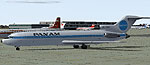
Screenshot of 1980's Boeing 727-200 on the ground.
Installation for FS2004:
1. Unzip & copy the extracted folder into your 'Flight Simulator 9\Aircraft\B-727' folder.
2. Copy&Paste the following lines to the aircrafte.cfg:
[fltsim.XX1]

	title=AIA 727-200 SAA

	sim=aia_727_200

	model=reflective

	panel=

	sound=

	texture=SAA

	kb_checklists=

	kb_reference=

	atc_id=

	atc_airline=Syrian Arab Airlines

	atc_flight_number=1303

	ui_manufacturer=Boeing

	ui_type=727-200

	ui_variation=Syrian Arab Airlines

	description=AI Aardvark 727-200

	atc_id_color=0000000000

	visual_damage=1

	atc_parking_types=GATE,RAMP

	atc_parking_codes=LAV
[fltsim.XX2]

	title=AIA 727-200 PanAm

	sim=aia_727_200

	model=reflective

	panel=

	sound=

	texture=PanAm

	kb_checklists=

	kb_reference=

	atc_id=

	atc_airline=Pan American

	atc_flight_number=1303

	ui_manufacturer=Boeing

	ui_type=727-200

	ui_variation=Pan American

	description=AI Aardvark 727-200

	atc_id_color=0000000000

	visual_damage=1

	atc_parking_types=GATE,RAMP

	atc_parking_codes=LAV
[fltsim.XX3]

	title=AIA 727-200 Trans World Airlines

	sim=aia_727_200

	model=reflective

	panel=

	sound=

	texture=TWA

	kb_checklists=

	kb_reference=

	atc_id=

	atc_airline=TWA

	atc_flight_number=1303

	ui_manufacturer=Boeing

	ui_type=727-200

	ui_variation=TWA

	description=AI Aardvark 727-200

	atc_id_color=0000000000

	visual_damage=1

	atc_parking_types=GATE,RAMP

	atc_parking_codes=TWA
[fltsim.XX4]

	title=AIA 727-200 Sterling

	sim=aia_727_200

	model=reflective

	panel=

	sound=

	texture=Sterling

	kb_checklists=

	kb_reference=

	atc_id=

	atc_airline=TWA

	atc_flight_number=1303

	ui_manufacturer=Boeing

	ui_type=727-200

	ui_variation=Sterling

	description=AI Aardvark 727-200

	atc_id_color=0000000000

	visual_damage=1

	atc_parking_types=GATE,RAMP

	atc_parking_codes=TWA
3. replace XXX by the next free fltsim-number.
Free for all simmers · 939.55 KB · Scanned clean Oct 2026
Download speed: Free tier is capped at 0.5 Mbps. PRO members download at full line speed.
FS9\Aircraft\, FS9\Addon Scenery\, FS9\Gauges\, or FS9\Effects\.readme.txt or README file. It tells you exactly where files go, what dependencies are needed, and any quirks specific to this add-on.The archive 727tex80.zip has 15 files and directories contained within it.
This list displays the first 500 files in the package. If the package has more, you will need to download it to view them.
| Filename/Directory | File Date | File Size |
|---|---|---|
| Readme.txt | 05.20.04 | 2.20 kB |
| texture.PANAM | 05.20.04 | 0 B |
| AIA_727_200_L.bmp | 09.10.03 | 1.00 MB |
| AIA_727_200_T.bmp | 04.26.04 | 1.00 MB |
| texture.SAA | 05.20.04 | 0 B |
| AIA_727_200_L.bmp | 09.10.03 | 1.00 MB |
| AIA_727_200_T.bmp | 05.04.04 | 1.00 MB |
| texture.Sterling | 05.20.04 | 0 B |
| AIA_727_200_L.bmp | 09.10.03 | 1.00 MB |
| AIA_727_200_T.bmp | 05.05.04 | 1.00 MB |
| texture.TWA | 05.20.04 | 0 B |
| AIA_727_200_L.bmp | 09.10.03 | 1.00 MB |
| AIA_727_200_T.bmp | 04.26.04 | 1.00 MB |
| flyawaysimulation.txt | 10.29.13 | 959 B |
| Go to Fly Away Simulation.url | 01.22.16 | 52 B |
Only PRO members can place votes.
More FS2004 add-ons hand-picked based on this download.
FS2004 Civil Jet Aircraft
This repaint for Microsoft Flight Simulator 2004 depicts the 1980s Turkish Ai…
 FS2004 Civil Jet Aircraft
This repaint showcases a classic USAir Boeing 727-200 bare metal fuselage ren…
 FS2004 Civil Jet Aircraft
This repaint recreates Air France’s 1980s-era Boeing 727-200 markings for Mic…
 FS2004 Civil Jet Aircraft
This repaint offers a meticulously polished metal finish for the iconic Boein…
 FS2004 Civil Jet Aircraft
This freeware package features a meticulously recreated Eastern Airlines Boei…
 FS2004 Civil Jet Aircraft
This updated package offers a retro-themed Boeing 727-100 from Eastern Airlin…
 FS2004 Civil Jet Aircraft
This freeware Orion Boeing 737-300 package is meticulously crafted for Micros…
 FS2004 Civil Jet Aircraft
Pilots interested in expanding their FS2004 fleet with a robust, long-haul tr…
Be the first to leave a comment on this download.
Be the first to share your thoughts on this download.