

 FS2004 Civil Jet Aircraft
United Nations Boeing 727-200 ZS-NZV
Vistaliners B727-200 in United Nations circa 2004 livery. Default panel and s…
United Airlines’ early-1970s Boeing 727-200 trijet brings authentic classic traffic to FS2004 with an optimized AI Aardvark model and Alan Campbell repaint. Nine LOD stages keep busy airports smooth while preserving the 727’s distinctive T-tail silhouette, and the included flight dynamics support realistic takeoff, approach, and quick runway exits.
 Rate
Rate
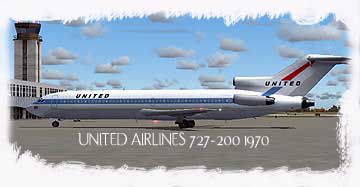
Experience a classic piece of aviation history with this freeware United Airlines Boeing 727-200 from the early 1970s, meticulously crafted by AI Aardvark and featuring a repaint by Alan Campbell. This complete package brings the iconic trijet to your FS2004 environment in a faithful rendition, complete with advanced modeling that minimizes performance impact.
The Boeing 727-200 introduced a sleek fuselage combined with an innovative T-tail and three rear-mounted engines. In the 1970s, United Airlines operated these versatile jets on high-density domestic routes. Spotters and passengers appreciated the short-field capabilities and unique silhouette, making it a common sight at major hubs and smaller airports alike.
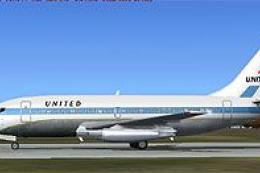
United Airlines Boeing 727-200 parked on the tarmac.
Once added, you will see the unmistakable United Airlines livery performing scheduled flights in your simulated skies.
This package includes a non-reflective model by default. However, if you wish to enable the reflective model, open your aircraft.cfg file and change the line:
model=no_refl
to:
model=reflective
While doing so activates a reflective channel, the included texture does not incorporate dedicated reflectivity layers, so you may not notice a visual change.
AI Aardvark built this Boeing 727-200 to serve as a traffic aircraft. The model focuses on seamless airport traffic experiences, whether parked at the terminal or approaching the runway. It leverages nine LOD (levels of detail) variations to dynamically simplify geometry as the aircraft recedes from your viewpoint. This helps sustain smoother frame rates, especially when multiple 727-200s are active in your simulator.
In contrast, some GMAX-based aircraft without LOD may reduce performance when numerous instances appear simultaneously. This add-on’s LOD design sidesteps those issues while maintaining a recognizable shape at various distances.
The included FDE (Flight Dynamics Engine) balances robust takeoff performance with controlled landings. Since AI traffic flow requires rapid runway clearance, the model aims to touch down near the runway end and exit promptly. If you prefer more extended ground effect during AI landings, you can refine the cruise lift, parasite drag, and induced drag entries in the aircraft.cfg file. Adjusting these parameters can alter how the jet floats before touchdown.
Enjoy this freeware homage to one of United Airlines’ most iconic aircraft, complete with the timeless 1970s livery. AI Aardvark and Alan Campbell have brought this vintage beauty to FS2004 with impressive attention to detail, ensuring a rewarding experience for those wanting authentic AI traffic in their simulator.
Free for all simmers · 916.29 KB · Scanned clean Oct 2026
Download speed: Free tier is capped at 0.5 Mbps. PRO members download at full line speed.
FS9\Aircraft\, FS9\Addon Scenery\, FS9\Gauges\, or FS9\Effects\.readme.txt or README file. It tells you exactly where files go, what dependencies are needed, and any quirks specific to this add-on.The archive ua727197.zip has 18 files and directories contained within it.
This list displays the first 500 files in the package. If the package has more, you will need to download it to view them.
| Filename/Directory | File Date | File Size |
|---|---|---|
| AIA 727-200_README.txt | 09.20.04 | 4.24 kB |
| AIA_727_200_UNITED 1970 | 09.20.04 | 0 B |
| aia_727_200.air | 08.06.03 | 9.63 kB |
| Aircraft.cfg | 09.20.04 | 10.88 kB |
| model.no_refl | 09.20.04 | 0 B |
| aia_727_200.mdl | 09.05.03 | 554.09 kB |
| model.cfg | 07.22.03 | 34 B |
| model.reflective | 09.20.04 | 0 B |
| aia_727_200.mdl | 09.05.03 | 558.31 kB |
| model.cfg | 07.22.03 | 34 B |
| Texture | 09.20.04 | 0 B |
| aia_727_200_l.bmp | 08.10.03 | 256.07 kB |
| aia_727_200_t.bmp | 09.20.04 | 4.00 MB |
| file id.txt | 09.20.04 | 90 B |
| UA727.jpg | 09.20.04 | 13.77 kB |
| UA7271970txt.txt | 09.20.04 | 138 B |
| flyawaysimulation.txt | 10.29.13 | 959 B |
| Go to Fly Away Simulation.url | 01.22.16 | 52 B |
Only PRO members can place votes.
More FS2004 add-ons hand-picked based on this download.
FS2004 Civil Jet Aircraft
Vistaliners B727-200 in United Nations circa 2004 livery. Default panel and s…
 FS2004 Civil Jet Aircraft
This freeware release features Erick Cantu’s Vistaliners Boeing 727-200 (N763…
 FS2004 Civil Jet Aircraft
Vistaliners SilverJet B727 United Airlines (1977) textures. Textures only for…
 FS2004 Civil Jet Aircraft
This freeware add-on for Microsoft Flight Simulator 2004 showcases a complete…
 FS2004 Civil Jet Aircraft
This comprehensive freeware package features a meticulously rendered Boeing 7…
 FS2004 Civil Jet Aircraft
Vistaliners SilverJet B727 UPS textures. Textures only for Vistaliners latest…
 FS2004 Civil Jet Aircraft
This is a repaint of Erick Cantu's new Boeing 737-200 in the colors of United…
 FS2004 Civil Jet Aircraft
This specialized freeware package recreates United Airlines' iconic Boeing 73…
Be the first to leave a comment on this download.
Be the first to share your thoughts on this download.