

 FS2004 Civil Jet Aircraft
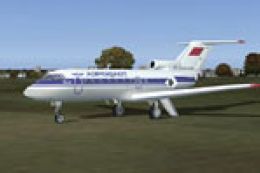
Aeroflot SCDS Yak-40
Aeroflot (USSR times) addon livery for SCDS Yakovlev Yak-40 v1.3 classic pass…
SCDS Yakovlev-40 v1.4 for FS2004 delivers three fully animated variants with distinct interiors, from classic passenger to convertible cargo and VIP “Salon.” Authentic flight dynamics and custom sounds pair with fully functional 2D and 3D cockpits, three lighting modes, dynamic English tooltips with unit conversions, and an illustrated English manual.
 Rate
Rate
Version 1.4 of SCDS Yakovlev-40, full package. Includes three different fully animated models with three different interiors (Yak-40 classic, Yak-40K convertible pax/cargo and Yak-40 "Salon" VIP carrier). Authentic flight dynamics and sounds of real aircraft. Fully functional 2D and 3D cockpits with three modes of lighting (the daylight mode, night with white floodlight and red with directional spotlights). Illustrated English manual included. Features also dynamic English tooltips with units conversions. All v1.3 liveries are compatible with v1.4. By Suprunov Computer Design Studio (SCDS). Shareware; some instruments disable in trial version.
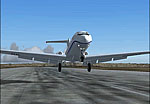
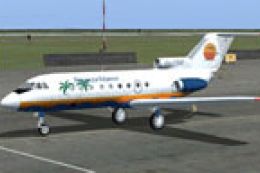
Screenshot of Yakovlev-40 taking off.
INSTALLATION: Run setup.exe and follow onscreen instructions. Unregistered version will have some instruments disabled but still permits to proceed with startup and flying. When installed You can proceed to cockpit and begin Your familiarization with Yakovlev-40 (type 2). If You'd like to purchase a license and unlock all aircraft functions, just use the supplied utility which is accessible from Windows "Start | Programs | SCDS Yak-40 | Yak-40 Registration".
FLYING: To preview all systems of the aircraft You can use (in both 2D and VC) the switchboard which is located next to radar housing to the left from it (black shield). When waked up by click the switchboard will give You access to all Yak-40 subpanels. To test flying behavior and as a "quick start" You can follow this way:
Free for all simmers · 39.67 MB · Scanned clean Oct 2026
Download speed: Free tier is capped at 0.5 Mbps (this file takes approximately 11 mins at the cap). PRO members download at full line speed.
FS9\Aircraft\, FS9\Addon Scenery\, FS9\Gauges\, or FS9\Effects\.readme.txt or README file. It tells you exactly where files go, what dependencies are needed, and any quirks specific to this add-on.The archive scyakv14.zip has 7 files and directories contained within it.
This list displays the first 500 files in the package. If the package has more, you will need to download it to view them.
| Filename/Directory | File Date | File Size |
|---|---|---|
| FILE_ID.DIZ | 10.29.04 | 627 B |
| README.txt | 10.29.04 | 2.92 kB |
| scyakv14_1.gif | 10.29.04 | 12.35 kB |
| scyakv14_2.gif | 10.29.04 | 8.17 kB |
| yak40setup14.exe | 10.30.04 | 39.66 MB |
| flyawaysimulation.txt | 10.29.13 | 959 B |
| Go to Fly Away Simulation.url | 01.22.16 | 52 B |
Only PRO members can place votes.
More FS2004 add-ons hand-picked based on this download.
FS2004 Civil Jet Aircraft
Aeroflot (USSR times) addon livery for SCDS Yakovlev Yak-40 v1.3 classic pass…
 FS2004 Civil Jet Aircraft
Upgrade From SCDS Yak-40 v1.3 to v1.4. This is the official SCDS upgrade. The…
 FS2004 Civil Jet Aircraft
This Boeing 767 model features 15 Gmax models with accurate feature; all Boei…
 FS2004 Civil Jet Aircraft
Repaint of the default B737-400, B747-400, B777-300 and FSPainter's A320-200,…
 FS2004 Civil Jet Aircraft
A repaint of the FFX B737-300 in the old colors of US Air. This package inclu…
 FS2004 Civil Jet Aircraft
Includes Boeing 747-200F, registration N616US, N629US, N630US, N639US, N640US…
 FS2004 Civil Jet Aircraft
FS2004 Yakovlev Yak-42, v2.0. Package includes documentation in English and R…
 FS2004 Civil Jet Aircraft
This package offers a specialized repaint for the popular SCDS Yak 40 v1.2RC …
Read what other simmers think, or add your own.

I add to the previous communication that the author of the Yak40 is unreachable...
I downloaded the program, but the gauge is unresponsive, perhaps because it failed. Could you please check? Thank you

I downloaded SCDS YAK-42 and it looks very good.
How do I buy a license if the web page does not work? Could you help me?
It is the version for FS2004.