

 FS2004 Civil Jet Aircraft
Aerodesigns Airbus A318-111/121 Extra Models
Designed exclusively for enthusiasts of Microsoft Flight Simulator 2004, this…
Boeing 767 Sunny V3 delivers a comprehensive Gmax model set for FS2004, covering all 767 variants across 15 finely detailed builds with selectable PW, RR, or CF engines. Expect smooth animations, transparent cabin windows, and a full virtual cockpit spanning flight deck and cabin, plus a paint kit for custom repaints.
 Rate
Rate
This Boeing 767 model features 15 Gmax models with accurate feature; all Boeing 767 serials included; three types of engines, PW, RR, CF; all moving parts; transparent cabin windows; virtual cockpit for whole model, paint kit. By Sunny Xia.
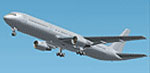
Screenshot of Boeing 767 in flight.
The Story:
After over 1 year's development, finally my Sunny 767 v3 is coming. Before this ver3 I had already published v1 and v2. I am not much satisfied with them, since I was not quite familiar with Gmax (a wonderful program!) to build the model. After a long time of studying and practice, I feel good with this new v3. For this v3, I tried to base on Boeing official data as accurate as possible. And I would also like to say Thanks to all the FS fans that gave me any kind of supports.
Sunny 767 v3 Model:
What's included:
Installation:
Notice:
Acknowledgement:
Please allow me to say thanks to POSKY for the comments from the talent team, and to all other modelers who made wonderful jobs. I've learnt a lot from you!
Hopes:
Finally, I would like to invite all the FS fans that have the will and ability to join us. Let's make out a wonderful Sim Sky.
Free for all simmers · 32.42 MB · Scanned clean Oct 2026
Download speed: Free tier is capped at 0.5 Mbps (this file takes approximately 9 mins at the cap). PRO members download at full line speed.
FS9\Aircraft\, FS9\Addon Scenery\, FS9\Gauges\, or FS9\Effects\.readme.txt or README file. It tells you exactly where files go, what dependencies are needed, and any quirks specific to this add-on.The archive sunny767.zip has 122 files and directories contained within it.
This list displays the first 500 files in the package. If the package has more, you will need to download it to view them.
| Filename/Directory | File Date | File Size |
|---|---|---|
| aircraft | 01.13.04 | 0 B |
| sunny767-200 | 01.13.04 | 0 B |
| Aircraft.cfg | 01.13.04 | 17.38 kB |
| Boeing767-200.air | 06.12.03 | 8.65 kB |
| model.762CF | 01.13.04 | 0 B |
| 762v3cf.mdl | 01.08.04 | 4.65 MB |
| Model.cfg | 12.22.03 | 24 B |
| model.762PW | 01.13.04 | 0 B |
| 762v3pw.mdl | 01.08.04 | 4.65 MB |
| Model.cfg | 12.22.03 | 24 B |
| model.762RR | 01.13.04 | 0 B |
| 762v3rr.mdl | 01.08.04 | 4.60 MB |
| Model.cfg | 12.22.03 | 24 B |
| panel | 01.13.04 | 0 B |
| panel.cfg | 01.08.04 | 32 B |
| sound.CF | 01.13.04 | 0 B |
| Sound.cfg | 01.08.04 | 30 B |
| sound.PW | 01.13.04 | 0 B |
| Sound.cfg | 01.08.04 | 30 B |
| sound.RR | 01.13.04 | 0 B |
| Sound.cfg | 01.08.04 | 30 B |
| Texture.paintkit | 01.13.04 | 0 B |
| sunny767-300 | 01.13.04 | 0 B |
| Aircraft.cfg | 01.13.04 | 18.28 kB |
| Boeing767-300.air | 06.12.03 | 8.65 kB |
| model.763aCF | 01.13.04 | 0 B |
| 763aV3cf.mdl | 01.07.04 | 4.87 MB |
| Model.cfg | 12.22.03 | 25 B |
| model.763aPW | 01.13.04 | 0 B |
| 763aV3pw.mdl | 01.07.04 | 4.87 MB |
| Model.cfg | 12.22.03 | 25 B |
| model.763aRR | 01.13.04 | 0 B |
| 763aV3rr.mdl | 01.07.04 | 4.82 MB |
| Model.cfg | 12.22.03 | 25 B |
| model.763bCF | 01.13.04 | 0 B |
| 763bV3cf.mdl | 01.07.04 | 4.85 MB |
| Model.cfg | 12.22.03 | 25 B |
| model.763bPW | 01.13.04 | 0 B |
| 763bV3pw.mdl | 01.07.04 | 4.85 MB |
| Model.cfg | 12.22.03 | 25 B |
| model.763bRR | 01.13.04 | 0 B |
| 763bV3rr.mdl | 01.07.04 | 4.80 MB |
| Model.cfg | 12.22.03 | 25 B |
| panel | 01.13.04 | 0 B |
| panel.cfg | 01.08.04 | 32 B |
| sound.CF | 01.13.04 | 0 B |
| Sound.cfg | 01.08.04 | 30 B |
| sound.PW | 01.13.04 | 0 B |
| Sound.cfg | 01.08.04 | 30 B |
| sound.RR | 01.13.04 | 0 B |
| Sound.cfg | 01.08.04 | 30 B |
| Texture.paintkit | 01.13.04 | 0 B |
| sunny767-3ER | 01.13.04 | 0 B |
| Aircraft.cfg | 01.13.04 | 18.33 kB |
| Boeing767-300ER.air | 06.12.03 | 8.65 kB |
| model.763aCF | 01.13.04 | 0 B |
| 763av3cf.mdl | 01.07.04 | 4.87 MB |
| Model.cfg | 12.22.03 | 25 B |
| model.763aPW | 01.13.04 | 0 B |
| 763av3pw.mdl | 01.07.04 | 4.87 MB |
| Model.cfg | 12.22.03 | 25 B |
| model.763aRR | 01.13.04 | 0 B |
| 763av3rr.mdl | 01.07.04 | 4.82 MB |
| Model.cfg | 12.22.03 | 25 B |
| model.763bCF | 01.13.04 | 0 B |
| 763bv3cf.mdl | 01.07.04 | 4.85 MB |
| Model.cfg | 12.22.03 | 25 B |
| model.763bPW | 01.13.04 | 0 B |
| 763bv3pw.mdl | 01.07.04 | 4.85 MB |
| Model.cfg | 12.22.03 | 25 B |
| model.763bRR | 01.13.04 | 0 B |
| 763bv3rr.mdl | 01.07.04 | 4.80 MB |
| Model.cfg | 12.22.03 | 25 B |
| panel | 01.13.04 | 0 B |
| panel.cfg | 01.08.04 | 32 B |
| sound.CF | 01.13.04 | 0 B |
| Sound.cfg | 01.08.04 | 30 B |
| sound.PW | 01.13.04 | 0 B |
| Sound.cfg | 01.08.04 | 30 B |
| sound.RR | 01.13.04 | 0 B |
| Sound.cfg | 01.08.04 | 30 B |
| Texture.paintkit | 01.13.04 | 0 B |
| sunny767_texture_installer.bat | 01.13.04 | 926 B |
| Texture-763 | 01.13.04 | 0 B |
| 763A_fuselage_L.bmp | 01.09.04 | 682.74 kB |
| 763A_fuselage_t.bmp | 01.09.04 | 1.33 MB |
| 763B_fuselage_L.bmp | 01.09.04 | 682.74 kB |
| 763B_fuselage_t.bmp | 01.09.04 | 1.33 MB |
| 767a_fuselage2_L.bmp | 01.09.04 | 682.74 kB |
| 767a_fuselage2_t.bmp | 01.08.04 | 1.33 MB |
| 767b_fuselage2_L.bmp | 01.09.04 | 682.74 kB |
| 767b_fuselage2_t.bmp | 01.08.04 | 1.33 MB |
| Texture-all | 01.13.04 | 0 B |
| 767tire_blur.bmp | 01.08.04 | 682.75 kB |
| 767tire_still.bmp | 01.08.04 | 682.75 kB |
| 767wingL_L.bmp | 01.09.04 | 682.74 kB |
| 767wingL_t.bmp | 01.08.04 | 1.33 MB |
| 767wingR_L.bmp | 01.09.04 | 682.74 kB |
| 767wingR_t.bmp | 01.08.04 | 1.33 MB |
| 767_cockpit_L.bmp | 01.08.04 | 170.74 kB |
| 767_cockpit_t.bmp | 01.13.04 | 170.74 kB |
| 767_elevator_L.bmp | 01.08.04 | 170.74 kB |
| 767_elevator_t.bmp | 01.08.04 | 341.40 kB |
| 767_gear_L.bmp | 01.09.04 | 170.74 kB |
| 767_gear_T.bmp | 01.08.04 | 341.40 kB |
| 767_rudder_L.bmp | 01.09.04 | 170.74 kB |
| 767_rudder_t.bmp | 01.08.04 | 341.40 kB |
| CF_engineL_L.bmp | 01.08.04 | 682.74 kB |
| CF_engineL_t.bmp | 01.08.04 | 1.33 MB |
| CF_engineR_L.bmp | 01.08.04 | 682.74 kB |
| CF_engineR_t.bmp | 01.08.04 | 1.33 MB |
| PW_engineL_L.bmp | 01.08.04 | 682.74 kB |
| PW_engineL_t.bmp | 01.08.04 | 1.33 MB |
| PW_engineR_L.bmp | 01.08.04 | 682.74 kB |
| PW_engineR_t.bmp | 01.08.04 | 1.33 MB |
| RR_engineL_L.bmp | 01.08.04 | 682.74 kB |
| RR_engineL_t.bmp | 01.08.04 | 1.33 MB |
| RR_engineR_L.bmp | 01.08.04 | 682.74 kB |
| RR_engineR_t.bmp | 01.08.04 | 1.33 MB |
| readme.txt | 01.13.04 | 4.03 kB |
| flyawaysimulation.txt | 10.29.13 | 959 B |
| Go to Fly Away Simulation.url | 01.22.16 | 52 B |
Only PRO members can place votes.
More FS2004 add-ons hand-picked based on this download.
FS2004 Civil Jet Aircraft
Designed exclusively for enthusiasts of Microsoft Flight Simulator 2004, this…
 FS2004 Civil Jet Aircraft
Version 1.4 of SCDS Yakovlev-40, full package. Includes three different fully…
 FS2004 Civil Jet Aircraft
Repaint of the default B737-400, B747-400, B777-300 and FSPainter's A320-200,…
 FS2004 Civil Jet Aircraft
A repaint of the FFX B737-300 in the old colors of US Air. This package inclu…
 FS2004 Civil Jet Aircraft
Includes Boeing 747-200F, registration N616US, N629US, N630US, N639US, N640US…
 FS2004 Civil Jet Aircraft
Presenting the new Embraer 170 version 3. New model, new textures, animated f…
 FS2004 Civil Jet Aircraft
Project EL AL Boeing 767 Photoreal fleet package. Includes all EL AL's curren…
 FS2004 Civil Jet Aircraft
Model Designer : C. Vincent Cho Flight Dynamics Designer : Warren C,Daniel FD…
Read what other simmers think, or add your own.

After running the texture installer, all the aircraft have no paint. The engine sound appears to be from a Cessna.