

 FS2004 Civil Jet Aircraft
Kenya Boeing 747-400
Original Project Open Sky model modified for FS2004. Uses default panel or pa…
Kenya Airways’ classic Douglas DC-9-30 look comes alive with this faithful repaint for the SGA model in Microsoft Flight Simulator 2004, featuring crisp logos, correct markings, and period-accurate colors suited to regional jet operations. It requires the freeware SGA DC-9-30 base package and complements the aircraft’s proven flight dynamics.
 Rate
Rate
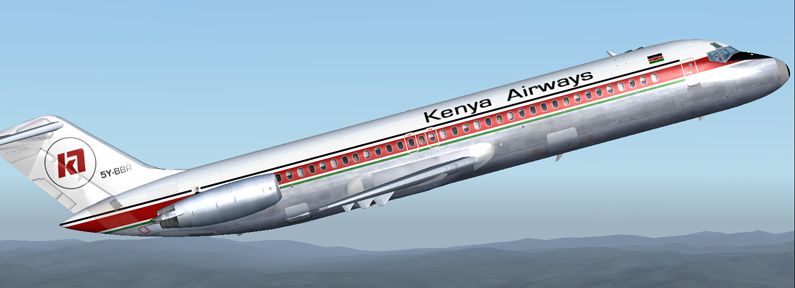
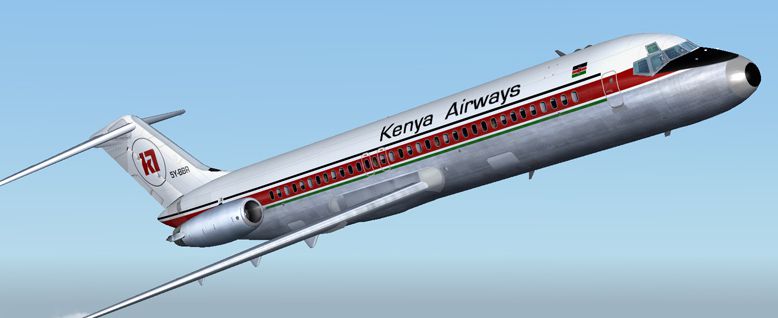
This repaint package showcases an authentic Kenya Airways livery specifically tailored for the SGA DC-9-30 framework in Microsoft Flight Simulator 2004. Built by Henry William, it captures both the airline’s vibrant exterior design and the classic profile of the DC-9 series. Kenya Airways—originally formed in the late 1970s—relied heavily on short- and medium-haul aircraft like the DC-9 to connect regional routes efficiently. Now, this repaint allows you to experience those historic operations with accurate exterior textures that reflect real-world details.
The Douglas DC-9-30 is a short-to-medium range jet airliner that first entered service in the 1960s. Equipped with two rear-mounted turbofan engines, it offered reliable performance across various airlines worldwide. Kenya Airways, known as the national flag carrier of Kenya, maintained a practical yet distinctive paint scheme on these jets. Henry William’s texture set replicates that unique color pattern by incorporating carefully mapped logos and markings. The base model from SGA, originally developed by Erick Cantu and refined by Fraser W. Turner, forms the foundation for this repaint and merges visual authenticity with stable flight dynamics.
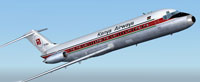
Screenshot of Kenya Airways Douglas DC-9-30 in flight.
This texture add-on requires the SGA DC-9-30 freeware base package (filename SGA930.zip), which is available in the Fly Away Simulation mod library. Once you have obtained that model, ensure it is fully operational within your simulator before you apply the Kenya Airways repaint.
Aircraft.cfg file using a text editor such as Notepad.Aircraft.cfg, making sure to replace X with the next fltsim index number:[fltsim.X] title=SGA DC-9-30 Kenya Airways sim=SGA DC9_30 model= panel= sound= texture=kenya checklists= atc_id=N940N atc_id_color=0xffffffff atc_airline=kenya airways atc_flight_number=935 ui_manufacturer=Douglas ui_type=DC-9-31 ui_variation=Kenya Airways description=Model: Erick Cantu\nFlight Dynamics V9.1.0: Fraser W. Turner\n\n visual_damage=0 atc_heavy=0 atc_id_font=Verdana,-11,1,600,0 atc_parking_codes= atc_parking_types=
Aircraft.cfg entries match the folder name exactly for a smooth texture load.Aircraft.cfg and close the file.This repaint was meticulously prepared by Henry William, whose work focuses on bringing historic airline liveries to life within flight simulators. Erick Cantu’s base model, along with performance refinements by Fraser W. Turner, ensures a well-rounded experience featuring realistic aerodynamics and cockpit behavior. By installing this repaint, you can reenact Kenya Airways’ regional routes while appreciating the unique features of the Douglas DC-9 family.
Free for all simmers · 2.81 MB · Scanned clean Oct 2026
Download speed: Free tier is capped at 0.5 Mbps. PRO members download at full line speed.
This file is a repaint — the package below is the base model it paints onto. Install it first, or the textures will have nothing to load onto.
FS9\Aircraft\, FS9\Addon Scenery\, FS9\Gauges\, or FS9\Effects\.readme.txt or README file. It tells you exactly where files go, what dependencies are needed, and any quirks specific to this add-on.The archive kawdc9h.zip has 24 files and directories contained within it.
This list displays the first 500 files in the package. If the package has more, you will need to download it to view them.
| Filename/Directory | File Date | File Size |
|---|---|---|
| texture.kenya | 12.09.04 | 0 B |
| CONE_L.BMP | 08.08.03 | 5.43 kB |
| CONE_T.BMP | 08.08.03 | 5.43 kB |
| DC9_B_L.BMP | 05.19.04 | 256.07 kB |
| DC9xINTERIOR_L.BMP | 05.19.04 | 256.07 kB |
| DC9xINTERIOR_T.BMP | 01.28.04 | 1.00 MB |
| ENGINES_L.BMP | 05.19.04 | 256.07 kB |
| INTAKE_L.bmp | 08.08.03 | 5.43 kB |
| INTAKE_t.BMP | 08.10.03 | 42.78 kB |
| WING_LEFT_L.BMP | 05.19.04 | 256.07 kB |
| WING_RIGHT_L.BMP | 05.19.04 | 256.07 kB |
| WING_RIGHT_T.BMP | 09.24.03 | 1.00 MB |
| engines_t.bmp | 10.27.04 | 4.00 MB |
| 30FUSE_L.BMP | 10.28.04 | 4.00 MB |
| dc9_b_t.bmp | 11.05.04 | 4.00 MB |
| WING_LEFT_T.bmp | 11.29.04 | 4.00 MB |
| 30fuse_t.bmp | 12.09.04 | 4.00 MB |
| readme.txt | 12.09.04 | 1.57 kB |
| aa.jpg | 12.09.04 | 83.55 kB |
| bb.jpg | 12.09.04 | 88.42 kB |
| small.gif | 12.09.04 | 4.43 kB |
| Kenya AW DC9-30 | 12.09.04 | 0 B |
| flyawaysimulation.txt | 10.29.13 | 959 B |
| Go to Fly Away Simulation.url | 01.22.16 | 52 B |
Only PRO members can place votes.
More FS2004 add-ons hand-picked based on this download.
FS2004 Civil Jet Aircraft
Original Project Open Sky model modified for FS2004. Uses default panel or pa…
 FS2004 Civil Jet Aircraft
This freeware release brings fresh updates to a classic tri-engine wide-body …
 FS2004 Civil Jet Aircraft
Laker Airways Douglas DC-10-30, "Californian Belle". Textures only. Model by …
 FS2004 Civil Jet Aircraft
Textures only. Registration G-GOKT was unusual in that it operated for some t…
 FS2004 Civil Jet Aircraft
This complete freeware package brings the iconic tri-jet design of the Dougla…
 FS2004 Civil Jet Aircraft
Brand new model from SGA. The SGA DC9-30 with North Central and Eastern. Mode…
 FS2004 Civil Jet Aircraft
This freeware release offers flight simulation enthusiasts an enhanced Dougla…
 FS2004 Civil Jet Aircraft
A Douglas DC9-30 in Aerorepublica Colombia livery, painted in DXT3 textures, …
Be the first to leave a comment on this download.
Be the first to share your thoughts on this download.