

 FS2004 Propeller Aircraft
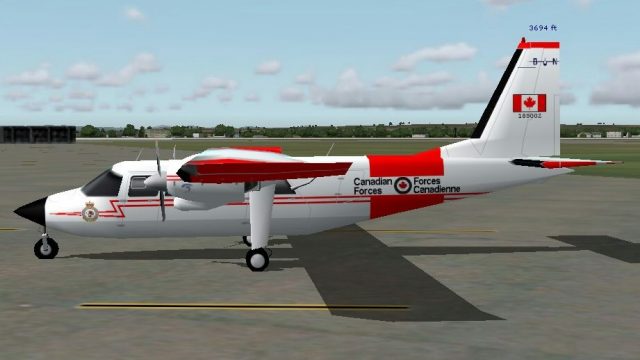
Fly Montserrat BN2 Islander VP-MNT
This airline uses only Britten Norman Islanders; this one is VP-MNT. Model by…
Britten-Norman BN-2 Islander AI repaint in fictional Canadian Armed Forces markings adds believable ramp and traffic variety for FS2004, with matching textures for both short-nose and long-nose models plus CANFORCE-style ATC details and parking codes. Textures only; requires Henry Tomkiewicz’s AI BN2A/B base model.
 Rate
Rate
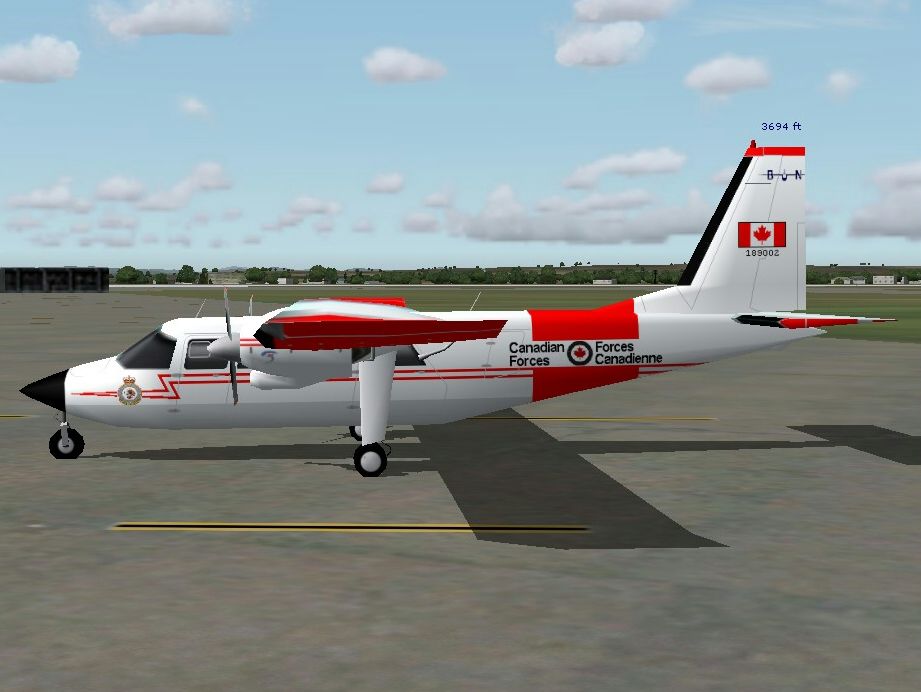

This is a Britten Norman BN2 Islander in fictitious colors of the CAF. Textures only; requires the AI BN2A/B for installation and can be used for both short and long nose variations. Repaint by Gord Broten. Original aircraft by Henry Tomkiewicz.
Screenshot of CAF BN2 Islander on the ground.
Unzip the contents of this zip file to a temp folder and and copy\paste the fltsim text below into your AI BN2 folder.
Change the XX in [fltsim.XX] to the next number available in sequence in your .cfg file.
[fltsim.xx]

	title=Britten-Norman BN-2 SN CAF AI

	sim=Britten-Norman BN-2

	model=shortnose

	panel=

	sound=

	texture=CAF

	kb_checklists=

	atc_id_enable=1

	atc_heavy=0

	atc_id=189002

	atc_airline=CANFORCE

	atc_flight_number=

	atc_parking_codes=CFC

	atc_parking_types=GATE,RAMP

	ui_manufacturer=Britten-Norman

	ui_type=BN-2 AI

	ui_variation=SHORT NOSE CAF AI

	description=AI Britten-Norman BN-2 Islander by Henry Tomkiewicz, repaint by Gord Broten
[fltsim.xx]

	title=Britten-Norman BN-2 LN CAF AI

	sim=Britten-Norman BN-2

	model=longnose

	panel=

	sound=

	texture=CAF

	kb_checklists=

	atc_id_enable=1

	atc_heavy=0

	atc_id=189002

	atc_airline=CANFORCE

	atc_flight_number=

	atc_parking_codes=CFC

	atc_parking_types=GATE,RAMP

	ui_manufacturer=Britten-Norman

	ui_type=BN-2 AI

	ui_variation=LONG NOSE CAF AI

	description=AI Britten-Norman BN-2 Islander by Henry Tomkiewicz, repaint by Gord Broten
Aircraft will appear in FS2004 as ui_manufacturer=Britten-Norman, ui_type=BN-2 AI, ui_variation=SHORT NOSE CAF AI, LONG NOSE CAF AI.
Free for all simmers · 512.84 KB · Scanned clean Oct 2026
Download speed: Free tier is capped at 0.5 Mbps. PRO members download at full line speed.
FS9\Aircraft\, FS9\Addon Scenery\, FS9\Gauges\, or FS9\Effects\.readme.txt or README file. It tells you exactly where files go, what dependencies are needed, and any quirks specific to this add-on.The archive bn2cafup.zip has 13 files and directories contained within it.
This list displays the first 500 files in the package. If the package has more, you will need to download it to view them.
| Filename/Directory | File Date | File Size |
|---|---|---|
| AI BN2 CAF 1.jpg | 10.03.04 | 302.65 kB |
| AI BN2 CAF.jpg | 10.03.04 | 140.09 kB |
| CAf AI BN2 Readme.txt | 10.02.04 | 1.89 kB |
| file_id.diz | 10.05.04 | 538 B |
| texture.CAF | 10.02.04 | 0 B |
| aibn2.bmp | 10.05.04 | 1.00 MB |
| aibn2_l.bmp | 08.27.04 | 1.00 MB |
| prop-hs.bmp | 08.27.04 | 64.07 kB |
| Thumbs.db | 10.03.04 | 9.00 kB |
| Thumbs.db | 10.05.04 | 7.50 kB |
| BN2CAFUP | 10.05.04 | 0 B |
| flyawaysimulation.txt | 10.29.13 | 959 B |
| Go to Fly Away Simulation.url | 01.22.16 | 52 B |
Only PRO members can place votes.
More FS2004 add-ons hand-picked based on this download.
FS2004 Propeller Aircraft
This airline uses only Britten Norman Islanders; this one is VP-MNT. Model by…
 FS2004 Propeller Aircraft
These two repaints were made for the AI Britten Normen BN2 Islanders by Henry…
 FS2004 Propeller Aircraft
Textures of Air Panama for the HTAI Britten Norman BN-2 Islander model. Textu…
 FS2004 Propeller Aircraft
Aurigny Britten Norman BN2-2AMk3 Trislander. Four repaints, G-BDTO, G-BEVT, G…
 FS2004 Propeller Aircraft
Model by Marcel Kuhnt. Repainted by Gerard G. Olvis. Screenshot of Britten No…
 FS2004 Propeller Aircraft
Britten Norman BN-2 Islander Winair and St. Barths Commuter repaints. These t…
 FS2004 Propeller Aircraft
Repaint in Transgabon livery of Marcel Khunt's Britten Norman BN2 for FSX and…
 FS2004 Propeller Aircraft
Air Flamenco is a regional airline based in Puerto Rico that transports passe…
Be the first to leave a comment on this download.
Be the first to share your thoughts on this download.