

 FSX Civil Aircraft
Bombardier Canadair CRJ 200 V2.0
Includes liveries for Air Canada, America West, Delta Connection and Lufthans…
British Airways livery for the default Bombardier CRJ700 brings registration G-MRSG and Speedbird-style ATC details to your hangar in Microsoft Flight Simulator X. The repaint targets the CRJ-700’s exterior textures and pairs clean markings with a believable airline identity; requires the stock Bombardier CRJ700 model.
 Rate
Rate
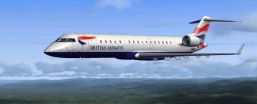
Textures only for the default Bombardier CRJ700. Repaint by David Morgan.
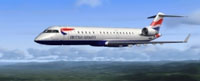
Screenshot of British Airways Canadair CRJ-700 in flight.
[fltsim.X]

title=Bombardier CRJ 700 British Airways

sim=Bombardier_CRJ_700

model=

panel=

sound=

texture=British Airways

kb_checklists=BombardierCRJ700_check

kb_reference=BombardierCRJ700_ref

atc_id=G-MRSG

atc_airline=SPEED BIRD

atc_flight_number=124

atc_parking_types=GATE,RAMP

ui_manufacturer="Bombardier"

ui_type="CRJ700"

ui_variation="British Airways"

ui_typerole="Regional Jet"

ui_createdby="Microsoft Corporation"

description="The CRJ (Canadair Regional Jet) family of aircraft was derived from the Canadair Challenger business jet, which began its operational life as the LearStar 600. The Bombardier Canadair CRJ700, which entered service in 2001, is a stretched version of the CRJ100/200 regional jet, with increased seating capacity from 50 to 70. With increased length and upgraded landing gear, the CRJ700 features a longer wing span and leading edge slats. Like other members of the CRJ family, the CRJ700 features an electronic flight instrument system (EFIS) avionics suite and 'glass cockpit' instrumentation."
Free for all simmers · 833.64 KB · Scanned clean Oct 2026
Download speed: Free tier is capped at 0.5 Mbps. PRO members download at full line speed.
texture.{airline}) inside FSX\SimObjects\Airplanes\{base-aircraft}\.aircraft.cfg in Notepad. Add a new [fltsim.X] section per the readme.readme.txt or README file. It tells you exactly where files go, what dependencies are needed, and any quirks specific to this add-on.The archive txtbrtar.zip has 7 files and directories contained within it.
This list displays the first 500 files in the package. If the package has more, you will need to download it to view them.
| Filename/Directory | File Date | File Size |
|---|---|---|
| CRJ_700_1_T.dds | 03.14.07 | 1.33 MB |
| CRJ_700_2_T.dds | 03.14.07 | 1.33 MB |
| texture.cfg | 08.14.06 | 137 B |
| thumbnail.jpg | 03.14.07 | 16.41 kB |
| readme.txt | 03.14.07 | 1.69 kB |
| flyawaysimulation.txt | 10.29.13 | 959 B |
| Go to Fly Away Simulation.url | 01.22.16 | 52 B |
Only PRO members can place votes.
More FSX & P3D add-ons hand-picked based on this download.
FSX Civil Aircraft
Includes liveries for Air Canada, America West, Delta Connection and Lufthans…
 FSX Civil Aircraft
Canadair (Bombardier) CRJ-100/200LR, 50 seat, twin turbofan, regional airline…
 FSX Civil Aircraft
This is a complete Project Open Sky aircraft but it uses the default Microsof…
 FSX Civil Aircraft
Stellweg Airlines Canadair CRJ-200 for AI. This is one of the medium range ai…
 FSX Civil Aircraft
A repaint of the FSX default CRJ700 aircraft. Textures only. Painted in the n…
 FSX Civil Aircraft
FSX US Airways Express Bombardier CRJ-700. A repaint of the default CRJ700, r…
 FSX Civil Aircraft
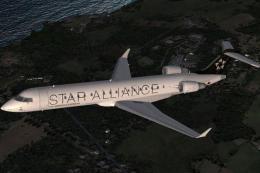
This freeware package provides a specialized Star Alliance repaint for the de…
 FSX Civil Aircraft
Thai Airways International CRJ-700. This is 100% fictional because there are …
Read what other simmers think, or add your own.

Great repaint - unfortunately, I gave 4 stars because the graphics of the livery are "very dry" and not very clear. Try making the graphics I bit clearer and easier to see. Once these things are fixed, I'll be more than happy to give 5 stars to this livery. Good day!