

 FSX Misc
Make Photoreal Ground Textures Tutorial
It is very easy to create your very own high-resolution, custom (photoreal) g…
‘Person’ turns Flight Simulator X into a slow-moving ground vehicle for close-up sightseeing, letting scenery, road traffic, and ships unfold at walking pace while staying firmly on terra firma. It uses stock gauges and configuration files, includes a GPS-ready autopilot and virtual cockpit views, and keeps everything self-contained for easy cruising.
 Rate
Rate
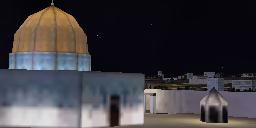
An attempt to make a slow-moving ground vehicle for native Flight Simulator X, using stock gauges and CFG files from content included with FSX. Lets you view the new amazing FSX scenery, ground and water traffic up close, plus it is GPS and autopilot ready. Everything is stock and everything is included, with instructions.
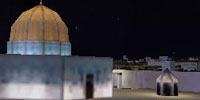
FSX scenery as seen from the ground.
As soon as I saw how good the graphics on the ground were in FSX, especially with the new automotive and ship traffic, I wanted to get on the ground at slower speeds and lower altitude than a helicopter.
Another VERY important thing to me for this ground vehicle was the ability to have autopiloting coupled with GPS. I wanted to be able to have the computer handle 'Walking' (arguably more like 'Driving') from one place to another easily, while just watching what scenery unfolded.
I made this set of files, which is essentially a ground vehicle for native Flight Simulator X, by "Frankensteining" together a few panels and CFG values from various other vehicles. Of course, I also personally tweaked the wing, motor, autopilot, and other settings to confine the vehicle to terra firma, and get a somewhat realistic rate of speed, although this vehicle can certainly move faster than any human.
This is an admittedly weak attempt that could use tons of improvements, but it actually meets many of my needs for now.
Free for all simmers · 1.75 MB · Scanned clean Oct 2026
Download speed: Free tier is capped at 0.5 Mbps. PRO members download at full line speed.
SimObjects\Airplanes\, Addon Scenery\, Effects\, or Gauges\.readme.txt or README file. It tells you exactly where files go, what dependencies are needed, and any quirks specific to this add-on.The archive fsxpersn.zip has 34 files and directories contained within it.
This list displays the first 500 files in the package. If the package has more, you will need to download it to view them.
| Filename/Directory | File Date | File Size |
|---|---|---|
| Person | 10.24.06 | 641.96 kB |
| Aircraft.cfg | 10.24.06 | 11.35 kB |
| Aircreation582SL_check.htm | 07.27.06 | 24.99 kB |
| Aircreation582SL_ref.htm | 06.08.06 | 3.03 kB |
| Aircreation_582SL.air | 09.04.06 | 5.73 kB |
| model | 10.24.06 | 641.96 kB |
| panel | 10.24.06 | 641.96 kB |
| sound | 10.24.06 | 641.96 kB |
| soundai | 10.24.06 | 641.96 kB |
| texture | 10.24.06 | 641.96 kB |
| texture.1 | 10.24.06 | 641.96 kB |
| texture.2 | 10.24.06 | 641.96 kB |
| texture.3 | 10.24.06 | 641.96 kB |
| placeholder.txt | 10.24.06 | 0 B |
| AirCreation_582SL.cab | 09.04.06 | 88.10 kB |
| AirCreation_582SL_background.bmp | 10.24.06 | 769.05 kB |
| AirCreation_582SL_popup_background.bmp | 05.12.06 | 33.71 kB |
| Lear_45_XML.cab | 09.04.06 | 1.57 MB |
| panel.cfg | 10.24.06 | 2.18 kB |
| Thumbs.db | 10.24.06 | 6.50 kB |
| placeholder.txt | 10.24.06 | 0 B |
| placeholder.txt | 10.24.06 | 0 B |
| thumbnail.jpg | 10.24.06 | 4.53 kB |
| thumbnail.jpg | 10.24.06 | 4.53 kB |
| Thumbs.db | 10.24.06 | 4.50 kB |
| thumbnail.jpg | 10.24.06 | 4.53 kB |
| Thumbs.db | 10.24.06 | 4.50 kB |
| thumbnail.jpg | 10.24.06 | 4.53 kB |
| Thumbs.db | 10.24.06 | 4.50 kB |
| Readme.txt | 10.24.06 | 2.79 kB |
| FILE_ID.DIZ | 10.24.06 | 402 B |
| thumbnail.jpg | 10.24.06 | 4.53 kB |
| flyawaysimulation.txt | 10.29.13 | 959 B |
| Go to Fly Away Simulation.url | 01.22.16 | 52 B |
Only PRO members can place votes.
More FSX & P3D add-ons hand-picked based on this download.
FSX Misc
It is very easy to create your very own high-resolution, custom (photoreal) g…
 FSX Misc
An illustrated guide. After landing your favorite FSX aircraft, are you frust…
 FSX Misc
A tutorial in PDF format. By Mike Basford. Thumbnail of Tiger Sky6 in flight.
 FSX Misc
A translation into French. By Gilbert Fouche from original by David Marshall …
 FSX Misc
Weapons effects with Minigun sounds for the FSX 160 SOAR Little Bird by Tim C…
 FSX Misc
Converted for FSX. These files act as HDE sky texture replacements for import…
 FSX Misc
These are the final keyboard commands for FSX. Many are new due to the new fe…
 FSX Misc
In order to view the full high definition resolution within FSX, you will nee…
Be the first to leave a comment on this download.
Be the first to share your thoughts on this download.