

 FSX General Aviation Aircraft
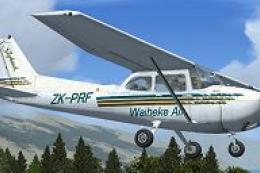
Waiheke Air Cessna 172 ZK-PRF
This repaint introduces a new Waiheke Air livery for the default FSX Cessna 1…
Waiheke Air’s ZK-PRF livery refreshes the default Cessna 172SP with island-inspired branding and crisp textures matched to the Garmin G1000-equipped virtual cockpit in Microsoft Flight Simulator X. Ideal for scenic hops around Auckland and beyond, it requires the stock C172SP G1000 model and keeps the Skyhawk’s familiar training-aircraft feel.
 Rate
Rate
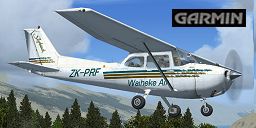
This carefully crafted repaint offers enthusiasts a distinctive Waiheke Air livery for the default Cessna 172 featuring Garmin G1000 avionics in Microsoft Flight Simulator X. Jon Murchison, who meticulously designed this texture set, has captured the unique character of an operator known for short island hops. Waiheke Island, located near Auckland, New Zealand, is celebrated for scenic flights and picturesque coastlines. This addition serves pilots wanting to recreate those island-hopping adventures in a reliable single-engine trainer that has introduced countless aspiring aviators to the skies.

Screenshot of Waiheke Air Cessna C172 in the air.
These texture files apply a distinctive island-inspired color scheme and branding, giving your default Cessna 172 a new identity. Although the real-world Waiheke Air operates short-haul routes, this repaint extends the same atmosphere across any environment you decide to explore.
aircraft.cfg document in that folder and append the block of text listed below. Change [fltsim.x] to the correct sequential number, for example [fltsim.5].[fltsim.x]
title=Cessna Skyhawk 172SP ZK-PRF 'Waiheke Air' G1000
sim=Cessna172SP
model=G1000
panel=G1000
sound=
texture=G1000_PRF
kb_checklists=Cessna172SP_check
kb_reference=Cessna172SP_ref
atc_id=ZK-PRF
ui_manufacturer="ARNZ"
ui_type="C172SP Skyhawk"
ui_variation="ZK-PRF 'Waiheke Air G1000"
ui_typerole="Single Engine Prop"
ui_createdby="ARNZ"
description="This repaint mimics the reliable and ever-popular Cessna 172 in a Waiheke Air aesthetic. The C172’s worldwide popularity and straightforward handling make it an ideal training platform, with over 35,000 airframes produced since 1955. Renowned for robust tricycle-gear design and dependable operations, this aircraft remains a top choice for many private and commercial flight schools alike."
This add-on supplies textures only and does not include the base model. You will need the freeware default Cessna 172 G1000 variant, obtainable from the Fly Away Simulation library. Once installed, this livery offers a fresh take on the C172’s clean lines and stable flight characteristics, as interpreted by Jon Murchison’s dedicated repaint work.
Free for all simmers · 2.58 MB · Scanned clean Oct 2026
Download speed: Free tier is capped at 0.5 Mbps. PRO members download at full line speed.
texture.{airline}) inside FSX\SimObjects\Airplanes\{base-aircraft}\.aircraft.cfg in Notepad. Add a new [fltsim.X] section per the readme.readme.txt or README file. It tells you exactly where files go, what dependencies are needed, and any quirks specific to this add-on.The archive prf_1k.zip has 12 files and directories contained within it.
This list displays the first 500 files in the package. If the package has more, you will need to download it to view them.
| Filename/Directory | File Date | File Size |
|---|---|---|
| C172_1_C.dds | 09.04.06 | 682.79 kB |
| C172_1_night_C.dds | 09.04.06 | 682.79 kB |
| C172_2_C.dds | 09.04.06 | 682.79 kB |
| C172_2_night_C.dds | 09.04.06 | 682.79 kB |
| C172_Interior_T.dds | 09.04.06 | 341.45 kB |
| C172_T.dds | 06.14.07 | 1.00 MB |
| texture.cfg | 08.14.06 | 137 B |
| thumbnail.jpg | 06.17.07 | 31.54 kB |
| texture.G1000_PRF | 06.17.07 | 0 B |
| README_INSTALL.txt | 06.17.07 | 2.38 kB |
| flyawaysimulation.txt | 10.29.13 | 959 B |
| Go to Fly Away Simulation.url | 01.22.16 | 52 B |
Only PRO members can place votes.
More FSX & P3D add-ons hand-picked based on this download.
FSX General Aviation Aircraft
This repaint introduces a new Waiheke Air livery for the default FSX Cessna 1…
 FSX General Aviation Aircraft
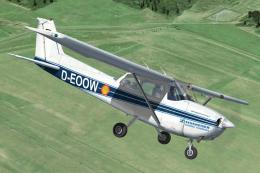
Immerse yourself in a vibrant depiction of Air Hamburg’s Cessna 172, identifi…
 FSX General Aviation Aircraft
Air Hamburg Cessna C172, registration D-ECWQ. This is a repaint for the FSX d…
 FSX General Aviation Aircraft
Bring a new layer of authenticity to your virtual hangar with this carefully …
 FSX General Aviation Aircraft
Air Hamburg Cessna C172, registration D-ECWQ. This is a repaint of the defaul…
 FSX General Aviation Aircraft
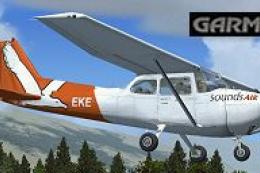
This freeware repaint exhibits the ZK-EKE registration markings of Sounds Air…
 FSX General Aviation Aircraft
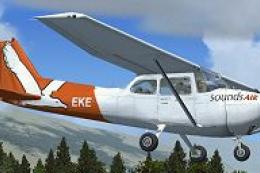
This repaint package showcases a Sounds Air Cessna 172 registration ZK-EKE ex…
 FSX General Aviation Aircraft
Experience a uniquely detailed Wanganui Aeroclub Air livery for the classic C…
Be the first to leave a comment on this download.
Be the first to share your thoughts on this download.