

 FS2004 AFCAD Files
AFCAD2 File For Default CYUL
CYUL, Pierre Elliot Trudeau Int'l Airport, Montreal, Quebec, Canada. Adds lot…
Washington Dulles International Airport (KIAD) gets a busy, airline-aware AFCAD2 update for the default FS2004 scenery, adding 120+ gates and parking positions including dedicated United Express regional and turboprop areas. Accurate gate numbers, size-based assignments, and expanded small, medium, and large stands improve AI flow and ramp realism.
 Rate
Rate
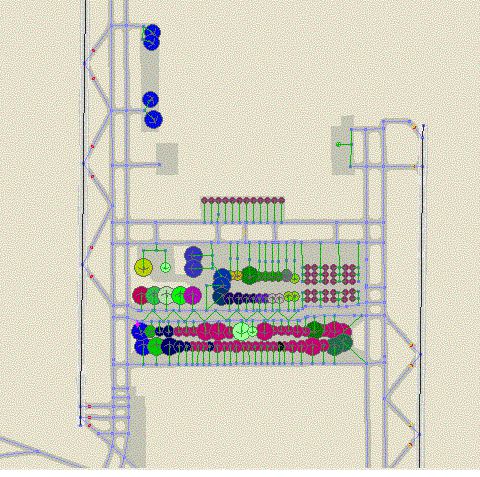
AFCAD2 file for KIAD Default Scenery, Washington Dulles Airport, Virginia (VA). By Michael Wolfe.
Overview of Washington Dulles Airport.
FS2004 AFCAD2 file for KIAD default scenery. Adds 120+ Gates and Parking including RJ and Turboprop area for United Express. 42 Parking spots for UAX 40 small gates 14 Medium gates and 26 Large gates. Gate assignments are highly accurate not only by airline but by size also. Gate numbers are accurate also. Wherever possible I tried to maintain accuracy of gate placement with respect to airline and aircraft type it is about 90% accurate. The default FS2004 scenery leaves something to be desired.
I have tested this file with Ultimate Traffic and AI Traffic sliders at 100%. You get quite a line at rwys 1L/1R or 19L/19R between 17:00 and 18:30 as that is the peak traffic time at Washington Dulles Int'l.
This is my first upload of any file to the flightsim community so your feed back is greatly appreciated.
Thanks to Lee Swordy for AFCAD it is a truly excellent tool.
Free for all simmers · 94.31 KB · Scanned clean Oct 2026
Download speed: Free tier is capped at 0.5 Mbps. PRO members download at full line speed.
FS9\Aircraft\, FS9\Addon Scenery\, FS9\Gauges\, or FS9\Effects\.readme.txt or README file. It tells you exactly where files go, what dependencies are needed, and any quirks specific to this add-on.The archive kiad10.zip has 6 files and directories contained within it.
This list displays the first 500 files in the package. If the package has more, you will need to download it to view them.
| Filename/Directory | File Date | File Size |
|---|---|---|
| file_id.diz.txt | 04.23.04 | 335 B |
| KIAD10.GIF | 04.23.04 | 81.47 kB |
| README.txt | 04.23.04 | 1.84 kB |
| AF2_KIAD.bgl | 04.23.04 | 25.17 kB |
| flyawaysimulation.txt | 10.29.13 | 959 B |
| Go to Fly Away Simulation.url | 01.22.16 | 52 B |
Only PRO members can place votes.
More FS2004 add-ons hand-picked based on this download.
FS2004 AFCAD Files
CYUL, Pierre Elliot Trudeau Int'l Airport, Montreal, Quebec, Canada. Adds lot…
FS2004 AFCAD Files
Toronto Pearson International, Ontario, Canada. Adds the new 24L/06R runway a…
 FS2004 AFCAD Files
268 gates are available. Features aprons, blue center line lights and stop li…
 FS2004 AFCAD Files
AFCAD2 files for default Carriers in Washington, Oceana, Jacksonville, Mirama…
 FS2004 AFCAD Files
Orlando International Airport, Florida (FL). Now with accurate gate numbers a…
 FS2004 AFCAD Files
Frankfurt/Main Airport, Germany, for use with AMEDDF11.ZIP. Should solve most…
FS2004 AFCAD Files
FS2004 AFCAD2 File For RCKH and RCSS, Taipei Sungshan Airport and Kaohsiung A…
 FS2004 AFCAD Files
Tokyo Narita Airport (RJAA), Japan (not for the default FS2004 airport; detai…
Be the first to leave a comment on this download.
Be the first to share your thoughts on this download.