

 FSX Civil Aircraft
Transmile Air Boeing 737-200 Repaint
This package offers a detailed Transmile Air livery specifically designed for…
Transmile Air’s Boeing 737-200 cargo livery brings authentic Malaysian freight traffic to AI ramps, with crisp textures and a matching lightmap for convincing night lighting. Built for the FAIB 737-200 model in Microsoft Flight Simulator X and Microsoft Flight Simulator 2004, it includes DXT5 plus DXT3 and optional 32-bit formats, and requires FAIB_B7372.ZIP.
 Rate
Rate
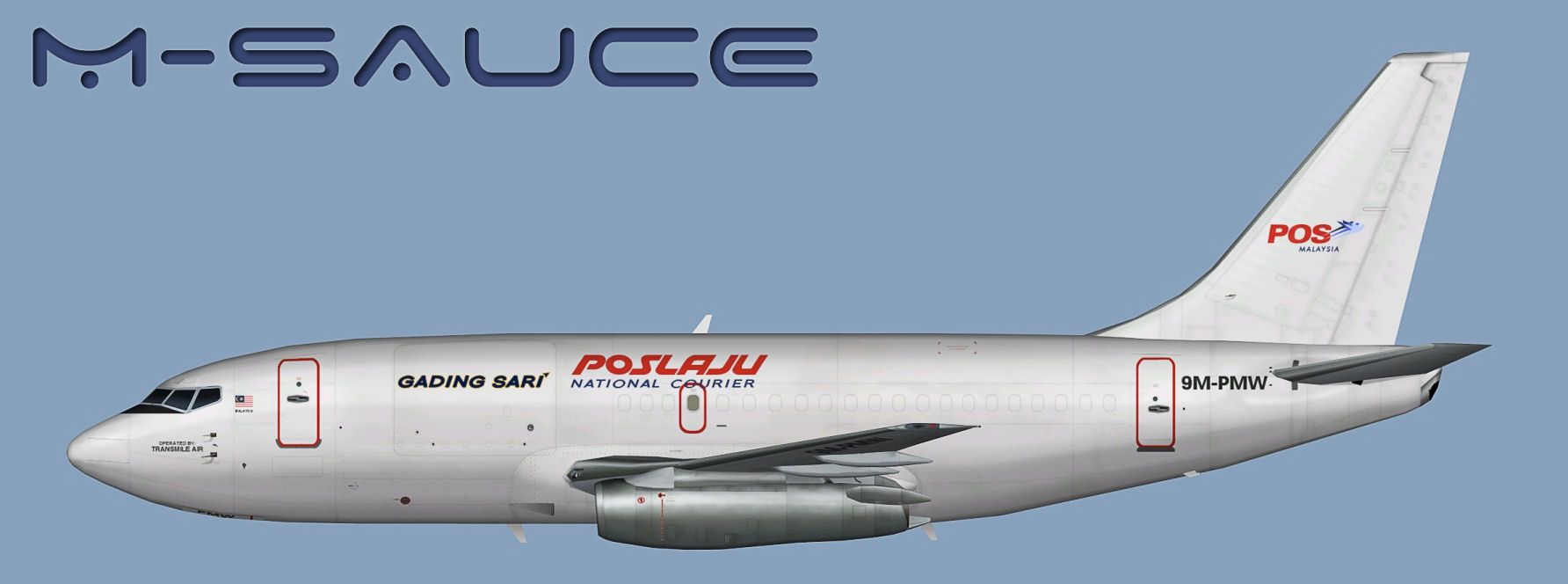
This package provides a specialized texture set representing the Transmile Air (operating on behalf of Gading Sari) Boeing 737-200. The repaint is crafted for the freeware FAIB_B7372.ZIP model by FSX AI Bureau, created by Mariano Bonaccorso. It is a freeware release focusing on cargo operations. Enthusiasts of Microsoft Flight Simulator X or Microsoft Flight Simulator 2004 will find both performance-friendly and high-detail formats within the archive, along with a tailored lightmap. The base model is not included in this repaint set. You will locate the necessary FAIB_B7372.ZIP base files in the Fly Away Simulation library.
Above, a lateral perspective of the Transmile Air Boeing 737-200 displaying the cargo operator’s livery.
1. Extract the enclosed texture folder into the appropriate “FAIB 737-200” directory found within your AI aircraft repository.
2. Append an entry to your aircraft.cfg file using the structure below. Replace “X” in [fltsim.X] with the next sequential number that fits your setup. Ensure the model=normal parameter aligns with the standard (non-logo-wing) variant.
[fltsim.X]
title=AI B732 TSE_GSB
sim=FAIB_7372
model=normal
texture=TSE_GSB
atc_airline=TRANSMILE
atc_parking_codes=TSE,GSB
atc_parking_types=CARGO
ui_manufacturer=Boeing
ui_type=B737-200
ui_variation=Transmile Air (OpFor: GSB)
description=Transmile Air (Gading Sari) cargo repaint by Mariano Bonaccorso
This Boeing 737-200 traces its lineage to early short-to-medium-range jets developed by Boeing, typically powered by Pratt & Whitney JT8D engines. Transmile Air, which operated cargo routes as part of Malaysia’s freight network, utilized this classic airframe for both regional and domestic transport under the Gading Sari partnership. With this repaint, the visual fidelity of your AI traffic or dedicated cargo flight operations reflects the authentic appearance of Transmile Air’s Malaysia-based fleet.
Free for all simmers · 1.59 MB · Scanned clean Oct 2026
Download speed: Free tier is capped at 0.5 Mbps. PRO members download at full line speed.
This file is a repaint — the package below is the base model it paints onto. Install it first, or the textures will have nothing to load onto.
texture.{airline}) inside FSX\SimObjects\Airplanes\{base-aircraft}\.aircraft.cfg in Notepad. Add a new [fltsim.X] section per the readme.readme.txt or README file. It tells you exactly where files go, what dependencies are needed, and any quirks specific to this add-on.The archive faib_b732_tse_gsb_fsx.zip has 9 files and directories contained within it.
This list displays the first 500 files in the package. If the package has more, you will need to download it to view them.
| Filename/Directory | File Date | File Size |
|---|---|---|
| FAIB_737_200_AlwaysOn_L.bmp | 03.17.12 | 4.07 kB |
| FAIB_737_200_L.bmp | 09.03.12 | 4.00 MB |
| FAIB_737_200_T.bmp | 09.03.12 | 5.33 MB |
| Preview.jpg | 09.04.12 | 99.53 kB |
| Thumbnail.png | 09.04.12 | 6.42 kB |
| Installation.txt | 09.04.12 | 2.20 kB |
| UPLOAD_ReadMe.txt | 03.27.12 | 3.35 kB |
| flyawaysimulation.txt | 10.29.13 | 959 B |
| Go to Fly Away Simulation.url | 01.22.16 | 52 B |
Only PRO members can place votes.
More FSX & P3D add-ons hand-picked based on this download.
FSX Civil Aircraft
This package offers a detailed Transmile Air livery specifically designed for…
 FSX Civil Aircraft
This package comes with a complete virtual cockpit from the default B747-400.…
 FSX Civil Aircraft
Textures only for Captain Sim's payware 737-200ADV Expansion Model. Repaint b…
 FSX Civil Aircraft
Sriwijaya Air is the actual largest B737-200 operator in the world. Textures …
 FSX Civil Aircraft
This is the repaint of the payware Captain Sim B737-200 model in Batavia Air …
 FSX Civil Aircraft
A repaint of the payware Captain Sim B737-200 model in Iran Air livery, regis…
 FSX Civil Aircraft
Textures for the FSX AI Bureau Boeing 737-200 for FSX (FAIB_B7372.ZIP). Inclu…
 FSX Civil Aircraft
A repaint of the payware Captain Sim B737-200 model in Air Madagascar livery,…
Be the first to leave a comment on this download.
Be the first to share your thoughts on this download.