

 FSX Civil Aircraft
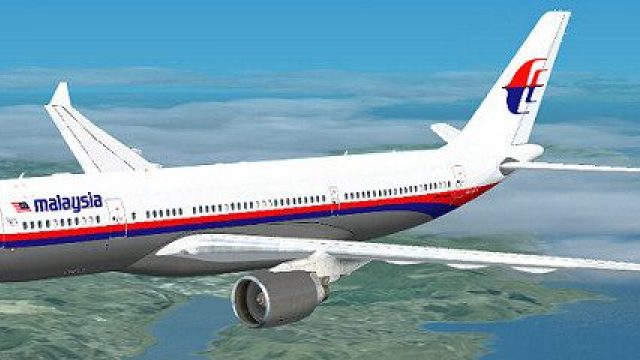
Malaysia Airlines Airbus A330-200
This comprehensive repaint package offers an authentic Malaysia Airlines Airb…
Malaysia Airlines’ Airbus A330-200 livery brings a crisp, true-to-life exterior with accurate fuselage striping and tail emblem, tuned for clean texture mapping and smooth performance in Microsoft Flight Simulator X. The repaint integrates with Thomas Ruth’s A330-200 PW model and requires the freeware base package for full aircraft visuals and flight dynamics.
 Rate
Rate
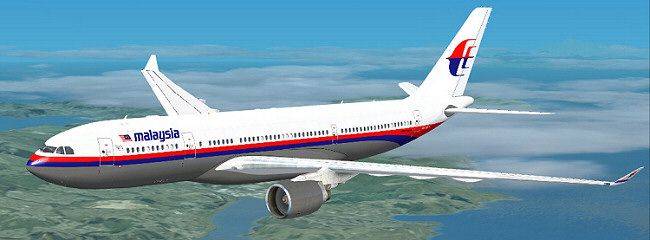
Experience a meticulously rendered livery for the Airbus A330-200 that faithfully captures Malaysia Airlines' color scheme. Designed by Jon Murchison, this texture package offers Microsoft Flight Simulator X users the opportunity to immerse themselves in a distinctive painting of Malaysia’s long-haul fleet. Be aware that only the repaint is supplied, so the freeware base model by Thomas Ruth must be acquired separately from the Fly Away Simulation library.
The Airbus A330-200 is a twin-engine, wide-body airliner well-known for its efficient mid-to-long-range routes. Malaysia Airlines employs this model for regional and international flights, leveraging its high capacity and economical fuel usage. Enthusiasts often appreciate the balanced aerodynamics and the advanced cockpit technology (or flight deck instrumentation) that offers robust altitude control and flight management systems.
As this repaint depends on Thomas Ruth’s freeware base package, pilots should confirm the presence of the A330-200 (PW engine variant) in their aircraft folder. If absent, a quick search in Fly Away Simulation’s repository will reveal the necessary TOM330.ZIP file to enable accurate modeling and flight dynamics.
SimObjects/ Airplanes/ Tom_A330-200.aircraft.cfg file in the same folder. Insert the following snippet after the last repaint entry. Update the [fltsim.X] to the next available index number (e.g., [fltsim.9]):
[fltsim.X]
title=Malaysia A330-200
sim=TomA332
model=PW
panel=
sound=
texture=MALAYSIA
kb_checklists=
kb_reference=
atc_id=D-AIMD
atc_airline=Malaysia
atc_flight_number=1124
atc_heavy=1
ui_manufacturer=Airbus
ui_type="A330-200"
ui_variation="Malaysia"
description=
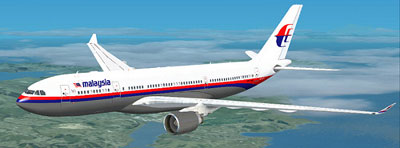
This repaint arises from a passion for achieving true-to-life airline textures. Jon Murchison has diligently recreated the Malaysia Airlines exterior for all aviation aficionados seeking an authentic flight experience. Once the base model files are installed, this addition refines realism and augments your virtual fleet with a striking regional and international workhorse.
Free for all simmers · 1.91 MB · Scanned clean Oct 2026
Download speed: Free tier is capped at 0.5 Mbps. PRO members download at full line speed.
This file is a repaint — the package below is the base model it paints onto. Install it first, or the textures will have nothing to load onto.
texture.{airline}) inside FSX\SimObjects\Airplanes\{base-aircraft}\.aircraft.cfg in Notepad. Add a new [fltsim.X] section per the readme.readme.txt or README file. It tells you exactly where files go, what dependencies are needed, and any quirks specific to this add-on.The archive malaysia-1.zip has 25 files and directories contained within it.
This list displays the first 500 files in the package. If the package has more, you will need to download it to view them.
| Filename/Directory | File Date | File Size |
|---|---|---|
| MALAYSIA.jpg | 03.17.09 | 52.11 kB |
| README _INSTALL.txt | 03.17.09 | 1.34 kB |
| A321_1_L.dds | 03.12.09 | 1.00 MB |
| A321_2_L.dds | 03.12.09 | 256.12 kB |
| A330_VC01.dds | 03.12.09 | 1.00 MB |
| A330_VC01L.dds | 03.12.09 | 1.00 MB |
| Airbus_A321_1_L.dds | 03.12.09 | 1.00 MB |
| Airbus_A321_2_L.dds | 03.12.09 | 1.00 MB |
| Airbus_A321_3_L.dds | 03.12.09 | 4.12 kB |
| Airbus_A321_4_L.dds | 03.12.09 | 1.00 MB |
| glass.dds | 03.12.09 | 64.12 kB |
| glass_spec.dds | 03.12.09 | 4.12 kB |
| main.dds | 03.15.09 | 4.00 MB |
| main_bump.dds | 03.12.09 | 4.00 MB |
| main_light.dds | 03.15.09 | 1.00 MB |
| main_spec.dds | 03.12.09 | 64.12 kB |
| texture.cfg | 03.12.09 | 165 B |
| thumbnail.jpg | 03.15.09 | 13.60 kB |
| VCblend.dds | 03.12.09 | 1.12 kB |
| wing_bump.dds | 03.12.09 | 1.00 MB |
| wing_l.dds | 03.15.09 | 1.00 MB |
| wing_r.dds | 03.15.09 | 1.00 MB |
| wing_spec.dds | 03.12.09 | 64.12 kB |
| flyawaysimulation.txt | 10.29.13 | 959 B |
| Go to Fly Away Simulation.url | 01.22.16 | 52 B |
Only PRO members can place votes.
More FSX & P3D add-ons hand-picked based on this download.
FSX Civil Aircraft
This comprehensive repaint package offers an authentic Malaysia Airlines Airb…
 FSX Civil Aircraft
This freeware package introduces a long-haul twin-aisle jet for FSX, featurin…
 FSX Civil Aircraft
Model by YeoDesign. Repaint by Muhd Khairul Fathi Bin Mohammad. Screenshot of…
 FSX Civil Aircraft
This repaint is only for FSX and Project Airbus A320 model. This repaint regi…
 FSX Civil Aircraft
This livery is only for Project Airbus A320. The registration of this aircraf…
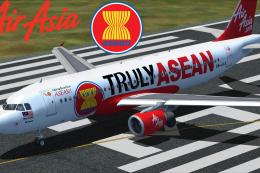 FSX Civil Aircraft
This is only for Project Airbus A320. Truly Asean livery is painted back in 2…
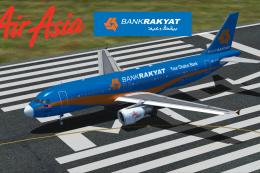 FSX Civil Aircraft
This livery is only for Project Airbus A320 and FSX. The registration of this…
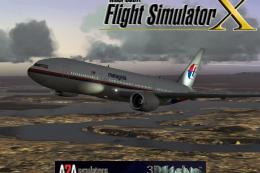 FSX Civil Aircraft
This freeware release features a meticulously updated Malaysia Boeing 777-200…
Be the first to leave a comment on this download.
Be the first to share your thoughts on this download.