

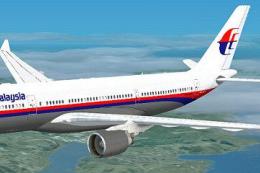
 FSX Civil Aircraft
Malaysia Airbus A330-200
Experience a meticulously rendered livery for the Airbus A330-200 that faithf…
Malaysia Airlines’ modern livery comes to the Airbus A330-200 with crisp, high-clarity textures, accurate logos, and subtle shading that suit medium- to long-haul flying. Built for Microsoft Flight Simulator X, it requires the CLS payware A330-200 Pratt & Whitney base model and adds a polished, airline-authentic look in the virtual cockpit and exterior views.
 Rate
Rate
This comprehensive repaint package offers an authentic Malaysia Airlines Airbus A330-200 experience for Microsoft Flight Simulator X. It combines the payware Airbus A330-200 by Commercial Level Simulations (CLS) with a carefully crafted repaint by developer Sebastian Szucs, showcasing Malaysia Airlines’ updated color scheme. Enthusiasts will appreciate the measured balance of historical airline context and technical accuracy embedded in every detail.
The Airbus A330-200 is a popular wide-body aircraft commonly employed on medium to long-haul routes worldwide. Malaysia Airlines has utilized the A330 series for its efficiency and passenger comfort, especially on routes connecting Southeast Asia to other global destinations. This repaint presents a meticulous update to the iconic livery, reflecting the airline’s latest branding and subtle design enhancements.
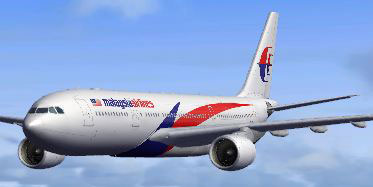
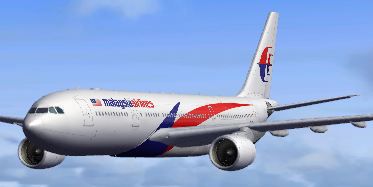
Malaysia Airlines Airbus A330-200 in flight.
The straightforward installation sequence ensures you can quickly incorporate the newly updated livery into your simulator. Make sure the CLS A330-200 PW base product is correctly installed before proceeding. The following steps outline the required directories and configuration entries:
The following snippet exemplifies the essential aircraft.cfg entries:
[fltsim.XX]

productfolder=A330-200-PW

title=Airbus A330-200 Malaysia Airlines NC

sim=CLS-A330-200-PW

model=pw

panel=pw

sound=

texture=mas_nc

kb_checklists=CLS-A330_check

kb_reference=CLS-A330_ref

atc_airline=Malaysian

atc_heavy=1

atc_id=9M-MKV

ui_typerole="Commercial Airliner"

ui_createdby="Commercial Level Simulations"

ui_manufacturer=Airbus

ui_type=A330-200

ui_variation=Malaysia Airlines NC
This repaint is fully credited to Sebastian Szucs, who meticulously reconstructed the external textures and fuselage patterns. The original CLS Airbus A330-200 base model is the work of Commercial Level Simulations and is available as payware from retailers such as SimShack. Be sure to acquire the CLS base package prior to installing this repaint to ensure compatibility and intended performance.
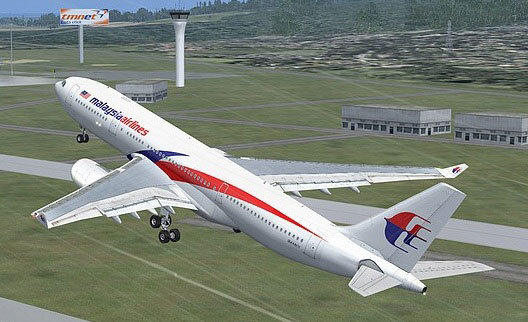
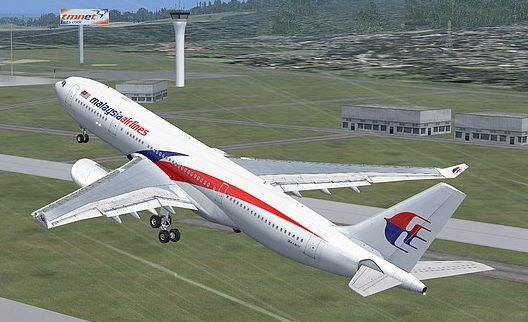
Malaysia Airlines Airbus A330-200 taking off.
Upon completion, enjoy the modernized Malaysia Airlines livery and explore the routes this wide-body jet expertly handles. Fly proud under the airline’s updated design and immerse yourself in long-haul adventures across continents within Microsoft Flight Simulator X.
Free for all simmers · 17.29 MB · Scanned clean Oct 2026
Download speed: Free tier is capped at 0.5 Mbps (this file takes approximately 5 mins at the cap). PRO members download at full line speed.
texture.{airline}) inside FSX\SimObjects\Airplanes\{base-aircraft}\.aircraft.cfg in Notepad. Add a new [fltsim.X] section per the readme.readme.txt or README file. It tells you exactly where files go, what dependencies are needed, and any quirks specific to this add-on.The archive a332_pw_cls_masnc.zip has 54 files and directories contained within it.
This list displays the first 500 files in the package. If the package has more, you will need to download it to view them.
| Filename/Directory | File Date | File Size |
|---|---|---|
| a333v2_l.bmp | 02.27.07 | 1.00 MB |
| a333v2_t.bmp | 02.06.08 | 341.43 kB |
| a333v2door_l.bmp | 02.27.07 | 1.00 MB |
| a333v2door_t.bmp | 02.27.07 | 1.00 MB |
| cls_a330vcM_l.bmp | 11.19.07 | 1.33 MB |
| cls_a330vcM_t.bmp | 11.18.07 | 5.33 MB |
| cls_a330vcOHM_l.bmp | 10.21.07 | 1.00 MB |
| cls_a330vcOHM_t.bmp | 10.14.07 | 5.33 MB |
| cls_a330vcP1_l.bmp | 07.09.07 | 4.00 MB |
| cls_a330vcP1_t.bmp | 10.13.07 | 5.33 MB |
| cls_a330vcP2_l.bmp | 10.15.07 | 1.33 MB |
| cls_a330vcP2_t.bmp | 10.15.07 | 1.33 MB |
| cls_a330vcP3_l.bmp | 07.09.07 | 4.00 MB |
| cls_a330vcP3_t.bmp | 07.06.07 | 5.33 MB |
| cls_a330vcP4_l.bmp | 11.19.07 | 1.33 MB |
| cls_a330vcP4_t.bmp | 11.19.07 | 5.33 MB |
| cls_a330vcR_l.bmp | 10.21.07 | 1.00 MB |
| cls_a330vcR_t.bmp | 10.14.07 | 5.33 MB |
| cls_a340vcOHM_l.bmp | 08.16.07 | 1.33 MB |
| cls_a340vcOHM_t.bmp | 08.16.07 | 5.33 MB |
| cls_stairs_l.bmp | 07.09.07 | 16.07 kB |
| cls_stairs_t.bmp | 03.12.07 | 256.07 kB |
| CLSa330_gau_l.bmp | 11.19.07 | 1.33 MB |
| CLSFMC_l.bmp | 11.19.07 | 1.33 MB |
| CLSpush_l.bmp | 07.09.07 | 1.00 MB |
| CLSpush_t.bmp | 07.09.07 | 1.00 MB |
| fuse1and2200l_l.bmp | 05.21.07 | 4.00 MB |
| fuse1and2200l_t.bmp | 02.25.11 | 4.00 MB |
| fuse1and2200r_l.bmp | 05.21.07 | 4.00 MB |
| fuse1and2200r_t.bmp | 02.25.11 | 4.00 MB |
| fusetail200r_l.bmp | 05.21.07 | 4.00 MB |
| fusetail200r_t.bmp | 02.25.11 | 4.00 MB |
| ltwing_l.bmp | 07.09.07 | 1.00 MB |
| ltwing_t.bmp | 04.25.07 | 4.00 MB |
| pwengmisc_l.bmp | 07.17.07 | 1.00 MB |
| pwengmisc_t.bmp | 02.25.11 | 4.00 MB |
| rtwing_l.bmp | 07.09.07 | 1.00 MB |
| rtwing_t.bmp | 04.25.07 | 4.00 MB |
| satcom.bmp | 07.17.07 | 16.07 kB |
| satcom_l.bmp | 06.30.07 | 1.00 MB |
| thumbnail.JPG | 02.26.11 | 17.37 kB |
| vcbutton_l.bmp | 07.09.07 | 1.00 MB |
| vcbutton_t.bmp | 10.14.07 | 341.43 kB |
| vcceil_l.bmp | 10.15.07 | 1.33 MB |
| vcceil_t.bmp | 10.15.07 | 5.33 MB |
| VCswitches_t.bmp | 08.25.07 | 85.43 kB |
| FILE_ID.diz | 03.10.11 | 65 B |
| installerinfo.txt | 03.10.11 | 631 B |
| Readme.txt | 03.10.11 | 315 B |
| Compressed_0016.jpg | 03.10.11 | 9.95 kB |
| Compressed_0001.jpg | 03.10.11 | 73.98 kB |
| Compressed_0077.jpg | 03.10.11 | 16.02 kB |
| flyawaysimulation.txt | 10.29.13 | 959 B |
| Go to Fly Away Simulation.url | 01.22.16 | 52 B |
Only PRO members can place votes.
More FSX & P3D add-ons hand-picked based on this download.
FSX Civil Aircraft
Experience a meticulously rendered livery for the Airbus A330-200 that faithf…
 FSX Civil Aircraft
This freeware package introduces a long-haul twin-aisle jet for FSX, featurin…
 FSX Civil Aircraft
Model by YeoDesign. Repaint by Muhd Khairul Fathi Bin Mohammad. Screenshot of…
 FSX Civil Aircraft
Malaysia Airlines Boeing 737-400, registration 9M-MME. Textures only for the …
 FSX Civil Aircraft
This repaint texture is for the TDS B787-800 RR model (TDS788TRENT_BOEING_N78…
 FSX Civil Aircraft
Textures for the Project Open Sky B747-400 with PW engines in Malaysia Airlin…
 FSX Civil Aircraft
Textures only for the Project Open Sky B777-200 model. By Ayu Emelda Othman. …
 FSX Civil Aircraft
This livery is only for the payware PMDG 747-400X. Malaysia Airlines uses two…
Be the first to leave a comment on this download.
Be the first to share your thoughts on this download.