

 FSX Civil Aircraft
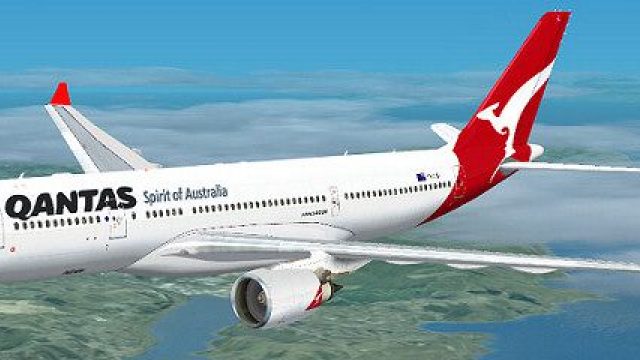
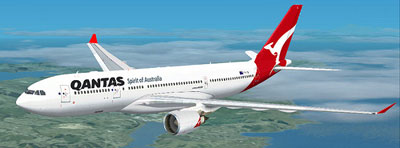
Qantas Airbus A330-200 OneWorld Livery
Qantas Airbus A330-200 in "OneWorld" livery. Textures only; requires TOM330.Z…
Qantas Airbus A330-200 livery brings the airline’s red-and-white branding to life with carefully aligned textures, subtle weathering, and reflective surface detail that complements the airframe in daylight or at night in Microsoft Flight Simulator X. Built for the GE engine model variant, it requires the Thomas Ruth A330-200 base pack.
 Rate
Rate
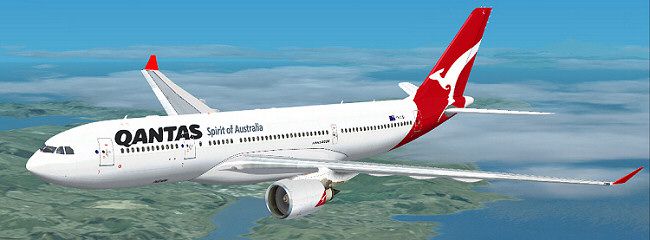
Immerse yourself in the distinctive red-and-white heritage of Australia’s flag carrier with this meticulously crafted livery for the Airbus A330-200. This repaint, designed for Microsoft Flight Simulator X, reproduces the Qantas branding in precise detail. It was developed by Thomas Ruth (base model) and repainted by Jon Murchison. Aviation fans looking for a refined addition to their virtual hangar will appreciate the subtle authenticity captured here.
True-to-Life Texture Layout: Each texture file has been tailored to replicate the real Airbus A330-200 surface, ensuring the distinctive Qantas insignia aligns with correct fuselage and tail contours.
Accurate Aircraft Configuration: The model uses a (GE variant) specification, aligning with certain General Electric engine upgrades seen on actual A330 aircraft, delivering an immersive powerplant experience.
Captivating Visuals: Subtle weathering and reflective details highlight the curvature of the airframe, creating a realistic impression during day or night operations.
Seamless Integration: Once installed, the repaint is readily accessible in your aircraft selection menu, identifiable under Airbus with a Qantas variation entry.
[fltsim.X]
title=QANTAS A330-200
sim=TomA332
model=GE
panel=
sound=
texture=QANTAS
kb_checklists=
kb_reference=
atc_id=
atc_airline=Qantas
atc_flight_number=1124
atc_heavy=1
ui_manufacturer=Airbus
ui_type="A330-200"
ui_variation="QANTAS"
description=
Note: This repaint package does not include the base model. The original freeware model, developed by Thomas Ruth, must be installed beforehand and can be found in the Fly Away Simulation library.
Qantas is a leading airline known for its extensive domestic and international services. The Airbus A330-200 typically operates mid- to long-haul routes and offers balanced performance characteristics, including efficient fuel burn and robust payload options. Within the Qantas fleet, this aircraft frequently appears on routes connecting major Australian cities and beyond, reflecting its popularity as a wide-body choice under demanding operational conditions.
Free for all simmers · 2.04 MB · Scanned clean Oct 2026
Download speed: Free tier is capped at 0.5 Mbps. PRO members download at full line speed.
texture.{airline}) inside FSX\SimObjects\Airplanes\{base-aircraft}\.aircraft.cfg in Notepad. Add a new [fltsim.X] section per the readme.readme.txt or README file. It tells you exactly where files go, what dependencies are needed, and any quirks specific to this add-on.The archive qantas-1.zip has 25 files and directories contained within it.
This list displays the first 500 files in the package. If the package has more, you will need to download it to view them.
| Filename/Directory | File Date | File Size |
|---|---|---|
| QANTAS.jpg | 03.17.09 | 51.38 kB |
| README _INSTALL.txt | 03.17.09 | 1.32 kB |
| A321_1_L.dds | 03.12.09 | 1.00 MB |
| A321_2_L.dds | 03.12.09 | 256.12 kB |
| A330_VC01.dds | 03.12.09 | 1.00 MB |
| A330_VC01L.dds | 03.12.09 | 1.00 MB |
| Airbus_A321_1_L.dds | 03.12.09 | 1.00 MB |
| Airbus_A321_2_L.dds | 03.12.09 | 1.00 MB |
| Airbus_A321_3_L.dds | 03.12.09 | 4.12 kB |
| Airbus_A321_4_L.dds | 03.12.09 | 1.00 MB |
| glass.dds | 03.12.09 | 64.12 kB |
| glass_spec.dds | 03.12.09 | 4.12 kB |
| main.dds | 03.14.09 | 4.00 MB |
| main_bump.dds | 03.12.09 | 4.00 MB |
| main_light.dds | 03.12.09 | 1.00 MB |
| main_spec.dds | 03.12.09 | 64.12 kB |
| texture.cfg | 03.12.09 | 165 B |
| thumbnail.jpg | 03.14.09 | 10.93 kB |
| VCblend.dds | 03.12.09 | 1.12 kB |
| wing_bump.dds | 03.12.09 | 1.00 MB |
| wing_l.dds | 03.13.09 | 1.00 MB |
| wing_r.dds | 03.13.09 | 1.00 MB |
| wing_spec.dds | 03.12.09 | 64.12 kB |
| flyawaysimulation.txt | 10.29.13 | 959 B |
| Go to Fly Away Simulation.url | 01.22.16 | 52 B |
Only PRO members can place votes.
More FSX & P3D add-ons hand-picked based on this download.
FSX Civil Aircraft
Qantas Airbus A330-200 in "OneWorld" livery. Textures only; requires TOM330.Z…
 FSX Civil Aircraft
Qantas Cityflyer Airbus A330-200. Textures only; requires TOM330.ZIP. A repai…
 FSX Civil Aircraft
This complete freeware package offers an authentic Airbus A330-300 in Qantas …
 FSX Civil Aircraft
Airbus NEO livery for the payware Blackbox Simulations A330 Prologue. This is…
 FSX Civil Aircraft
Qantas Boeing 747-200, registration VH-EBK, 1978. A B747-238B in 1970s vintag…
 FSX Civil Aircraft
Liveries for the Qualitywings B757F package freighter for Qantas and Qantasli…
 FSX Civil Aircraft
FSX Qantas Airbus A380-800. High quality Gmax model of the Airbus A380-800, …
 FSX Civil Aircraft
FSX Qantas Airbus A380-841, registration VH-OQA. The first Qantas A380 named …
Be the first to leave a comment on this download.
Be the first to share your thoughts on this download.