

 FSX Civil Aircraft
Excel Airlines Boeing 737-800 G-XLAK
Here is a carefully refined repaint that enriches the default Boeing 737-800 …
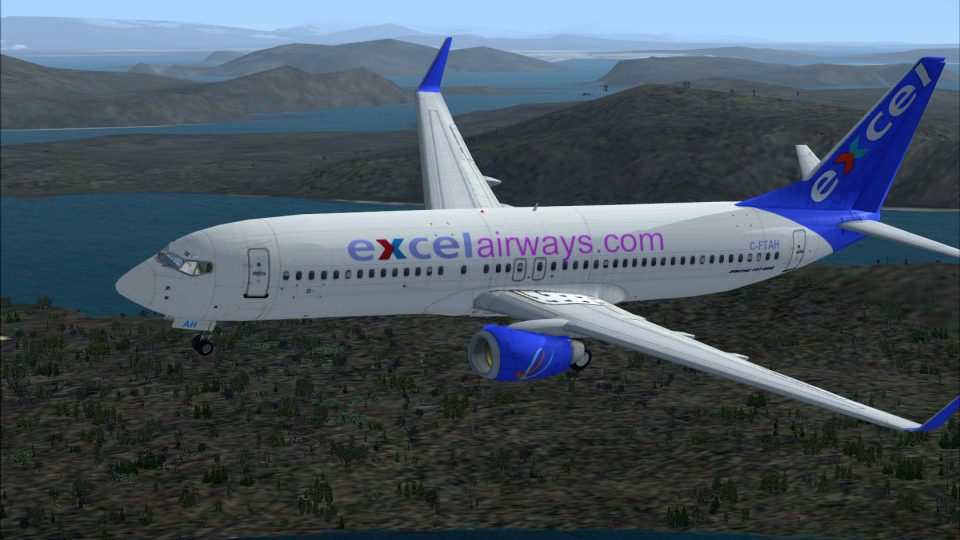
Excel Airways’ understated UK budget livery comes to life on the default Boeing 737-800 with a crisp freeware repaint depicting registration C-FTAH. Designed for Microsoft Flight Simulator X, it refreshes the airliner’s exterior while keeping the stock flight model and virtual cockpit intact, and requires the complete default 737-800 base aircraft.
 Rate
Rate
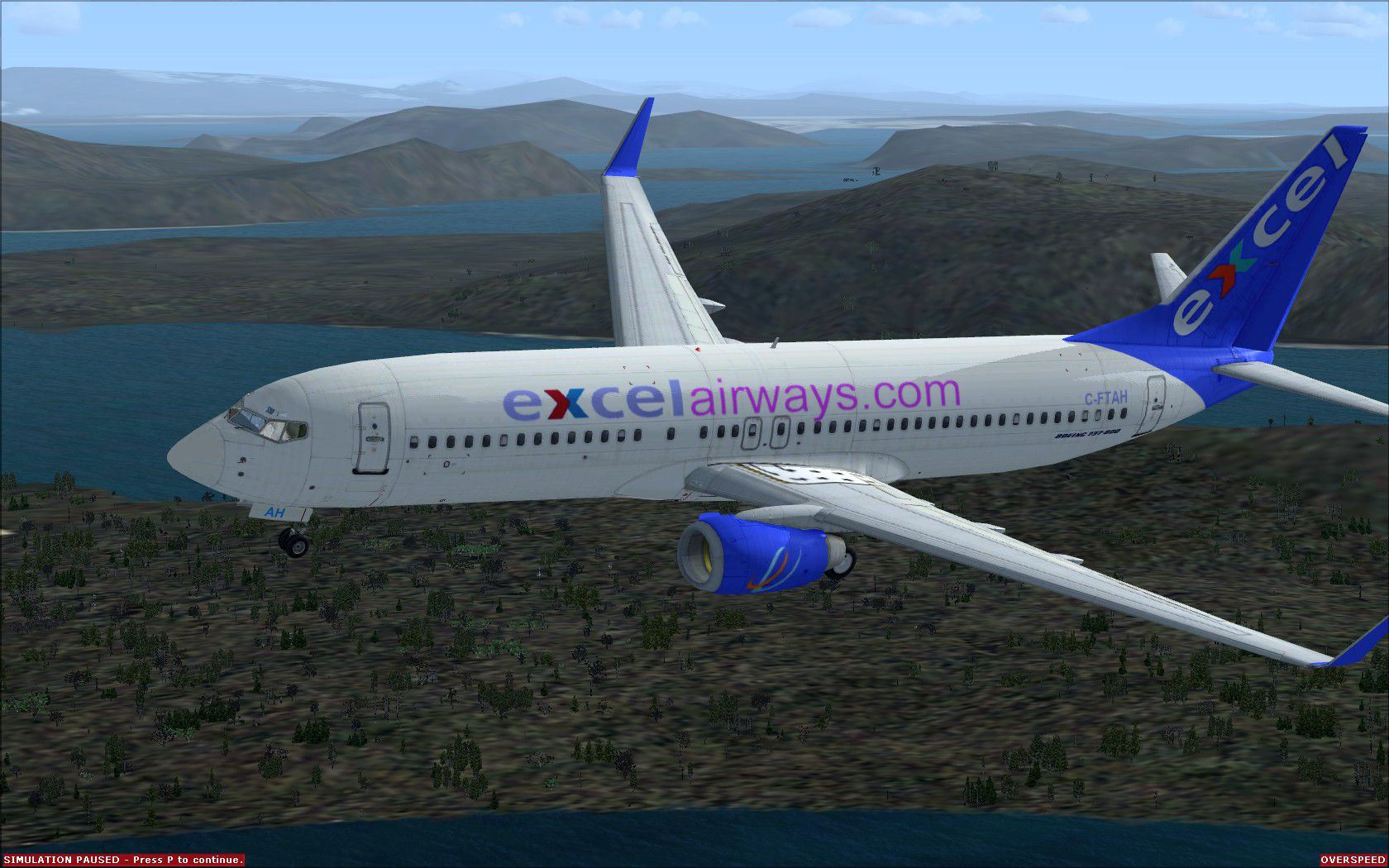
Enhance your Microsoft Flight Simulator X experience by adding this specialized Excel Airways repaint for the default Boeing 737-800. Created by Paul Davies, this freeware texture set captures the UK-based budget carrier’s livery, specifically reflecting aircraft registration C-FTAH. You will need the complete default model beforehand (available in the Fly Away Simulation mod library), as these files only include the repaint.
Excel Airways was originally a British budget and charter airline operating popular routes within Europe, often deploying Boeing aircraft for medium-haul services. The 737-800 variant offers a reliable, fuel-efficient profile that meets the demands of extensive short- to medium-range flights. This repaint recreates the airline’s understated color scheme, bringing an additional regional flavor to your virtual skies.
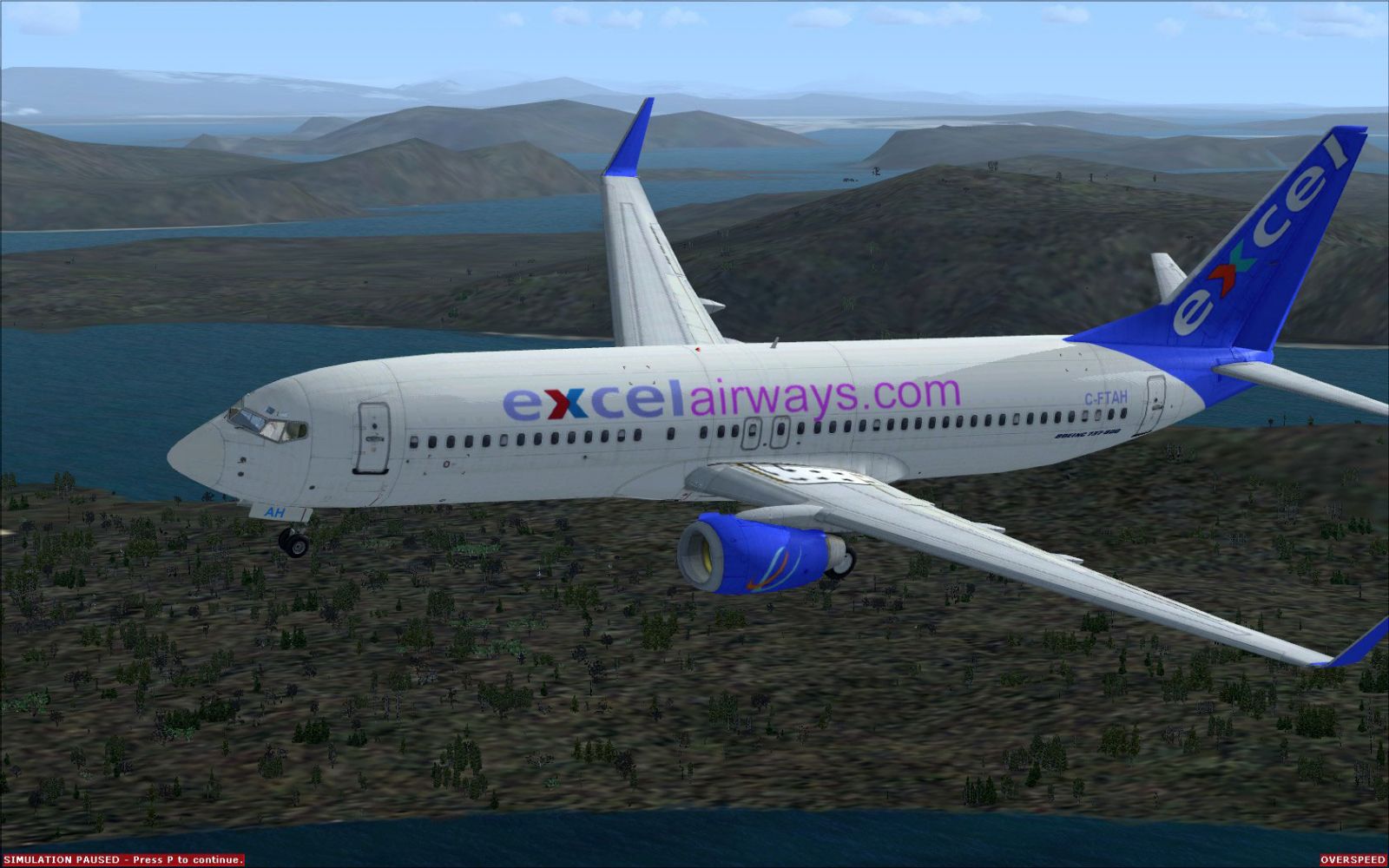
Excel Airways Boeing 737-800 in flight.
C-FTAH).Add these textures to your existing 737-800 folder, ensuring that you do not overwrite critical default files. Below are streamlined directions to get you airborne in the Excel Airways colors.
texture.excel1 inside.SimObjects, then Airplanes, then locate B737-800.B737-800 folder to a safe place to preserve default content.texture.excel1 folder from your temporary location. Paste that folder into the B737-800 directory alongside other texture.xxx folders.aircraft.cfg (often displayed as an icon within the B737-800 folder). If prompted, open it with Notepad or another plain text editor.fltsim.x] entries.XX to the next sequential number (e.g., if the last item is [fltsim.5], your new one becomes [fltsim.6]):
[fltsim.XX]
title=Boeing 737-800 EXCEL
sim=Boeing737-800
model=
panel=
sound=
texture=excel1
kb_checklists=Boeing737-800_check
kb_reference=Boeing737-800_ref
atc_id=
atc_airline=excel
atc_flight_number=
ui_manufacturer="Boeing"
ui_type="737-800"
ui_variation="excel"
ui_typerole="Commercial Airliner"
ui_createdby="Microsoft Corporation"
description="..."
XX) and replace it with the correct [fltsim.n] index.texture.excel1 into the main 737-800 folder and not any other subdirectory.fltsim] entry correctly in aircraft.cfg, matching the precise folder name excel1.Following these steps will ensure that you can enjoy a fully functional Excel Airways repaint, reflecting one of the most recognizable UK budget airline liveries on the Boeing 737-800. Credits go entirely to Paul Davies for developing and releasing this remarkable freeware texture set.
Free for all simmers · 8.25 MB · Scanned clean Oct 2026
Download speed: Free tier is capped at 0.5 Mbps (this file takes approximately 2 mins at the cap). PRO members download at full line speed.
texture.{airline}) inside FSX\SimObjects\Airplanes\{base-aircraft}\.aircraft.cfg in Notepad. Add a new [fltsim.X] section per the readme.readme.txt or README file. It tells you exactly where files go, what dependencies are needed, and any quirks specific to this add-on.The archive excelairways1.zip has 31 files and directories contained within it.
This list displays the first 500 files in the package. If the package has more, you will need to download it to view them.
| Filename/Directory | File Date | File Size |
|---|---|---|
| EXCEL 1 JPeg.JPG | 01.29.11 | 342.41 kB |
| FILE_ID.DIZ | 02.16.11 | 183 B |
| Readme.txt | 02.16.11 | 3.58 kB |
| texture.excel1 | 02.16.11 | 0 B |
| 737_Refection.dds | 09.04.06 | 170.79 kB |
| B737_800_1_C.dds | 09.04.06 | 682.79 kB |
| b737_800_1_LM.dds | 09.04.06 | 170.79 kB |
| B737_800_1_night_C.dds | 12.21.10 | 1.33 MB |
| b737_800_1_T.dds | 02.11.11 | 1.00 MB |
| b737_800_1_T_Bump.dds | 09.04.06 | 1.00 MB |
| b737_800_1_T_Specular.dds | 09.04.06 | 1.33 MB |
| B737_800_2_C.dds | 09.04.06 | 682.79 kB |
| B737_800_2_night_C.dds | 12.21.10 | 1.33 MB |
| b737_800_2_T.dds | 09.04.06 | 1.33 MB |
| b737_800_2_T_Bump.dds | 09.04.06 | 1.00 MB |
| b737_800_2_T_Specular.dds | 09.04.06 | 1.33 MB |
| B737_800_3_C.dds | 09.04.06 | 682.79 kB |
| B737_800_3_night_C.dds | 12.21.10 | 1.33 MB |
| B737_800_4_C.dds | 09.04.06 | 682.79 kB |
| B737_800_4_night_C.dds | 12.21.10 | 1.33 MB |
| B737_800_5_C.dds | 09.04.06 | 170.79 kB |
| B737_800_5_night_C.dds | 12.21.10 | 341.48 kB |
| B737_800_C.bmp | 05.12.06 | 682.74 kB |
| B737_800_Interior.dds | 09.04.06 | 170.79 kB |
| EXCEL 1.JPG | 01.29.11 | 342.41 kB |
| Fresnel_Ramp.dds | 09.04.06 | 640 B |
| Pilots_737.dds | 09.04.06 | 42.79 kB |
| texture.cfg | 08.14.06 | 137 B |
| thumbnail.JPG | 01.29.11 | 12.29 kB |
| flyawaysimulation.txt | 10.29.13 | 959 B |
| Go to Fly Away Simulation.url | 01.22.16 | 52 B |
Only PRO members can place votes.
More FSX & P3D add-ons hand-picked based on this download.
FSX Civil Aircraft
Here is a carefully refined repaint that enriches the default Boeing 737-800 …
 FSX Civil Aircraft
British Airways Boeing 737-800. This is a fictional repaint for the default B…
 FSX Civil Aircraft
registration G-DOCN. Textures only for the default B737-800. Repaint by Paul …
 FSX Civil Aircraft
This is a repaint for the FSX default Boeing 737-800. It includes 1 paint sch…
 FSX Civil Aircraft
FSX US Airways Boeing 737-800. Textures only for the default B737-800. Repain…
 FSX Civil Aircraft
This freeware package provides a distinct livery for the Boeing 737-800 in Mi…
 FSX Civil Aircraft
Repaints of the default B737-800. Based on the ANA basic livery 737-800 fleet…
 FSX Civil Aircraft
Textures only for the TDS B737-800 model By Juan Marcano. Screenshot of Kenya…
Be the first to leave a comment on this download.
Be the first to share your thoughts on this download.