

 FSX General Aviation Aircraft
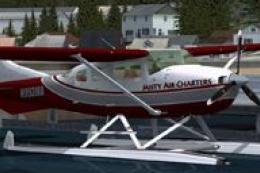
Misty Air Cessna 206 Stationair Amphib
This freeware repaint integrates seamlessly with the payware Carenado 206 Sta…
Misty Air Charters livery refreshes the Carenado Cessna 206 Stationair Cargo with bold, Alaska-ready textures suited to hauling mail, supplies, and passengers into remote strips. Built for Microsoft Flight Simulator X, it requires the payware Carenado 206 Cargo package and complements bush operations with a rugged, authentic working-aircraft look.
 Rate
Rate
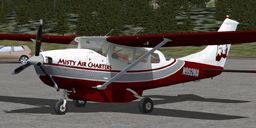
This carefully crafted repaint is designed for the cargo variant of the Carenado Cessna 206 Stationair, adding a distinctive Misty Air Charters livery for operations within the challenging Alaskan environment. The Cessna 206, often referred to as the Stationair, is well-regarded for its sturdy build and ample load capacity—two qualities that make it ideal for short-haul flights carrying mail, supplies, and passengers to remote Alaskan communities. This package provides only the repaint files; you will need to own the original payware aircraft from Carenado, available for purchase from vendors such as SimShack, to enjoy this fully.
Striking Livery: The textures by Mark Bradshaw impart a bold Misty Air Charters look, emphasizing both utility and regional authenticity for bush flying in the Alaska Panhandle.
Adapted for Microsoft Flight Simulator X: Although it is specifically tailored for Microsoft Flight Simulator X, it may also align with other compatible simulator platforms if the original Cessna 206 Stationair payware package is supported.
Cargo Configuration Advantages: The real-world Cessna 206 is widely recognized for its spacious cabin. In its cargo setup, the aircraft excels at hauling equipment, provisions, and even specialized items crucial for research stations and mining sites.
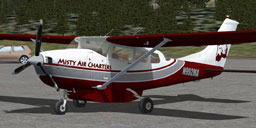
Misty Air Cessna 206 Stationair Cargo
1. Place the Texture Folder: Insert the new texture.MAC folder inside your chosen installation path for the Carenado Cessna 206 Cargo (for instance, [FSX Installation]/SimObjects/Airplanes/Carenado Cessna 206 Cargo).
2. Edit the Configuration File: Within the AIRCRAFT.CFG, locate the existing [fltsim.x] entries. At the bottom of the last entry, paste the provided FLTSIM block and update the “X” to the next number available in your own sequence.
3. Back Up Your Original CFG: It is prudent to save a copy of your AIRCRAFT.CFG before making changes. If you are uncertain about any modifications, you may reconsider installing this livery. The author does not take responsibility for any edits that might affect performance.
[fltsim.X]
title=C 206 Cargo MAC
sim=Caren206CP
model=SC
panel=
sound=
texture=MAC
kb_checklists=Carenado C 206_check
kb_reference=Carenado C 206_ref
atc_id=N992MA
ui_manufacturer=Carenado
ui_type=C U206G Stationair 6 II
ui_createdby="Carenado"
ui_variation=Cargo Pack
description=Carenado C Stationair 6 II Model U206G Cargo Pack without Pant Wheels
atc_heavy=0
atc_airline=
atc_flight_number=
atc_id_color=0000000000
visual_damage=1
Misty Air Charters is a virtual organization focused on providing essential bush flight services within the Tongass National Forest, Misty Fjords National Monument, and neighboring areas of Alaska. Whether delivering mail to remote outposts, ferrying fishing parties to isolated lakeside cabins, or supporting specialized endeavors like research programs and mining operations, the group handles a wide range of responsibilities. Occasional missions even extend to aerial surveys, rescue flights, and scenic tours that reveal the breathtaking Alaskan terrain.
Flight roles can be performed online or offline, and Misty Air offers flexibility regarding both the aircraft choice and pilot time constraints, making this an appealing environment for hobbyists. There are very few regulations, and no restrictive ranking tiers exist—only straightforward guidelines. Everyone can jump in, share insights, and contribute from day one, fostering a welcoming space for aviation enthusiasts who want a dynamic bush flying experience.
Free for all simmers · 1.06 MB · Scanned clean Oct 2026
Download speed: Free tier is capped at 0.5 Mbps. PRO members download at full line speed.
texture.{airline}) inside FSX\SimObjects\Airplanes\{base-aircraft}\.aircraft.cfg in Notepad. Add a new [fltsim.X] section per the readme.readme.txt or README file. It tells you exactly where files go, what dependencies are needed, and any quirks specific to this add-on.The archive mac_c206_cargo.zip has 14 files and directories contained within it.
This list displays the first 500 files in the package. If the package has more, you will need to download it to view them.
| Filename/Directory | File Date | File Size |
|---|---|---|
| README.txt | 08.07.09 | 927 B |
| Texture.MAC | 08.07.09 | 0 B |
| Carenado 206 Fuse.bmp | 08.07.09 | 1.00 MB |
| Carenado 206 Fuse2.bmp | 08.07.09 | 1.00 MB |
| Carenado 206 Fuse3.bmp | 08.07.09 | 1.00 MB |
| texture.cfg | 08.16.08 | 139 B |
| thumbnail.jpg | 08.07.09 | 48.26 kB |
| Thumbs.db | 08.07.09 | 5.00 kB |
| FILE_ID.DIZ | 08.09.09 | 220 B |
| Disclaimer.txt | 08.09.09 | 340 B |
| Misty_Air_Charters.txt | 08.09.09 | 1.29 kB |
| MAC_C206_Cargo.jpg | 08.09.09 | 26.09 kB |
| flyawaysimulation.txt | 10.29.13 | 959 B |
| Go to Fly Away Simulation.url | 01.22.16 | 52 B |
Only PRO members can place votes.
More FSX & P3D add-ons hand-picked based on this download.
FSX General Aviation Aircraft
This freeware repaint integrates seamlessly with the payware Carenado 206 Sta…
 FSX General Aviation Aircraft
Enhance your experience flying the classic single-engine Cessna 206 Stationai…
 FSX General Aviation Aircraft
This repaint, created by B. Lechner, brings a realistic texture set to the ca…
 FSX General Aviation Aircraft
Misty Air DHC6-100 Twin Otter. A repaint of the Aerosoft DeHavilland Twin Ott…
 FSX General Aviation Aircraft
High Flight Simulations is pleased to introduce the Cessna C206T Turbo Statio…
 FSX General Aviation Aircraft
This is a North American Registry (N206RX) re-paint of the Cessna C206H Stati…
 FSX General Aviation Aircraft
Cessna C206H Stationair, v2.1, registration N206RX. A repaint of the Cessna 2…
 FSX General Aviation Aircraft
Cessna C206H Stationair Fix. A 2D panel/VC gauge fix for use with C206_6RX.ZI…
Be the first to leave a comment on this download.
Be the first to share your thoughts on this download.