

 FSX General Aviation Aircraft
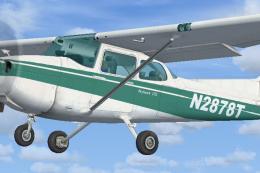
Green And White Cessna 172 Fix
Green And White Cessna 172 Fix, for use with Cessna_172_N2878T.ZIP">FSX_DEFAU…
Give the Carenado C172II N a period-correct splash of color with this vintage green Skyhawk repaint, inspired by 1970s-era training aircraft and tuned to preserve the model’s classic lines and authentic look. Built for Microsoft Flight Simulator X, it requires the payware Carenado base aircraft and includes texture files only.
 Rate
Rate
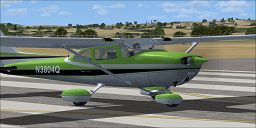
Enhance your installation of Microsoft Flight Simulator X with this carefully detailed green-livery repaint for the payware Carenado C172II N. Created by Craig Davis, it showcases a vintage color scheme reminiscent of a 1970s-era Cessna Skyhawk. Known for its robust design and reliability as a training aircraft, the real-world Cessna 172 family has been a mainstay in general aviation for decades. Here, the classic lines of the aircraft are accentuated by a vibrant green paint job, which was inspired by a scaled model once built by the author in his youth. The textures in this repaint are derived from Carenado’s provided blanks and were refined using tools such as DXTBmp and Paint.net. This customized scheme reflects a timeless aesthetic while maintaining the authenticity of the aircraft’s original construction.

Green Cessna Skyhawk 172 on runway.
texture.Classic172_Green.Classic172_Skyhawk_green.zip content into “texture.Classic172_Green.” When prompted, allow the overwrite of any files.aircraft.CFG file and insert the snippet below, replacing [fltsim.x] with the next sequential number:[fltsim.x] title=Classic 172 Skyhawk_Green sim=SingleEngineProp model= panel=1 sound= texture=classic172_Green kb_checklists=C172_CHECK kb_reference=C172_REF atc_id=N3804Q ui_manufacturer="Carenado" ui_type="C172N" ui_variation="Classic Skyhawk Green,Black" ui_createdby="Carenado" ui_typerole="Highwing single Engine Prop" description="The Cessna 172 Skyhawk is one of the most popular aircraft in aviation. Its easy handling and reliability has made it a favorite of students and seasoned pilots." atc_heavy=0 atc_airline= atc_flight_number= atc_id_color=0x00000000 atc_id_font=Verdana,-11,1,600,0 visual_damage=0
Enjoy this classic green livery, and immerse yourself in nostalgic general aviation flying with the Cessna Skyhawk!
Free for all simmers · 987.13 KB · Scanned clean Oct 2026
Download speed: Free tier is capped at 0.5 Mbps. PRO members download at full line speed.
texture.{airline}) inside FSX\SimObjects\Airplanes\{base-aircraft}\.aircraft.cfg in Notepad. Add a new [fltsim.X] section per the readme.readme.txt or README file. It tells you exactly where files go, what dependencies are needed, and any quirks specific to this add-on.The archive classic172_skyhawk_green.zip has 9 files and directories contained within it.
This list displays the first 500 files in the package. If the package has more, you will need to download it to view them.
| Filename/Directory | File Date | File Size |
|---|---|---|
| texture.cfg | 08.14.06 | 137 B |
| thumbnail.jpg | 05.17.10 | 16.55 kB |
| Classic172_skyhawk_Green Readme.txt | 05.27.10 | 1.72 kB |
| FILE_ID.DIZ | 05.27.10 | 189 B |
| Alabeo172c_T.bmp | 05.26.10 | 1.33 MB |
| Alabeo172a_T.bmp | 05.26.10 | 1.33 MB |
| Alabeo172b_T.bmp | 05.26.10 | 1.33 MB |
| flyawaysimulation.txt | 10.29.13 | 959 B |
| Go to Fly Away Simulation.url | 01.22.16 | 52 B |
Only PRO members can place votes.
More FSX & P3D add-ons hand-picked based on this download.
FSX General Aviation Aircraft
Green And White Cessna 172 Fix, for use with Cessna_172_N2878T.ZIP">FSX_DEFAU…
 FSX General Aviation Aircraft
Textures only for the default C172. Easy installation. Screen shots enclosed.…
 FSX General Aviation Aircraft
Cessna 172 Skyhawk. This livery is from the tribute for Microsoft Flight Simu…
 FSX General Aviation Aircraft
FSX Cessna 172 SP Skyhawk registration N7690X. Textures only for the default …
 FSX General Aviation Aircraft
Immerse yourself in a vintage aviation atmosphere with this repaint of the Ca…
 FSX General Aviation Aircraft
Experience a distinctive take on the iconic Cessna Skyhawk 172 with these uni…
 FSX General Aviation Aircraft
This repaint adds a vibrant red exterior finish to the Carenado Cessna 172N f…
 FSX General Aviation Aircraft
Repaint textures for the default C172 for real world N81ER. By Tom Tiedman. S…
Be the first to leave a comment on this download.
Be the first to share your thoughts on this download.