

 FSX Scenery
NL2000 V4.02 Rotterdam,The Hague Airport
Enhance your simulator’s portrayal of one of the Netherlands’ busiest regiona…
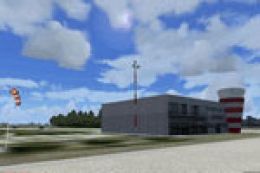
Texel Airport (EHTX) comes to life with NL2000 v4.0 scenery, delivering photoreal ground textures, crisp apron markings, and accurately placed hangars, terminal buildings, and navigation aids that match the real island airfield’s coastal character. Designed for FSX, it requires the official NL2000 v4 installer for seamless integration with surrounding Netherlands coverage.
 Rate
Rate
 Netherlands
Immerse yourself in this detailed EHTX (Texel Airport) scenery package, an integral part of the NL2000 v4.0 collection. Developed by The Netherlands 2000 Scenery Design Team, this free enhancement delivers an authentic representation of the real-world airfield located on the island of Texel, off the northern coast of the Netherlands. Users will benefit from its modular design, which merges seamlessly with other NL2000 areas for enhanced flight simulation experiences in FSX.
The add-on incorporates photoreal ground imagery and meticulous surface details. These elements strive to emulate the characteristic landscapes found throughout Texel’s coastal region. The result is a crisp panorama that captures each apron marking, turf runway texture, and the typical Dutch ambiance.
To reinforce realism, the scenery depicts hangars, terminal buildings, and navigational aids in precise alignment. Additional static objects and customized 3D structures have been included to mirror the everyday operations and general aviation traffic commonly observed at this airfield.
This rendition of Texel Airport is designed exclusively for use with NL2000 v4.0, ensuring full compatibility. To install, you will need the official NL2000 v4 installer, which streamlines the scenery implementation process across multiple Dutch airports and regions.
The Netherlands 2000 Scenery Design Team has generously kept this package free to download and use. Despite its no-cost nature, the level of detail and care applied to Texel’s environment remains competitive with payware offerings. The final effect is an impressive layer of immersion that resonates with virtual pilots and scenery enthusiasts alike.
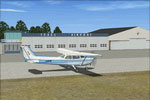
NL2000 V4.0 Texel Airport Scenery.
Situated in the Wadden Sea region, Texel Airport is a hub for scenic flight excursions and general aviation. Its coastal charm, alongside active skydiving operations and light aircraft traffic, provides a rare setting for flight simulation enthusiasts looking to expand their collection of Dutch airports.
This package ties into the modular nature of NL2000’s comprehensive coverage of the Dutch landscape. By following the same management and installation approach, simmers can easily keep track of all their NL2000 expansions. Once loaded, expect a consistent environment that reflects the geography and culture of the Netherlands in greater depth.
As with every NL2000 release, this Texel Airport enhancement is the result of meticulous work by The Netherlands 2000 Scenery Design Team. By combining field research with digital expertise, they bring a blend of photorealism and authenticity to FSX. Enthusiasts who value high-quality freeware will especially appreciate this devoted effort.
Free for all simmers · 30.18 MB · Scanned clean Oct 2026
Download speed: Free tier is capped at 0.5 Mbps (this file takes approximately 8 mins at the cap). PRO members download at full line speed.
FSX\Addon Scenery\ containing scenery and texture sub-folders.readme.txt or README file. It tells you exactly where files go, what dependencies are needed, and any quirks specific to this add-on.Use these coordinates to fly directly to this location once the mod is installed.
53.11530000,4.83560000
Launch FSX or Prepar3D and use Flights → Load to open the downloaded .pln file. Your aircraft will be positioned at this location.
The archive nl2k_v4_ehtx.zip has 8 files and directories contained within it.
This list displays the first 500 files in the package. If the package has more, you will need to download it to view them.
| Filename/Directory | File Date | File Size |
|---|---|---|
| nl2k_v4_ehtx.gif | 05.24.10 | 9.46 kB |
| FILE_ID.DIZ | 05.24.10 | 349 B |
| nl2k_v4_ehtx.nl2 | 04.16.10 | 30.19 MB |
| nl2k_v4_ehtx.txt | 05.22.10 | 341 B |
| copyright.txt | 05.24.10 | 4.43 kB |
| auteursrecht.txt | 05.24.10 | 5.06 kB |
| flyawaysimulation.txt | 10.29.13 | 959 B |
| Go to Fly Away Simulation.url | 01.22.16 | 52 B |
Only PRO members can place votes.
More FSX & P3D add-ons hand-picked based on this download.
FSX Scenery
Enhance your simulator’s portrayal of one of the Netherlands’ busiest regiona…
 FSX Scenery
This comprehensive scenery package brings an authentic representation of Eind…
 FSX Scenery
This free add-on offers a precisely modeled depiction of EHEH Eindhoven Airpo…
 FSX Scenery
This comprehensive package brings an updated rendition of Maastricht Aachen A…
 FSX Scenery
Enhance your virtual journey in FSX by adding a meticulously detailed renditi…
 FSX Scenery
This airport enhancement transforms Groningen Airport Eelde (EHGG) within Mic…
 FSX Scenery
Experience the intricacies of Den Helder Airport (EHKD) with this free FSX sc…
 FSX Scenery
This add-on enhances Microsoft Flight Simulator X with a finely detailed rend…
Be the first to leave a comment on this download.
Be the first to share your thoughts on this download.