

 FSX Scenery
NL2000 V4.02 Rotterdam,The Hague Airport
Enhance your simulator’s portrayal of one of the Netherlands’ busiest regiona…
Rotterdam The Hague Airport (EHRD) is recreated with accurate terminal and hangar placement, realistic runway and taxiway textures, proper signage, and tailored lighting for convincing day and night operations in FSX. Its modular NL2000 V4.0 design fits into the wider Netherlands coverage and requires the NL2000 v4.0 installer for correct layering and dependencies.
 Rate
Rate
 Netherlands
Enhance your virtual journey in FSX by adding a meticulously detailed rendition of Rotterdam The Hague Airport (EHRD). Created by The Netherlands 2000 Scenery Design Team, this freeware package brings accurate ground markings, custom objects, and a modular design to enrich your flights over one of the Netherlands’ busiest airports.
Rotterdam The Hague Airport, situated close to the city center and serving as a pivotal regional hub, appears with precise terminal structures and realistic hangars in this package. Each building is carefully placed to mirror real-world counterparts, and the complex taxiway network includes genuine signage for improved navigational immersion. The airport’s runways have been textured with realistic asphalt patterns, ensuring a representative look when operating aircraft of various categories.
The developers integrated custom textures and lighting to depict EHRD’s apron areas at varying times of day. Subtle differences in pavement color and wear provide a lifelike impression when taxiing. In addition, detailed placement of approach lights and runway edge lighting contributes to consistent realism during low-visibility operations. These refined visuals serve to enhance the overall sense of authenticity.
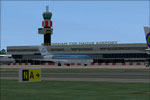
NL2000 V4.0 Rotterdam The Hague Airport Scenery.
This add-on integrates into the broader NL2000 v4 environment, which is a cohesive, free collection covering the entire Dutch region. It fits neatly into existing scenery segments, reflecting the notable layout and geographic context of Rotterdam’s surroundings. The modular nature of NL2000 v4 ensures that users can selectively install or remove specific airports without affecting overall performance.
In order to properly implement this package, flight sim enthusiasts must utilize the dedicated NL2000 v4.0 installer. This specialized tool applies consistent texture layering and updates any underlying dependencies automatically to maintain compatibility. Without this installer, some features may not align correctly, and users could encounter reduced scenery performance.
The Netherlands 2000 Scenery Design Team, known for their longstanding commitment to producing accurate freeware add-ons, presents this portrayal of Rotterdam The Hague Airport at no cost. Their work is aimed at delivering the most reliable and up-to-date simulation experience for FSX, particularly for those who frequently fly in or around Dutch airspace. With an emphasis on precision, the team’s collaborative efforts result in a cohesive and richly detailed environment suitable for general aviation, regional flights, or even larger commercial operations.
This freeware package is part of a comprehensive suite of scenery expansions, all designed to enhance overall immersion in FSX. The NL2000 v4.0 Rotterdam The Hague Airport package stands out by recreating one of the key gateways to the Netherlands, offering a robust blend of visual fidelity and technical accuracy that integrates seamlessly into your simulated flights.
Free for all simmers · 182.26 MB · Scanned clean Oct 2026
Download speed: Free tier is capped at 0.5 Mbps (this file takes approximately 51 mins at the cap). PRO members download at full line speed.
FSX\Addon Scenery\ containing scenery and texture sub-folders.readme.txt or README file. It tells you exactly where files go, what dependencies are needed, and any quirks specific to this add-on.Use these coordinates to fly directly to this location once the mod is installed.
51.95694400,4.43722200
Launch FSX or Prepar3D and use Flights → Load to open the downloaded .pln file. Your aircraft will be positioned at this location.
The archive nl2k_v4_ehrd.zip has 8 files and directories contained within it.
This list displays the first 500 files in the package. If the package has more, you will need to download it to view them.
| Filename/Directory | File Date | File Size |
|---|---|---|
| nl2k_v4_ehrd.gif | 05.24.10 | 7.32 kB |
| FILE_ID.DIZ | 05.24.10 | 363 B |
| nl2k_v4_ehrd.nl2 | 04.16.10 | 182.38 MB |
| nl2k_v4_ehrd.txt | 05.22.10 | 355 B |
| copyright.txt | 05.24.10 | 4.43 kB |
| auteursrecht.txt | 05.24.10 | 5.06 kB |
| flyawaysimulation.txt | 10.29.13 | 959 B |
| Go to Fly Away Simulation.url | 01.22.16 | 52 B |
Only PRO members can place votes.
More FSX & P3D add-ons hand-picked based on this download.
FSX Scenery
Enhance your simulator’s portrayal of one of the Netherlands’ busiest regiona…
 FSX Scenery
Immerse yourself in a meticulously crafted rendition of EHRD Rotterdam The Ha…
 FSX Scenery
Scenery Rotterdam Airport The Hague (EHRD), The Netherlands. Refurbished to m…
 FSX Scenery
This comprehensive scenery package brings an authentic representation of Eind…
 FSX Scenery
This free add-on offers a precisely modeled depiction of EHEH Eindhoven Airpo…
 FSX Scenery
This comprehensive package brings an updated rendition of Maastricht Aachen A…
 FSX Scenery
This airport enhancement transforms Groningen Airport Eelde (EHGG) within Mic…
 FSX Scenery
Experience the intricacies of Den Helder Airport (EHKD) with this free FSX sc…
Be the first to leave a comment on this download.
Be the first to share your thoughts on this download.