

 United States of America
  FSX Scenery
WashDCX
WashDCX beta is a complete upgrade to the default FSX Washington D.C. scenery…
WashDCX 1.0 brings Washington, D.C. to life in FSX with expanded National Mall photo scenery, additional landmark models, and transparent plus night textures for realistic sightseeing at any hour. Scenery complexity support, more trees, denser city traffic, tourists at key sites, and Andrews AFB Secret Service details round out a richer metro-area experience.
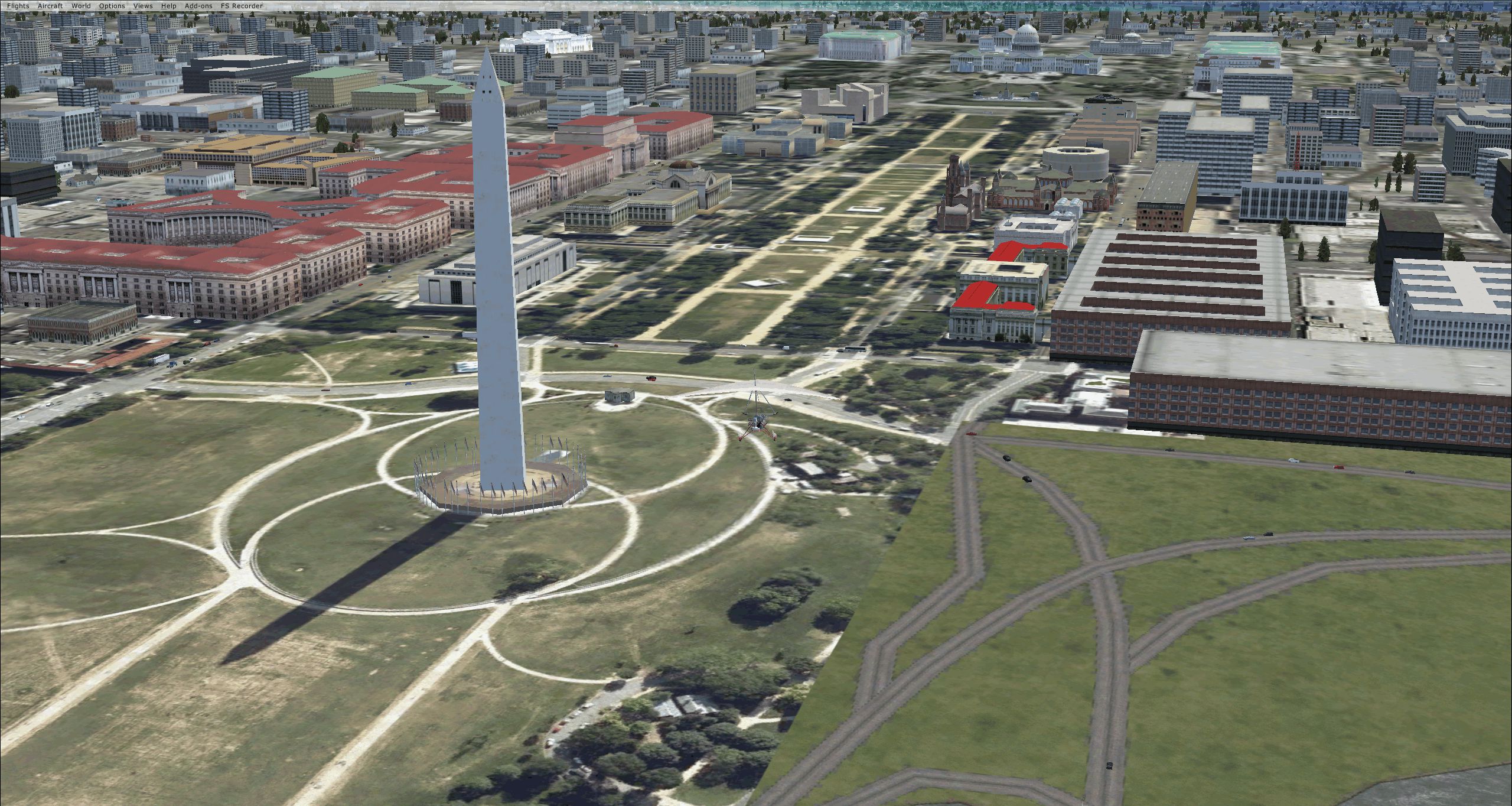
WashDCX 1.0. After more than 2000 downloads, here is the update to WashDCX Beta. WashDCX 1.0 contains even more Washington DC models and buildings, all of which have both transparent and night textures added. This version also expands the satellite photo scenery around the National Mall area; adds support for scenery complexity; adds trees and more traffic; and corrects the destination bug within the installer program. You will also find many tourists among the more popular tourist destinations in Washington D.C. By Larry Robbins.
Screenshot of the Washington Monument.
It's finally here !!! Thanks to all of you who downloaded and sent a comment, suggestion, or just your appreciation for WashDCX Beta. After more than 2000 downloads, I am pleased to announce a much anticipated UPDATE to WashDCX which will be referred to as Version 1.0. WashDCX 1.0 contains even more D.C. models and buildings, all of which have both Transparent and Night textures added. I have also expanded the Satellite Photo scenery around the National Mall area; added support for scenery complexity; added trees and more traffic; and corrected the destination bug within the installer program. You will also find many tourist among the more popular tourist destinations in Washington D.C. I hope that this addon will greatly enhance your flying experience around the D.C. Metro area. Be sure to check out both the Screen Shots and Video area for a look at what is included in WashDCX 1.0. I encourage your comments either by email or on the forum for all others to see. Have fun and Happy Flying !!
Thanks Again,
Larry
New to Vesion 1.0:
More models
Night textures
More Satellite Images
Fixed models with transparent textures (Alpha Cannels)
Added some Exclusions
Tourest (Very Dense Setting)
Trees (Even more trees with Very Dense Setting)
Secret Service Motor Cade at Andrews AFB
Fixed the installer destination bug found in the Beta version
Addon Models:
Washington Monument Bookstore in front of the Washington Monument
US Flags surrounding the Washington Monument
Air Force Memorial near the Pentagon
WWII Memorial near Reflection Pool opposite the Lincoln Memorial
American Indian Museum SE End of the National Mall near Capital Hill
Federal USDA Building (Orange Rooftop) near Washington Monument
Fountans in front of and behind the White House
George Washington Masonic Lodge in Alexandria, VA
USDA Fedeal Building at the SW Corner near Washington Monument
US Grant statue in front of Capital Building
LDS Morman Temple North near 495
Botanical Gardens in SE corner near the Capital Building
Trees on the National Mall and tourest at popular tourest locations
Secret Service surrounding Andrews AFB with Motor Cade
Other Features:
Rescaled and repositioned many default FSX buildings
Satellite images of: KDCA; Arlington National Cemetery; White House Grounds; National Mall; Capital Hill
City traffic surrounding the National Mall, Arlington Cemetery, Pentagon, Arlington Bridge, and KDCA
Install
1. Uninstall WashDCX Beta from your Hard Drive using the uninstall program
2. Download and run the installer for WashDCX 1.0 ensureing that the "WashDCX" file is unzipped into your Microsoft Flight Simulator X "Addon Scenery" folder.
2. Start up FSX and activate the WashDCX scenery (Add Scenery) within Scenery Library.
3. Restart FSX.
4. Go to KDCA airport. Takeoff and Have FUN !!
File Discription:
CVX_WashDCX.BGL - Traffic files, bridges, and landclass changes
Photo01 thru Photo51 BGL - Satellite images
WashDCX-EXT.BGL - Exclusion rectangles that allow me to reposition default FSX buildings
WashDCX_objects.bgl - Contains the new models imported from Google Sketchup
WashDCX.BGL - Places the new Google Sketchup models and moves FSX default buildings as well as rescale to size
Secret Service.BGL - Default FSX objects placed at Andrews AFB (KADW)
I would welcome any feedback, ideas, suggestions, or collaboration on this project.
Enjoy,
Larry
Free for all simmers · 86.69 MB · Scanned clean Oct 2026
Download speed: Free tier is capped at 0.5 Mbps (this file takes approximately 24 mins at the cap). PRO members download at full line speed.
FSX\Addon Scenery\ containing scenery and texture sub-folders.readme.txt or README file. It tells you exactly where files go, what dependencies are needed, and any quirks specific to this add-on.Use these coordinates to fly directly to this location once the mod is installed.
38.88950000,-77.03530000
Launch FSX or Prepar3D and use Flights → Load to open the downloaded .pln file. Your aircraft will be positioned at this location.
The archive washdcx1_0.zip has 7 files and directories contained within it.
This list displays the first 500 files in the package. If the package has more, you will need to download it to view them.
| Filename/Directory | File Date | File Size |
|---|---|---|
| WashDCX_1.0 | 02.04.11 | 0 B |
| Readme.txt | 02.04.11 | 3.64 kB |
| WashDCX 1.0.exe | 02.04.11 | 84.86 MB |
| WashDCX Thumb.gif | 02.03.11 | 7.81 kB |
| WashDCX.gif | 02.04.11 | 1.90 MB |
| flyawaysimulation.txt | 10.29.13 | 959 B |
| Go to Fly Away Simulation.url | 01.22.16 | 52 B |
Only PRO members can place votes.
More FSX & P3D add-ons hand-picked based on this download.
FSX Scenery
WashDCX beta is a complete upgrade to the default FSX Washington D.C. scenery…
FSX Scenery
Skara Scenery Bonaire X. Flamingo International Airport or Bonaire Internatio…
 FSX Scenery
Iwo Jima Scenery 1945 Update. This is a complete scenery with added effects a…
FSX Scenery
Kjeller Area Scenery X, Norway. Scenery around Kjeller airport with photoreal…
 FSX Scenery
FSX Loney's Alaska For FSX. This is a compilation of the author's Alaskan sce…
 FSX Scenery
For users of Flight Simulator X (and FSX: Steam Edition) and/or Prepar3D, ter…
 FSX Scenery
This freeware release by developer Aime Leclercq introduces revised highways …
 FSX Scenery
Team GEX Enhanced Autogen World. This package upgrades 522 world wide autogen…
Read what other simmers think, or add your own.


I tried contacting Larry Rollins and none of his contact info seems to work now. I understand it's been 10 years since this add-on was developed. Can one of the others who have successfully installed this airport upgrade contact me, because I have some questions on getting it to work in Windows 10.
I live in the Washington DC area, so I would really like to get this add-on working. I can be reached at LDPayne@aol.com Thanks.

I downloaded and tried to install in FSX (Win10) but after selecting the folder from the Addon Scenery directory it would not install to the Scenery Library. (I even tried the Win7 trick of clicking in the Name box of the folder description instead of the OK button) Nothing happens either way.

I had to shuffle the files a bit in order to run the scenery notwithstanding the scenery itself being technically aesthetic. The only criticism is that the White House reminds one of an abandoned train station. Every other square foot is jolly magisterial. I am trying to learn how to fly a Chinook in order to land and transmit screenshots to my friends. Even as free scenery if the White House had been on the same premises it would certainly have been beyond description. After numerous hard landings with single rotor helicopters I became enchanted by the tourists wandering around on the ground. Maybe later on in life the White House can be improved upon.

I notice the control tower in WASHDCX 1.0 appears to be incorrectly positioned on the airport and is at too low an altitude. I could correct this using ADE9X but I can't seem to locate the airport .bgl file. Where did you put it?