

 FSX Scenery
NL2000 V4.02 Rotterdam,The Hague Airport
Enhance your simulator’s portrayal of one of the Netherlands’ busiest regiona…
Gilze Rijen Air Base (EHGR) comes alive with refined buildings, crisp ground textures, and chart-accurate runway and taxiway geometry, plus authentic military statics and detailed Dutch surroundings for clearer on-base navigation in FSX. It integrates with the NL2000 v4 environment and requires the NL2000 v4.0.20 installer for full compatibility.
 Rate
Rate
 Netherlands
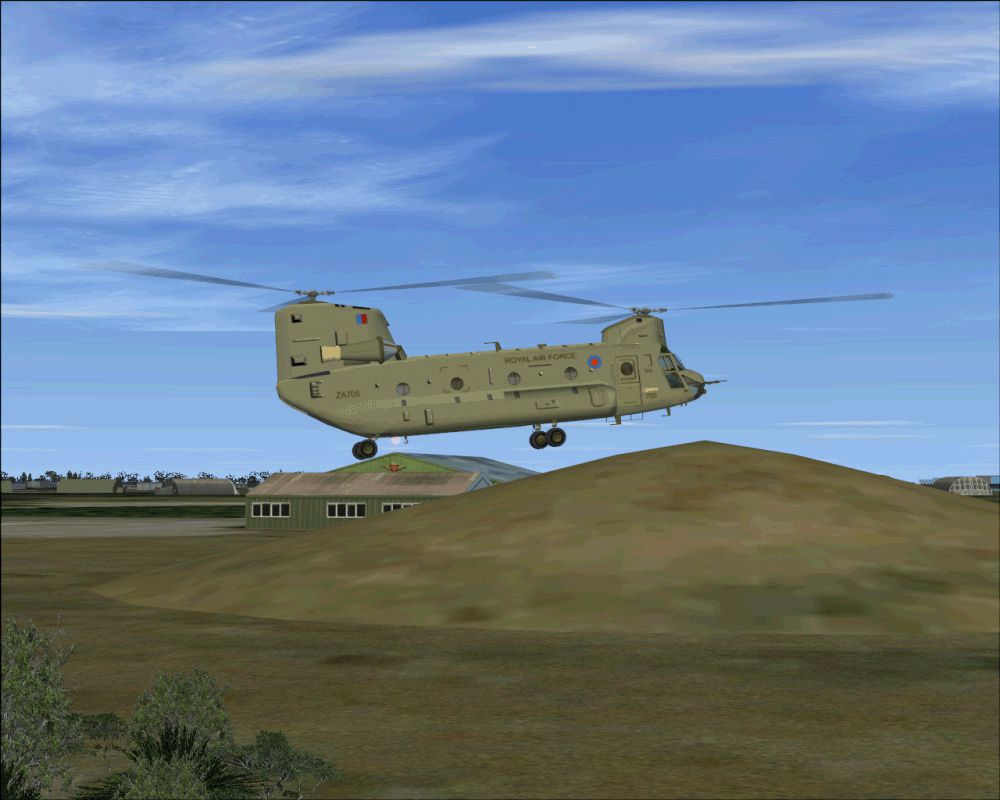
Step into a meticulously enhanced rendition of Gilze Rijen Air Base (EHGR) with this comprehensive scenery add-on, crafted by The Netherlands 2000 Scenery Design Team. It integrates seamlessly with the NL2000 v4 framework, presenting refined airfield structures, precise taxiway layouts, and accurately modeled surroundings. Flight sim enthusiasts who appreciate diligent attention to local detail will find this package delivers a more immersive experience in the southern region of the Netherlands.
Gilze Rijen Air Base serves as an essential hub in Dutch military aviation, and this scenery set portrays the facility with updated buildings and high-resolution ground textures. It showcases hangars, ramps, and flight line arrangements that mirror real-world layouts. This level of fidelity offers improved visual cues for both circuit practice and on-base navigation.
To install this EHGR package correctly, you will need the NL2000 v4.0.20 installer. This requirement ensures a smooth integration process and guarantees full compatibility with the wide-ranging features of the modular NL2000 v4 environment. Once installed, users can customize additional settings through the NL2000 interface to align with individual performance preferences.
This package continues the NL2000 v4 tradition of offering high-quality freeware scenery specific to the Netherlands. Designers from The Netherlands 2000 Scenery Design Team continually update multiple airports and regions, allowing simmers to expand coverage at their own pace. Each module is tailored for seamless interaction with the others, preserving system resources and overall flight simulator stability.
Screenshot of NL2000 V4 EHGR Scenery.
This expanded depiction of Gilze Rijen Air Base (EHGR) offers an opportunity to explore a crucial Royal Netherlands Air Force installation within a realistic virtual environment. Whether you frequent military scenarios or prefer civil traffic, this scenery mod delivers clarity and nuance for all flight operations. Created with authenticity in mind, this add-on by The Netherlands 2000 Scenery Design Team is a potent enhancement for any FSX setup.
Free for all simmers · 100.73 MB · Scanned clean Oct 2026
Download speed: Free tier is capped at 0.5 Mbps (this file takes approximately 28 mins at the cap). PRO members download at full line speed.
FSX\Addon Scenery\ containing scenery and texture sub-folders.readme.txt or README file. It tells you exactly where files go, what dependencies are needed, and any quirks specific to this add-on.Use these coordinates to fly directly to this location once the mod is installed.
51.57000000,4.93000000
Launch FSX or Prepar3D and use Flights → Load to open the downloaded .pln file. Your aircraft will be positioned at this location.
The archive nl2k_v4_01_ehgr.zip has 8 files and directories contained within it.
This list displays the first 500 files in the package. If the package has more, you will need to download it to view them.
| Filename/Directory | File Date | File Size |
|---|---|---|
| nl2k_v4.01_ehgr.txt | 05.12.11 | 362 B |
| auteursrecht.txt | 05.24.10 | 5.06 kB |
| copyright.txt | 05.24.10 | 4.43 kB |
| FILE_ID.DIZ | 05.12.11 | 362 B |
| nl2k_v4.01_ehgr.gif | 05.12.11 | 188.81 kB |
| nl2k_v4.01_ehgr.nl2 | 05.11.11 | 100.75 MB |
| flyawaysimulation.txt | 10.29.13 | 959 B |
| Go to Fly Away Simulation.url | 01.22.16 | 52 B |
Only PRO members can place votes.
More FSX & P3D add-ons hand-picked based on this download.
FSX Scenery
Enhance your simulator’s portrayal of one of the Netherlands’ busiest regiona…
 FSX Scenery
This comprehensive scenery package brings an authentic representation of Eind…
 FSX Scenery
This free add-on offers a precisely modeled depiction of EHEH Eindhoven Airpo…
 FSX Scenery
Enhance your simulator with this free package dedicated to EHEH (Eindhoven Ai…
 FSX Scenery
This comprehensive package brings an updated rendition of Maastricht Aachen A…
 FSX Scenery
Scenery NL2000 V4.0. This is the NL2000 v4.0 Traffic package for the NL2000 s…
 FSX Scenery
Immerse yourself in a thoroughly revised depiction of Dutch landscapes using …
 FSX Scenery
This package provides a dedicated set of core libraries intended to enhance a…
Be the first to leave a comment on this download.
Be the first to share your thoughts on this download.