

 FSX Scenery
NL2000 V4.02 Rotterdam,The Hague Airport
Enhance your simulator’s portrayal of one of the Netherlands’ busiest regiona…
Groningen Airport Eelde (EHGG) gets a sharper, more faithful look with NL2000 V4 scenery for FSX, featuring custom textures, refined ground markings, calibrated lighting, and accurately placed terminals, hangars, and aprons that match real-world geometry. It blends cleanly into the wider Dutch landscape and requires the NL2000 v4 core package.
 Rate
Rate
 Netherlands
Enhance Groningen Airport Eelde (EHGG) in FSX with a meticulously crafted scenery package that refines visual quality through custom textures, detailed airport structures, and accurately mapped surroundings. Created by The Netherlands 2000 Scenery Design Team, this free add-on seamlessly integrates into the broader NL2000 v4 environment to deliver authentic layouts and refined ground markings across the entire airfield.
The NL2000 V4 EHGG scenery incorporates an array of highly detailed elements that simulate every nuance of Groningen Airport Eelde. Pilots will notice refined runways, carefully modeled buildings, and accurate airport coordinates. Runway lighting and adjacent taxiway lines have been calibrated to ensure a realistic approach and taxi experience, especially during night operations or low-visibility conditions.
This specific scenery pack operates harmoniously with other NL2000 v4 assets. Designed as a modular free FSX scenery suite, The Netherlands 2000 V4 covers the nation’s aerial landscape in segments. Users can add or remove packages to tailor the simulator environment. By connecting EHGG enhancements to other airport or regional packages, simmers can build a cohesive representation of the entire country.
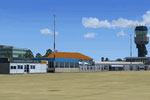
Screenshot of NL2000 V4 EHGG Scenery.
The Netherlands 2000 Scenery Design Team continues to refine FSX landscapes across various Dutch airports. Their dedication to precision and high-quality textures brings Groningen Airport Eelde to life, reinforcing the well-known reputation of the NL2000 series.
Experience a detailed rendition of EHGG through this package and enjoy the realistic ground elements, refined architectural models, and enhanced approaches. It is an essential addition for pilots seeking a more faithful Dutch environment in Flight Simulator X.
Free for all simmers · 150.73 MB · Scanned clean Oct 2026
Download speed: Free tier is capped at 0.5 Mbps (this file takes approximately 42 mins at the cap). PRO members download at full line speed.
FSX\Addon Scenery\ containing scenery and texture sub-folders.readme.txt or README file. It tells you exactly where files go, what dependencies are needed, and any quirks specific to this add-on.Use these coordinates to fly directly to this location once the mod is installed.
53.11970000,6.57940000
Launch FSX or Prepar3D and use Flights → Load to open the downloaded .pln file. Your aircraft will be positioned at this location.
The archive nl2k_v4_01_ehgg.zip has 8 files and directories contained within it.
This list displays the first 500 files in the package. If the package has more, you will need to download it to view them.
| Filename/Directory | File Date | File Size |
|---|---|---|
| nl2k_v4.01_ehgg.txt | 05.12.11 | 365 B |
| auteursrecht.txt | 05.24.10 | 5.06 kB |
| copyright.txt | 05.24.10 | 4.43 kB |
| FILE_ID.DIZ | 05.12.11 | 365 B |
| nl2k_v4.01_ehgg.gif | 05.12.11 | 7.63 kB |
| nl2k_v4.01_ehgg.nl2 | 03.27.11 | 150.84 MB |
| flyawaysimulation.txt | 10.29.13 | 959 B |
| Go to Fly Away Simulation.url | 01.22.16 | 52 B |
Only PRO members can place votes.
More FSX & P3D add-ons hand-picked based on this download.
FSX Scenery
Enhance your simulator’s portrayal of one of the Netherlands’ busiest regiona…
 FSX Scenery
This comprehensive scenery package brings an authentic representation of Eind…
 FSX Scenery
This free add-on offers a precisely modeled depiction of EHEH Eindhoven Airpo…
 FSX Scenery
Enhance your simulator with this free package dedicated to EHEH (Eindhoven Ai…
 FSX Scenery
This comprehensive package brings an updated rendition of Maastricht Aachen A…
 FSX Scenery
Scenery NL2000 V4.0. This is the NL2000 v4.0 Traffic package for the NL2000 s…
 FSX Scenery
Immerse yourself in a thoroughly revised depiction of Dutch landscapes using …
 FSX Scenery
This package provides a dedicated set of core libraries intended to enhance a…
Be the first to leave a comment on this download.
Be the first to share your thoughts on this download.