Works in X-Plane 12 · also X-Plane 11 · AlpilotX freeware · ultra-high-definition regions
Every region of AlpilotX's UHD Mesh Scenery v4 on one page: 30 m elevation data and a far denser triangle mesh than X-Plane 12's default scenery for the Alps, Pyrenees, Scandinavia, Japan, New Zealand and the mountain west of the USA and Canada. In XP12 the default mesh still rounds off peaks and smooths valleys; UHD puts the shape back. Tested by us in X-Plane 12 and 11. Pick the region you fly, download that file only, and layer it above HD Mesh in scenery_packs.ini.

Each outline is one download (approximate extents) and the blue land inside it is what the mesh replaces. Click a region, or type a place or coordinates to see which file covers it. USA West and Canada West come as three files: 1 is the eastern file, 2 the middle, 3 the western.
Land covered by UHD Mesh v4Default X-Plane meshOne download (click to jump)
zzz_uhd_global_scenery4; allow about twice the download size free while it unpacksuhd-mesh-v4-complete.zip 44.9 GB is a long pull on a free connection. PRO members download at full speed, no queue, no waiting — built for exactly this. Go PRO →
Only fly one part of the world? Pick single regions below — most people need two or three.
 Play: X-Plane 12 & 11 UHD Mesh Scenery v4 by Alpilotx (Freeware)
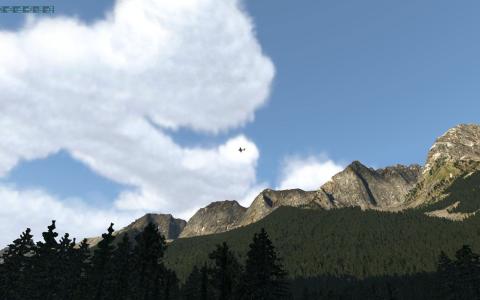
A flight over AlpilotX's UHD Mesh Scenery v4 in X-Plane 12: 30 m elevation data in the Alps and other mountain regions compared with HD Mesh and the default mesh.
The thumbnail shows roughly where each region sits. Every download is free; the button takes you straight to the file. Sizes are the compressed zip — allow roughly the same again once unpacked.
 3.8 GB
 7.4K
 4.5 (2)
XP11_UHD_Mesh_V4_Europe_Alps.zip
2 GB
4.1K
5.0 (2)
XP11_UHD_Mesh_V4_Europe_Pyrenees.zip
7.8 GB
2.4K
XP11_UHD_Mesh_V4_Europe_Scandinavia.zip
1.9 GB
1.5K
XP11_UHD_Mesh_V4_Canada_West_1.zip
5.3 GB
1.3K
XP11_UHD_Mesh_V4_Canada_West_2.zip
2.1 GB
1.1K
5.0 (2)
XP11_UHD_Mesh_V4_Canada_West_3.zip
5.8 GB
2.6K
XP11_UHD_Mesh_V4_USA_West_1.zip
7.6 GB
3.8K
XP11_UHD_Mesh_V4_USA_West_2.zip
3.2 GB
5.7K
3.8 (4)
XP11_UHD_Mesh_V4_USA_West_3.zip
3.7 GB
2.4K
XP11_UHD_Mesh_V4_Japan.zip
1.6 GB
2.9K
5.0 (2)
XP11_UHD_Mesh_V4_New_Zealand.zip
X-Plane 12's global scenery is a big step up from 11 in textures, water, seasons and autogen. The one thing Laminar did not change much is the terrain mesh underneath it — the triangle grid that gives mountains and coastlines their shape. That is exactly what UHD Mesh v4 replaces.
The default XP12 mesh is a worldwide compromise built to run on every PC. UHD Mesh v4 uses 30 m elevation data — roughly nine times the detail of 90 m data — and a far denser triangle mesh, so peaks are pointed instead of rounded, valleys are cut instead of smoothed and cliffs and fjords actually look vertical. The difference is obvious at low altitude, in the mountains and on approach.
A mesh pack only replaces the terrain shape. X-Plane 12's textures, seasons, weather, autogen, roads, airports and your other add-ons all render on top of it. The one trade-off: XP12's 3D water is limited along coastlines inside the tiles you install, because the coastline comes from the mesh. Inland and over the open sea nothing changes.
We have installed and flown UHD Mesh v4 in X-Plane 12 (and 11). It loads, it renders, and it is one of the most downloaded X-Plane scenery add-ons on Fly Away Simulation — 59.2K downloads so far. Performance cost is modest on a PC with 32 GB of RAM; see the FAQ below for the hardware notes.
You do not install the whole world. Pick the region covering your home airport or favourite route, drop it into zzz_uhd_global_scenery4, and X-Plane 12 uses UHD Mesh v4 there and its default mesh everywhere else. Nothing to pay, nothing to register — AlpilotX released it free, and with his own site now offline Fly Away Simulation is where it lives.
Taken in X-Plane with the mesh installed and nothing else added. Click any image for full size.


Mesh is a base layer: it has to sit at the bottom of scenery_packs.ini, or every airport and overlay in the area disappears. Five steps, once; extra regions just go in the same folder.
X-Plane/Custom Scenery/ make zzz_uhd_global_scenery4, and inside it a folder called exactly Earth nav data (case-sensitive, with the spaces).+50-010. Move those into Earth nav data.scenery_packs.ini (in Custom Scenery). New packs land at the top of that file.scenery_packs.ini in a text editor — above zzz_hd_global_scenery4 if you use HD Mesh too, below everything else. Ortho4XP photoscenery must stay above it.Log.txt for zzz_uhd_global_scenery4. Lines reading DSF load time … zzz_uhd_global_scenery4/Earth nav data/ mean the mesh is in use.# bottom of Custom Scenery/scenery_packs.ini SCENERY_PACK Custom Scenery/zzz_uhd_global_scenery4/ SCENERY_PACK Custom Scenery/zzz_hd_global_scenery4/
Both mesh packs are by AlpilotX and both use X-Plane 12's own textures and autogen, so neither needs extra art assets. HD is the global base; UHD is a heavier, sharper layer for a handful of mountainous regions, designed to sit on top of HD. Where you install nothing, X-Plane 12's default mesh stays.
Yes. We have tested it in X-Plane 12 and it loads and renders correctly. Because a mesh replaces the terrain in the regions it covers, X-Plane 12's own 3D water is limited along coastlines inside those areas; everything else (seasons, weather, autogen, roads, airports) works as normal. It also runs in X-Plane 11. It does not work in X-Plane 10 or earlier.
For terrain shape, yes. X-Plane 12 improved textures, water, seasons and autogen, but its elevation mesh is still a coarse worldwide grid. UHD Mesh v4 is built from 30 m elevation data with a far denser triangle mesh, so mountains, valleys, cliffs and coastlines are noticeably sharper and more accurate — most visible at low altitude and in mountainous areas. XP12's textures and autogen still render on top, so you keep the XP12 look with better terrain under it.
Only one: X-Plane 12's 3D water is limited along coastlines inside the regions you install, because the coastline comes from the mesh. Seasons, weather, lighting, autogen, roads, airports and all other add-ons are unaffected. Install only the regions where terrain matters to you and the default XP12 mesh (with full water) stays everywhere else.
Enter the coordinates of where you fly in the finder above. USA West and Canada West each come as three files: 1 is the eastern file, 2 the middle and 3 the western. Download whichever covers your area; you can install any combination.
Not strictly, but it is the usual setup. UHD covers a few mountainous regions; HD Mesh v4 covers most of the world at a lower resolution. Install both and list UHD above HD in scenery_packs.ini so UHD wins where it exists and HD takes over everywhere else.
Unzip each download and move the resulting folders (named like +50-010) into Custom Scenery/zzz_uhd_global_scenery4/Earth nav data/. Then move the pack's line to the bottom of scenery_packs.ini so airports and overlays load above it. The install guide on this page walks through it.
Yes. X-Plane shows only one mesh per 1°×1° tile, the highest in scenery_packs.ini, so keep your Ortho4XP tiles above zzz_uhd_global_scenery4. Ortho then covers the areas you have built it for and UHD Mesh v4 fills in everywhere else.
AlpilotX recommends 32 GB of RAM (64 GB is ideal) and 4–6 GB of VRAM. The lightest regions are Arizona and Nevada in USA West; dense, forested, urban areas such as the Alps are the heaviest. If HD Mesh v4 already strains your FPS, UHD will make it worse.
Completely. AlpilotX (Andras Fabian) released the mesh free for the community and has since stepped back from X-Plane development and taken his site offline, which is why Fly Away Simulation hosts every file itself, at no charge and without registration. PRO members download at full speed.
Just reworked and released by AlpilotX is their Ultra High Definition (UHD) Mesh Scenery v4 for X-Plane. This is compatible with the latest X-Plane 12 release and X-Plane 11. Most of the mountainous regions around the world have been covered (see the coverage map below) such as the Alps, Pyrenees, and Japan.
Download NowThese scenery packages will greatly upgrade your default scenery and add an even more realistic dimension to your VFR flights. All of these scenery packages are completely free to download and use.
Areas Covered
Coverage Map
Below is a map showing the coverage areas of the new UHD v4 mesh scenery. You may click on the image for a larger version.
These scenery packages a resource-intensive and requires a lot of free RAM and GPU power. The recommended minimum RAM is 32 GB.
Installation is easy and there are README files provided with each download to guide you through the process. It's simply a matter of dragging the files into the respective X-Plane directories. The scenery is also cross-platform compatible - it will work on the Windows, Linux, and macOS versions of XP12/11.
Below you can see a sample of screenshots showing this UHD Mesh scenery in use in X-Plane.
Step-by-step answers written by the Fly Away team — from first install to fixing a crash.