

 FSX AFCAD Files
AFCAD Modification For Stock KPSP '11
Palm Springs International Airport, California (CA). Version 2 contains many …
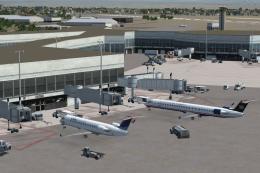
Palm Springs International Airport (KPSP) gets a sharper, more functional layout with an updated AFX BGL that expands parking, refines taxi and service vehicle routes, and adds fuel support for smoother turnarounds. Designed for the default Microsoft Flight Simulator X scenery, it also adjusts the tower viewpoint for clearer ramp and taxiway oversight.
 Rate
Rate
 United States of America
This comprehensive AFX file, created by Ray Smith, refines and expands the default Palm Springs International Airport (KPSP) environment in Microsoft Flight Simulator X. Palm Springs International is located in Southern California, a short distance from downtown Palm Springs, and is known for its open-air terminal design and scenic surroundings. This add-on delivers improvements to ground layouts, parking, and essential support elements, making the in-sim experience more authentic and streamlined.
Improved Parking Bays: The layout now features additional parking spots to handle a larger variety of virtual airliners and general aviation aircraft. This helps accommodate popular third-party traffic add-ons without congestion.
Support Vehicle Pathing: Dedicated roads for refueling trucks and other service vehicles have been rebuilt to minimize runway incursions, providing more realistic aircraft servicing positions across the apron.
Augmented Fuel Services: Multiple fuel trucks have been inserted, ensuring that both small and large aircraft receive quick turnaround times within the simulator environment.
Ray Smith generated this BGL file using ADE (Airport Design Editor) Home Edition specifically for the default FSX rendition of KPSP. Comprehensive testing was conducted alongside Ultimate Traffic and WOAI (World of AI) packages, although these are not essential for proper functionality. The design incorporates:
Important: Ensure there is only one KPSP.BGL file in the Addon Scenery/scenery folder at any time. Any duplicate versions should be removed or deleted to avoid conflicts.
This update is the work of Ray Smith. Special acknowledgment goes to Jon Masterson for his ADE utility, which made these intricate adjustments possible.
For a full 360-degree rotation while seated at the tower, map a key or controller button to the “View track/pan Toggle” function in your control bindings. Triggering this toggle releases your view from the user aircraft so that you can pivot around the airfield. Pressing the bound key again recovers your standard tower view orientation.
Enjoy the refined simulation at Palm Springs International, and feel free to explore all the new parking spaces and service improvements. Happy flying!
Free for all simmers · 11.09 KB · Scanned clean Oct 2026
Download speed: Free tier is capped at 0.5 Mbps. PRO members download at full line speed.
SimObjects\Airplanes\, Addon Scenery\, Effects\, or Gauges\.readme.txt or README file. It tells you exactly where files go, what dependencies are needed, and any quirks specific to this add-on.Use these coordinates to fly directly to this location once the mod is installed.
33.82970000,-116.50670000
Launch FSX or Prepar3D and use Flights → Load to open the downloaded .pln file. Your aircraft will be positioned at this location.
The archive fsxkpspa.zip has 5 files and directories contained within it.
This list displays the first 500 files in the package. If the package has more, you will need to download it to view them.
| Filename/Directory | File Date | File Size |
|---|---|---|
| KPSP_ADE_RS.BGL | 01.16.08 | 20.42 kB |
| ReadMe.txt | 01.18.08 | 1.64 kB |
| FSX_kpsp_ade_rs | 01.16.08 | 0 B |
| flyawaysimulation.txt | 10.29.13 | 959 B |
| Go to Fly Away Simulation.url | 01.22.16 | 52 B |
Only PRO members can place votes.
More FSX & P3D add-ons hand-picked based on this download.
FSX AFCAD Files
Palm Springs International Airport, California (CA). Version 2 contains many …
 FSX AFCAD Files
This freeware AFCAD modification revamps the default layout at Palm Springs I…
 FSX AFCAD Files
AFX File For LFBO, Toulouse/Blagnac Airport, France. Includes new parking. By…
 FSX AFCAD Files
Very realistic AFCAD file of Unalaska/Dutch Harbor Airport (PADU), Alaska (AK…
 FSX AFCAD Files
AFX File For KEDW, Edwards AFB, California (CA). Adds parking to the default …
FSX AFCAD Files
AFX File For LATI, Rinas, Tirana, Albania. An update for the default airport …
FSX AFCAD Files
AFX File For SBCT, Afonso Pena Airport, Curitiba, Parana, Brazil. By Efraim d…
FSX AFCAD Files
AFX File For FIMP, Mauritius International Airport. Upgrade for the default a…
Be the first to leave a comment on this download.
Be the first to share your thoughts on this download.