

 FS2004 Civil Jet Aircraft
Virgin Atlantic Boeing 747-200 G-VGIN
This meticulously rendered Boeing 747-200 captures the essence of Virgin Atla…
Virgin Atlantic Boeing 747-200 G-BABE “Virginia Mary” brings a classic jumbo to Microsoft Flight Simulator 2004 with a complete Project Open Sky base model and Devyn J. Silverstein’s accurate era-correct livery. Expect dynamic shine, detailed night lighting, reflective windows, wing flex, opening doors, thrust reversers, and carefully tuned flight dynamics for believable long-haul operations.
 Rate
Rate
This repaint showcases the iconic Boeing 747-200, registration G-BABE, in Virgin Atlantic’s “Virginia Mary” scheme for Microsoft Flight Simulator 2004. Developed by Project Open Sky, with the livery art crafted by Devyn J. Silverstein, this freeware release includes the entire base model and introduces a broad range of technical details and animations suited for realistic, long-haul virtual operations.
Virgin Atlantic’s distinctive visual identity appears prominently across the fuselage and tail, reflecting the airline’s signature style during the era of this wide-body aircraft. The real-world 747-200 variant was originally designed to serve medium- to long-range routes, and “Virginia Mary” (G-BABE) joined Virgin Atlantic’s fleet to connect travelers across the Atlantic. This paint includes the airline’s vibrant branding on the engines and tailfin, along with accurate titles carefully replicated by Devyn J. Silverstein. To preserve authenticity, the model showcases transparent navigation light covers, reflective cabin windows, and a dynamic shine layering that enhances the iconic shape of the 747’s hump.
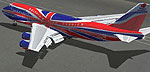
Screenshot of Virgin Atlantic Boeing 747-200 on the ground.
Primary Passenger Door: Press Shift + E to cycle the forward door
Secondary Passenger Door: Press Shift + E + 2 for the next passenger door
Cargo Bay Access: Use the “Arrest Hook” command to open
Additional Cargo or Combi Door: Utilize “Folding Wing” functionality
This fully integrated Boeing 747-200 package provides Microsoft Flight Simulator 2004 users with a comprehensive look at one of Virgin Atlantic’s notable early-era jumbo jets. Whether simulating transatlantic flights or shorter hops, the blend of custom animations, performance-tuned flight dynamics, and visual refinements delivers a thorough representation of this classic aircraft. Brought to you by the Project Open Sky team and painted by Devyn J. Silverstein, this add-on offers a faithful tribute to the majestic “Virginia Mary.”
Free for all simmers · 5.7 MB · Scanned clean Oct 2026
Download speed: Free tier is capped at 0.5 Mbps (this file takes approximately 2 mins at the cap). PRO members download at full line speed.
FS9\Aircraft\, FS9\Addon Scenery\, FS9\Gauges\, or FS9\Effects\.readme.txt or README file. It tells you exactly where files go, what dependencies are needed, and any quirks specific to this add-on.The archive po74vavm.zip has 39 files and directories contained within it.
This list displays the first 500 files in the package. If the package has more, you will need to download it to view them.
| Filename/Directory | File Date | File Size |
|---|---|---|
| 747-200RR.air | 03.05.04 | 10.24 kB |
| Aircraft.cfg | 06.04.04 | 13.59 kB |
| model | 06.04.04 | 0 B |
| Model.cfg | 03.03.04 | 37 B |
| POSKY742PRB211A12SB1.mdl | 03.14.04 | 1.80 MB |
| panel | 06.04.04 | 0 B |
| panel.cfg | 08.01.03 | 32 B |
| readme.txt | 06.04.04 | 3.03 kB |
| sound | 06.04.04 | 0 B |
| Sound.cfg | 08.26.99 | 32 B |
| texture.othervirgin | 06.04.04 | 0 B |
| posky_tire1.bmp | 03.03.04 | 64.07 kB |
| posky_tire2.bmp | 03.03.04 | 64.07 kB |
| posky_tire3.bmp | 03.03.04 | 64.07 kB |
| posky742_bodyl_l.bmp | 03.21.04 | 4.00 MB |
| posky742_bodyl_t.bmp | 05.22.04 | 5.33 MB |
| posky742_bodyr_l.bmp | 03.21.04 | 4.00 MB |
| posky742_bodyr_t.bmp | 05.23.04 | 5.33 MB |
| posky742_doors_l.bmp | 10.14.02 | 1.00 MB |
| posky742_doors_t.bmp | 05.31.04 | 5.33 MB |
| posky742_eng_RR21_t.bmp | 05.23.04 | 5.33 MB |
| posky742_gear_l.bmp | 10.14.02 | 64.07 kB |
| posky742_gear_t.bmp | 08.13.02 | 128.08 kB |
| posky742_misc_t.bmp | 03.21.04 | 4.00 MB |
| posky742_pax_interior_t.bmp | 03.20.04 | 1.00 MB |
| posky742_vertical_l.bmp | 10.14.02 | 256.07 kB |
| posky742_vertical_t.bmp | 05.23.04 | 1.33 MB |
| posky742_window_L.bmp | 09.20.02 | 85.40 kB |
| posky742_window_t.bmp | 09.09.02 | 170.75 kB |
| posky742_wingbottom_l.bmp | 10.14.02 | 64.06 kB |
| posky742_wingbottom_t.bmp | 03.21.04 | 4.00 MB |
| posky742_wingtop_l.bmp | 10.14.02 | 64.06 kB |
| posky742_wingtop_t.bmp | 03.21.04 | 4.00 MB |
| posky742fan.bmp | 12.12.03 | 256.07 kB |
| posky742fanfast.bmp | 12.12.03 | 256.07 kB |
| posky747cabina1.bmp | 12.30.03 | 682.75 kB |
| Thumbs.db | 05.31.04 | 113.00 kB |
| flyawaysimulation.txt | 10.29.13 | 959 B |
| Go to Fly Away Simulation.url | 01.22.16 | 52 B |
Only PRO members can place votes.
More FS2004 add-ons hand-picked based on this download.
FS2004 Civil Jet Aircraft
This meticulously rendered Boeing 747-200 captures the essence of Virgin Atla…
 FS2004 Civil Jet Aircraft
GE Engines. Virgin Atlantic "Jersey Girl". Original by Project Opensky.
 FS2004 Civil Jet Aircraft
Enjoy a detailed rendition of the Boeing 747-400 in the striking Silver Dream…
 FS2004 Civil Jet Aircraft
The freeware FS2004 Virgin Atlantic Airbus A340-300 package, created by Proje…
 FS2004 Civil Jet Aircraft
This freeware release brings a meticulously adapted Virgin Atlantic Airbus A3…
 FS2004 Civil Jet Aircraft
This freeware release features a meticulously created Airbus A340-313E model …
 FS2004 Civil Jet Aircraft
The new addition to the SGA fleet, the Airbus A300B4-200 is loaded with featu…
 FS2004 Civil Jet Aircraft
Complete avionics and high textures virtual cockpit. Animated: Airbus wonderf…
Read what other simmers think, or add your own.
