

 FS2004 Civil Jet Aircraft
LAM - Mozambique Airlines L-1011-500
Mozambique Airlines Lockheed L-1011-500 Africa with upgraded instruments. Tex…
South Africa Airlines’ 1970s-era Lockheed L-1011-500 livery brings period-correct colors, titles, and tail markings to the TriStar for Microsoft Flight Simulator 2004, recreating the airline’s classic wide-body presence on medium and long-haul routes. The repaint emphasizes authentic vintage branding and requires Mike Stone’s original L-1011 base model.
 Rate
Rate

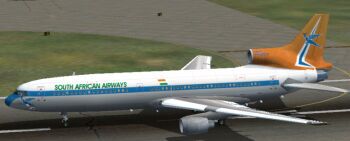
This freeware repaint showcases a classic South Africa Airlines L-1011-500 from the 1970s and is compatible with Microsoft Flight Simulator 2004. It is designed by Mario Coelho and requires the original TriStar model created by Mike Stone. You will find the base package available in the Fly Away Simulation mod library. These textures accurately capture the vivid style of that era, with emphasis on the airline’s distinctive design.
The Lockheed L-1011 TriStar series introduced several advanced aviation elements, such as a sophisticated autopilot system capable of handling precise descents. The -500 variant, in particular, provided improved range and tailplane modifications to enhance overall performance. With this livery, you can experience the visual authenticity of the South Africa Airlines branding, reflecting how these wide-body jets served medium and long-haul routes during a critical expansion period in the airline’s history.
During the 1970s, South Africa Airlines—often abbreviated as SAA—was seeking to modernize its fleet while retaining recognizable branding that passengers could easily identify. These repaint textures reflect the warm color tones and lettering that typified the airline’s design language of the time. When loaded into the simulator, this TriStar repaint helps recreate both the look and atmosphere of long-distance travel decades ago.
Screenshot of South Africa Airlines L-1011-500 on runway.
Once these steps are complete, you will be able to enjoy the authentic 1970s-inspired paint scheme.
This project is the work of Mario Coelho, who meticulously crafted the textures to represent the historical airline livery. The flight dynamics and base model remain courtesy of Mike Stone. The combination of their efforts provides a distinctive South African aviation experience for enthusiasts who want to relive an iconic era of commercial travel.
Free for all simmers · 1.26 MB · Scanned clean Oct 2026
Download speed: Free tier is capped at 0.5 Mbps. PRO members download at full line speed.
This file is a repaint — the package below is the base model it paints onto. Install it first, or the textures will have nothing to load onto.
FS9\Aircraft\, FS9\Addon Scenery\, FS9\Gauges\, or FS9\Effects\.readme.txt or README file. It tells you exactly where files go, what dependencies are needed, and any quirks specific to this add-on.The archive saa-l105.zip has 45 files and directories contained within it.
This list displays the first 500 files in the package. If the package has more, you will need to download it to view them.
| Filename/Directory | File Date | File Size |
|---|---|---|
| file_id.diz.txt | 07.31.04 | 159 B |
| INSTALL.txt | 07.31.04 | 238 B |
| saa.jpg | 07.31.04 | 9.08 kB |
| aircraft.cfg | 07.31.04 | 13.30 kB |
| ceng_l.bmp | 10.20.02 | 17.05 kB |
| ceng_t.bmp | 07.16.04 | 64.07 kB |
| cowl_l.BMP | 10.20.02 | 65.05 kB |
| cowl_t.bmp | 07.23.04 | 256.07 kB |
| elev_l.bmp | 10.20.02 | 65.05 kB |
| elev_t.bmp | 08.11.02 | 21.40 kB |
| eng_l.bmp | 10.20.02 | 17.05 kB |
| eng_t.bmp | 07.23.04 | 64.07 kB |
| flaps_l.bmp | 10.20.02 | 257.05 kB |
| flaps_t.bmp | 10.15.02 | 85.43 kB |
| fuslg_l.bmp | 10.20.02 | 1.00 MB |
| fuslg_T.bmp | 07.25.04 | 4.00 MB |
| lwing_bottom_l.bmp | 10.20.02 | 257.05 kB |
| lwing_bottom_T.bmp | 07.23.04 | 1.00 MB |
| lwing_top_l.bmp | 10.20.02 | 257.05 kB |
| lwing_top_T.bmp | 07.23.04 | 1.00 MB |
| ndoor_l.bmp | 10.20.02 | 17.05 kB |
| ndoor_T.bmp | 07.23.04 | 64.07 kB |
| pods_l.bmp | 10.20.02 | 17.05 kB |
| pods_t.bmp | 07.16.04 | 64.07 kB |
| pylon_l.bmp | 10.20.02 | 65.05 kB |
| pylon_T.bmp | 07.23.04 | 256.07 kB |
| root_l.bmp | 10.20.02 | 257.05 kB |
| root_T.bmp | 07.23.04 | 1.00 MB |
| rwing_bottom_l.bmp | 10.20.02 | 257.05 kB |
| rwing_bottom_T.bmp | 07.23.04 | 1.00 MB |
| rwing_top_l.bmp | 10.20.02 | 257.05 kB |
| rwing_top_T.bmp | 07.23.04 | 1.00 MB |
| sroot_l.bmp | 10.20.02 | 17.05 kB |
| sroot_t.bmp | 07.23.04 | 64.07 kB |
| stab_l.bmp | 10.20.02 | 257.05 kB |
| stab_T.bmp | 07.23.04 | 1.00 MB |
| tail_l.bmp | 10.21.02 | 257.05 kB |
| tail_T.bmp | 07.25.04 | 1.00 MB |
| Thumbs.db | 07.25.04 | 104.50 kB |
| wheel_l.bmp | 10.20.02 | 5.05 kB |
| wheel_t.bmp | 07.16.04 | 2.74 kB |
| texture.saa | 07.31.04 | 0 B |
| 70-S.jpg | 07.31.04 | 26.69 kB |
| flyawaysimulation.txt | 10.29.13 | 959 B |
| Go to Fly Away Simulation.url | 01.22.16 | 52 B |
Only PRO members can place votes.
More FS2004 add-ons hand-picked based on this download.
FS2004 Civil Jet Aircraft
Mozambique Airlines Lockheed L-1011-500 Africa with upgraded instruments. Tex…
 FS2004 Civil Jet Aircraft
This repaint showcases an authentic 1970s Tanzania Airlines livery, meticulou…
 FS2004 Civil Jet Aircraft
Full package with new flight dynamics, metallic colors, panel and full interi…
 FS2004 Civil Jet Aircraft
This add-on provides a carefully crafted Eastern Airlines livery for the Lock…
 FS2004 Civil Jet Aircraft
This package offers a precise rendition of the Lockheed L-1011 TriStar in a c…
 FS2004 Civil Jet Aircraft
The fleet of Singapore Airlines that operates flights to more than 60 world d…
 FS2004 Civil Jet Aircraft
A repaint of Singapore Airlines Airbus A340-500 "Leadership" based on the FSP…
 FS2004 Civil Jet Aircraft
This package features a compact yet robust Boeing 737-500 in United Airlines …
Be the first to leave a comment on this download.
Be the first to share your thoughts on this download.