

 FS2004 Civil Jet Aircraft
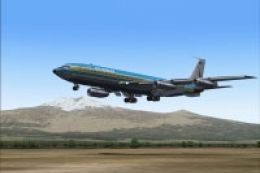
Air Tanzania Boeing 707 N762TW
"Ngorongoro Crater". The aircraft is derelict at Dar es Salaam since June 198…
Tanzania Airlines’ 1970s livery brings the Lockheed L-1011-500 TriStar to life with carefully aligned rivet detail, windows, and tail branding that suit the classic wide-body silhouette. Built for Microsoft Flight Simulator 2004, the repaint includes textures and configuration updates and requires Mike Stone’s freeware base model (MOZ-L105.ZIP).
 Rate
Rate

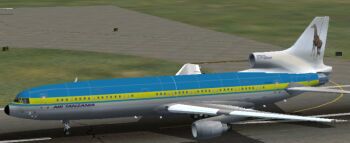
This repaint showcases an authentic 1970s Tanzania Airlines livery, meticulously crafted by Mario Coelho, for the wide-body Lockheed L-1011-500 TriStar. The original model was created by Mike Stone, and this package, designed for Microsoft Flight Simulator 2004, includes only the textures and configuration edits needed to introduce this historical airline scheme into your hangar. You will require the freeware base model (MOZ-L105.ZIP) from the Fly Away Simulation library to ensure compatibility.
The Lockheed L-1011, also referred to as the TriStar, was developed to rival other early wide-body airliners. It features advanced (at its time) turbofan powerplants and a tri-engine configuration that delivered enhanced reliability. Tanzania Airlines once operated versions of this aircraft, and this repaint captures the distinctive retro palette and fuselage markings commonly found during the airline’s early years. Expect attention to rivet alignment, window placement, and tail branding in these textures.
View of the Tanzania Airlines Lockheed L-1011-500 on the tarmac, highlighting fuselage striping and logo placement.
Once you have downloaded and installed Mike Stone’s TriStar base package, the following steps will integrate the Tanzania Airlines textures by Mario Coelho:
FS2004\aircraft\L-1011_Africa” directory.Once installed, you can load Microsoft Flight Simulator 2004 and select the Lockheed L-1011-500 aircraft with the Tanzania Airlines livery. In doing so, you will have access to a classic jetliner known for its unique three-engine layout and transcontinental capabilities.
This meticulously rendered texture set aims to enrich your virtual environment with a snapshot of Tanzania Airlines’ Lockheed TriStar heritage. Operators seeking an accurate representation of that period’s aviation style can now experience flight dynamics blended with visually faithful paintwork.
Free for all simmers · 1.18 MB · Scanned clean Oct 2026
Download speed: Free tier is capped at 0.5 Mbps. PRO members download at full line speed.
This file is a repaint — the package below is the base model it paints onto. Install it first, or the textures will have nothing to load onto.
FS9\Aircraft\, FS9\Addon Scenery\, FS9\Gauges\, or FS9\Effects\.readme.txt or README file. It tells you exactly where files go, what dependencies are needed, and any quirks specific to this add-on.The archive taz-l105.zip has 44 files and directories contained within it.
This list displays the first 500 files in the package. If the package has more, you will need to download it to view them.
| Filename/Directory | File Date | File Size |
|---|---|---|
| file_id.diz.txt | 07.31.04 | 155 B |
| INSTALL.txt | 07.31.04 | 238 B |
| Tanz.jpg | 07.25.04 | 8.72 kB |
| aircraft.cfg | 07.31.04 | 13.30 kB |
| ceng_l.bmp | 10.20.02 | 17.05 kB |
| ceng_t.bmp | 07.16.04 | 64.07 kB |
| cowl_l.BMP | 10.20.02 | 65.05 kB |
| cowl_t.bmp | 07.23.04 | 256.07 kB |
| elev_l.bmp | 10.20.02 | 65.05 kB |
| elev_t.bmp | 08.11.02 | 21.40 kB |
| eng_l.bmp | 10.20.02 | 17.05 kB |
| eng_t.bmp | 07.23.04 | 64.07 kB |
| flaps_l.bmp | 10.20.02 | 257.05 kB |
| flaps_t.bmp | 10.15.02 | 85.43 kB |
| fuslg_l.bmp | 10.20.02 | 1.00 MB |
| fuslg_T.bmp | 07.25.04 | 4.00 MB |
| lwing_bottom_l.bmp | 10.20.02 | 257.05 kB |
| lwing_bottom_T.bmp | 07.23.04 | 1.00 MB |
| lwing_top_l.bmp | 10.20.02 | 257.05 kB |
| lwing_top_T.bmp | 07.23.04 | 1.00 MB |
| ndoor_l.bmp | 10.20.02 | 17.05 kB |
| ndoor_T.bmp | 07.23.04 | 64.07 kB |
| pods_l.bmp | 10.20.02 | 17.05 kB |
| pods_t.bmp | 07.16.04 | 64.07 kB |
| pylon_l.bmp | 10.20.02 | 65.05 kB |
| pylon_T.bmp | 07.23.04 | 256.07 kB |
| root_l.bmp | 10.20.02 | 257.05 kB |
| root_T.bmp | 07.23.04 | 1.00 MB |
| rwing_bottom_l.bmp | 10.20.02 | 257.05 kB |
| rwing_bottom_T.bmp | 07.23.04 | 1.00 MB |
| rwing_top_l.bmp | 10.20.02 | 257.05 kB |
| rwing_top_T.bmp | 07.23.04 | 1.00 MB |
| sroot_l.bmp | 10.20.02 | 17.05 kB |
| sroot_t.bmp | 07.23.04 | 64.07 kB |
| stab_l.bmp | 10.20.02 | 257.05 kB |
| stab_T.bmp | 07.23.04 | 1.00 MB |
| tail_l.bmp | 10.21.02 | 257.05 kB |
| tail_T.bmp | 07.25.04 | 1.00 MB |
| wheel_l.bmp | 10.20.02 | 5.05 kB |
| wheel_t.bmp | 07.16.04 | 2.74 kB |
| texture.taz | 07.31.04 | 0 B |
| 70-S.jpg | 07.31.04 | 26.69 kB |
| flyawaysimulation.txt | 10.29.13 | 959 B |
| Go to Fly Away Simulation.url | 01.22.16 | 52 B |
Only PRO members can place votes.
More FS2004 add-ons hand-picked based on this download.
FS2004 Civil Jet Aircraft
"Ngorongoro Crater". The aircraft is derelict at Dar es Salaam since June 198…
 FS2004 Civil Jet Aircraft
This freeware repaint showcases a classic South Africa Airlines L-1011-500 fr…
 FS2004 Civil Jet Aircraft
Mozambique Airlines Lockheed L-1011-500 Africa with upgraded instruments. Tex…
 FS2004 Civil Jet Aircraft
This add-on provides a carefully crafted Eastern Airlines livery for the Lock…
 FS2004 Civil Jet Aircraft
This package offers a precise rendition of the Lockheed L-1011 TriStar in a c…
 FS2004 Civil Jet Aircraft
Designed to cut into the 747 market share, the Lockheed L-1011 did so in the …
 FS2004 Civil Jet Aircraft
This file just contains the model file, texture file for the Arrow cargo vers…
 FS2004 Civil Jet Aircraft
Model by Rey Lopez, FD by Gunter Kirschstein, panel by Marco Spada, sound by …
Be the first to leave a comment on this download.
Be the first to share your thoughts on this download.