

 FS2004 Civil Jet Aircraft
Ryanair Boeing 737-200 EI-CJD
Bring new life to your Microsoft Flight Simulator 2004 hangar with this Ryana…
Ryanair’s Boeing 737-200 EI-CNT “Vodafone” promotional livery brings crisp sponsor logos, accurate color matching, and sharp exterior detailing to Microsoft Flight Simulator 2004, preserving the classic -200’s character. The repaint fits the Kittyhawk Studios 737-200 geometry with aligned markings and rivet lines, and requires the Kittyhawk 737-200 base model.
 Rate
Rate
This striking repaint features the "Vodafone" branding carried by Ryanair's Boeing 737-200, registration EI-CNT, bringing a distinct visual touch to Microsoft Flight Simulator 2004. It delivers high-resolution external logos with crisp detailing, coupled with carefully matched colors that capture the unique promotional scheme originally applied by the airline. These textures were crafted by Rick Bores, while the base model, designed by Erick Cantu and Kittyhawk Studios, remains essential for operation. The following sections explore the core highlights, technical details, and the historical background of this Boeing 737-200 variant.
The Boeing 737-200 series stands out as part of the original 737 family, often referred to as the Classic generation. Its shorter fuselage and older JT8D engines differ significantly from modern 737 variants that rely on more efficient turbofans. By incorporating this model into your simulator setup, you can experience the vintage cockpit instrumentation and distinctive flight characteristics that shaped airline operations for many years. In contrast to newer Ryanair aircraft, which largely involve 737-800 models, this repaint takes you back to an era where the -200 was still actively serving regional routes across Europe.
Ryanair, known for its budget-friendly approach, occasionally unveiled promotional liveries for marketing campaigns. The "Vodafone" scheme applied to EI-CNT stands out due to its prominent red branding and sponsor decals. This repaint captures the sponsor graphics accurately, bringing recognizable brand elements together with Ryanair’s own style. The balanced color contrasts ensure that you see a polished finish from nose to tail in the virtual hangar.
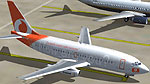
Screenshot of Ryanair Boeing 737-200 on the ground.
These texture files integrate seamlessly with the existing Kittyhawk 737-200 model. Be aware that the core model is not included within this package, so it is necessary to download the freeware base model from the Fly Away Simulation library. Once that is available, simply merge the repaint files into the appropriate folder, adjusting the aircraft configuration file (aircraft.cfg) to reference the new textures. The advanced texturing ensures minimal performance impact while preserving full exterior detail, making it a practical addition for users of varied hardware setups.
The entire repaint was developed by Rick Bores, utilizing the base model from Kittyhawk Studios, originally devised by Erick Cantu. Keep in mind that these files only include the livery and supporting textures. You will need the Kittyhawk 737-200 freeware model to enjoy the fully functional aircraft within Microsoft Flight Simulator 2004.
Free for all simmers · 1.44 MB · Scanned clean Oct 2026
Download speed: Free tier is capped at 0.5 Mbps. PRO members download at full line speed.
FS9\Aircraft\, FS9\Addon Scenery\, FS9\Gauges\, or FS9\Effects\.readme.txt or README file. It tells you exactly where files go, what dependencies are needed, and any quirks specific to this add-on.The archive kh732rnv.zip has 17 files and directories contained within it.
This list displays the first 500 files in the package. If the package has more, you will need to download it to view them.
| Filename/Directory | File Date | File Size |
|---|---|---|
| README.txt | 08.12.04 | 317 B |
| texture.rnvd | 08.12.04 | 0 B |
| 732_B_T.BMP | 02.21.04 | 256.07 kB |
| 737INTERIOR_T.BMP | 12.31.03 | 1.00 MB |
| B732FUSE_L.BMP | 03.11.03 | 1.33 MB |
| B732FUSE_T.BMP | 05.17.04 | 4.00 MB |
| B737TAIL_L.BMP | 03.11.03 | 341.40 kB |
| B737TAIL_T.bmp | 05.17.04 | 1.00 MB |
| ENGINES_L.bmp | 12.24.02 | 5.05 kB |
| ENGINES_T.bmp | 05.17.04 | 1.00 MB |
| MISC_L.BMP | 12.24.02 | 5.05 kB |
| MISC_T.BMP | 03.15.03 | 341.40 kB |
| WINGS_L.BMP | 02.23.04 | 256.07 kB |
| WINGS_T.BMP | 02.23.04 | 1.00 MB |
| KH732RNVD | 08.12.04 | 0 B |
| flyawaysimulation.txt | 10.29.13 | 959 B |
| Go to Fly Away Simulation.url | 01.22.16 | 52 B |
Only PRO members can place votes.
More FS2004 add-ons hand-picked based on this download.
FS2004 Civil Jet Aircraft
Bring new life to your Microsoft Flight Simulator 2004 hangar with this Ryana…
 FS2004 Civil Jet Aircraft
This complete freeware package for Microsoft Flight Simulator 2004 features a…
 FS2004 Civil Jet Aircraft
Ryanair Boeing 737-800, registration EI-DCM, in "shark tail" livery. Model by…
 FS2004 Civil Jet Aircraft
Boeing 737-800 with winglets, registration EI-INN. Textures only Includes spl…
 FS2004 Civil Jet Aircraft
A repaint of the default 737 in the Ryanair Jaguar livery. Textures only. Jus…
 FS2004 Civil Jet Aircraft
'Pride of Scotland'. A repaint of the FFX Boeing 737-800 in the new colors of…
 FS2004 Civil Jet Aircraft
"Hertz" livery. Textures only for the Kittyhawk B737-200. Repainted by Rick B…
 FS2004 Civil Jet Aircraft
Experience the classic lines of a Boeing 737-200 dressed in a distinctive "Ja…
Be the first to leave a comment on this download.
Be the first to share your thoughts on this download.