

 FSX Turboprops
Bell Geospace Basler BT-67 (Tailboom)
This repaint package depicts a modified Basler BT-67 configured by Bell Geosp…
Bell Geospace Aviation’s Basler BT-67 C-FTGI repaint brings crisp survey-style markings across the fuselage, engine nacelles, and wings, capturing the turboprop DC-3’s modernized working look. Built for Microsoft Flight Simulator X, it requires the Basler BT-67 base package and suits research flights, cargo hauls, or rugged regional ops.
 Rate
Rate
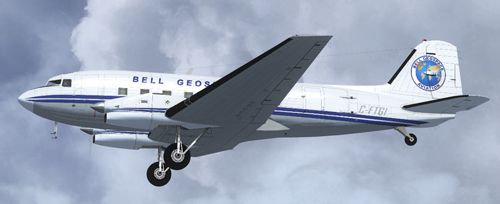
This repaint offers a detailed Bell Geospace Aviation livery for the Basler BT-67, a turboprop evolution of the classic DC-3 airframe. It is specifically designed for Microsoft Flight Simulator X (FSX) pilots seeking a distinctive research-oriented skin reflecting Bell Geospace’s real-world survey operations. Creators involved in the base model include Daniel Fuernkaess, Manfred Jahn, Alexander M. Metzger, and Hansjoerg Naegele. The repainter, known as Cheese-Strike Repaints (by Daniel Fuernkaess), ensures faithful details on fuselage markings, engine nacelles, and wing surfaces. Below, you will find important tips, references, and instructions to get this texture properly installed.
The Basler BT-67 is a significant modernization of the venerable DC-3. It integrates upgraded Pratt & Whitney turboprop engines, revised aerodynamics, and structural enhancements. These refinements deliver improved performance at higher altitudes and in challenging weather. Bell Geospace Aviation employs such aircraft for specialized aerial survey missions, thanks to the strong payload capacity and excellent slow-speed stability of this rugged airframe. This texture set highlights C-FTGI in its distinctive operational liveries, including unique exterior lines that convey its survey function and field-ready capabilities.
Shown above is the Basler BT-67 C-FTGI operating under Bell Geospace Aviation markings.
texture.C-FTGI folder into your simulator’s “Basler_BT67” directory. Typically, the path is Flight Simulator X\SimObjects\Airplanes\Basler_BT67.aircraft.cfg file in a text editor (e.g., Notepad). Copy the block of code below and paste it underneath the existing [fltsim] sections. Replace “x” with the correct sequential number, ensuring no conflicting entries.[fltsim.x] title=Basler BT67 Bell Geospace Aviation sim=Basler_BT67_v1.7 model=bt67_1 panel= sound= texture=C-FTGI kb_checklists=Douglas_DC3_check kb_reference=Douglas_DC3_ref atc_id=C-FTGI ui_manufacturer="Basler" ui_type="Turbo DC-3" ui_variation="Bell Geospace Aviation" ui_typerole="Twin Engine Prop" ui_createdby= description="Bell Geospace Aviation Paint by Daniel Fuernkaess (Cheese-Strike Repaints). Project BT-67 developers: Daniel Fuernkaess, Manfred Jahn, Alexander M. Metzger, Hansjoerg Naegele."
This livery is distributed under a freeware license and is intended for non-commercial purposes only. To enjoy C-FTGI’s custom visuals accurately, confirm that the included textures match your BT-67’s folder structure. With this enhancement, virtual pilots can explore survey operations, cargo transport, or regional hops in an aircraft that showcases both heritage and cutting-edge modifications.
Free for all simmers · 2.3 MB · Scanned clean Oct 2026
Download speed: Free tier is capped at 0.5 Mbps. PRO members download at full line speed.
This file is a repaint — the package below is the base model it paints onto. Install it first, or the textures will have nothing to load onto.
texture.{airline}) inside FSX\SimObjects\Airplanes\{base-aircraft}\.aircraft.cfg in Notepad. Add a new [fltsim.X] section per the readme.readme.txt or README file. It tells you exactly where files go, what dependencies are needed, and any quirks specific to this add-on.The archive bt-67_bgs_c-ftgi.zip has 16 files and directories contained within it.
This list displays the first 500 files in the package. If the package has more, you will need to download it to view them.
| Filename/Directory | File Date | File Size |
|---|---|---|
| BT-67_BGS_C-FTGI | 08.21.12 | 0 B |
| Cheese-Strike Repaints.url | 12.06.11 | 123 B |
| Install.txt | 08.21.12 | 2.25 kB |
| texture.C-FTGI | 08.21.12 | 0 B |
| bt67_1_T.dds | 08.21.12 | 4.00 MB |
| bt67_1_T_spec.dds | 06.28.12 | 1.00 MB |
| bt67_2_T.dds | 08.21.12 | 4.00 MB |
| bt67_2_T_spec.dds | 06.28.12 | 1.00 MB |
| bt67_4_T.dds | 08.21.12 | 1.00 MB |
| bt67_4_T_spec.dds | 06.27.11 | 1.00 MB |
| propdisk.dds | 04.13.12 | 256.12 kB |
| texture.cfg | 02.14.11 | 133 B |
| thumbnail.jpg | 08.21.12 | 80.18 kB |
| VC_nose.dds | 07.10.12 | 256.12 kB |
| flyawaysimulation.txt | 10.29.13 | 959 B |
| Go to Fly Away Simulation.url | 01.22.16 | 52 B |
Only PRO members can place votes.
More FSX & P3D add-ons hand-picked based on this download.
FSX Turboprops
This repaint package depicts a modified Basler BT-67 configured by Bell Geosp…
 FSX Turboprops
The BT67 is a turboprop conversion of the classic Douglas DC-3/C-47. Version …
 FSX Turboprops
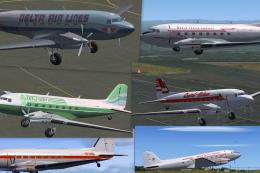
This Repaint Pack is for the FSX Basler BT-67. By Michael Mannschreck. Screen…
 FSX Turboprops
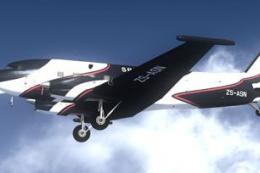
The "Spectrem" Basler BT-67 is a single specially modified aircraft used worl…
 FSX Turboprops
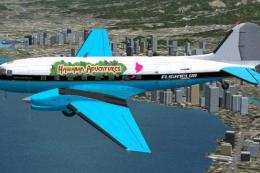
FlightClub International textures for the Basler BT67 by Daniel Fuernkaess, M…
 FSX Turboprops
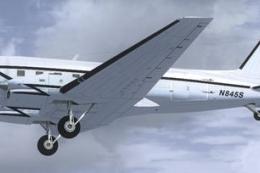
Experience a vibrant repaint crafted for the Basler BT-67 in Microsoft Flight…
 FSX Turboprops
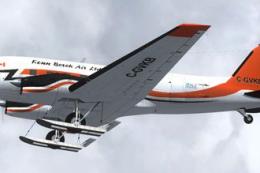
This freeware repaint package highlights a custom Kenn Borek Air livery desig…
 FSX Turboprops
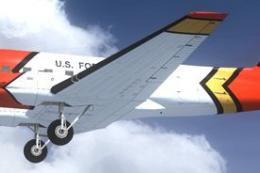
This repaint package introduces the United States Forest Service (USFS) liver…
Be the first to leave a comment on this download.
Be the first to share your thoughts on this download.