

 FS2004 Civil Jet Aircraft
EAL Douglas DC-9-30 Bare Metal V2.1
This freeware repaint package offers a meticulously crafted bare metal textur…
Eastern Air Lines’ Douglas DC-9-30 gets a crisp white-fuselage livery with era-correct markings, tuned for convincing daytime sheen and realistic night lighting on the AI Aardvark model. Built for Microsoft Flight Simulator 2004, it requires the AIA DC-9-30 base package and adds authentic ramp and traffic presence.
 Rate
Rate
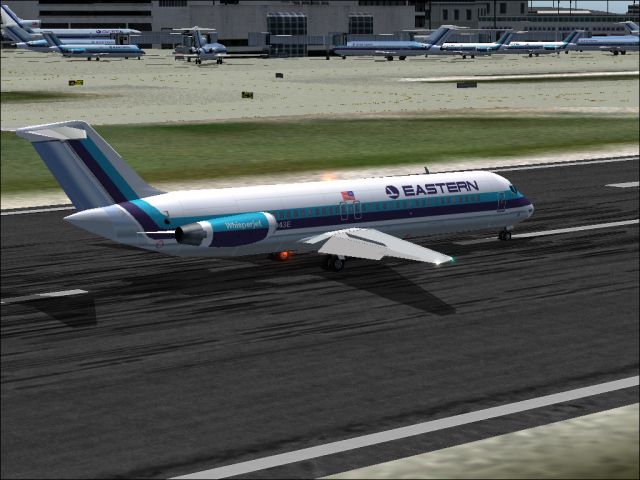
This repaint rendition offers a clean white-fuselage variant of the Eastern Air Lines Douglas DC-9-30, preserving era-specific details that reflect the airline's signature aesthetic while updating it with a modified scheme. Created by Sheppard Avery, this package provides day and night texture enhancements for the AI Aardvark DC-9-30 model. It is intended exclusively for Microsoft Flight Simulator 2004 and does not include the original base files, which remain mandatory for proper functionality.
DC-9 design overview: The McDonnell Douglas DC-9 series was introduced for short to medium routes, featuring rear-mounted engines (the Pratt & Whitney JT8D series), a distinctive tail-mounted air intake, and a T-tail empennage. Its compact dimensions allowed airlines to serve secondary airports and terminals with constrained gates, which significantly expanded domestic route possibilities.
Key textures included: The repaint captures both daytime clarity and nighttime illumination levels, ensuring the fuselage exhibits accurate reflectivity under various lighting conditions. The central focus is the updated white primary fuselage, complemented by Eastern’s revised tail markings.
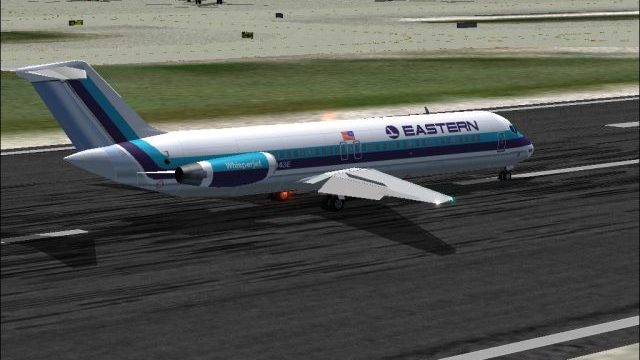
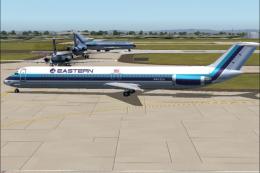
Above: This Douglas DC-9-30 wearing EAL’s white-based scheme sits on a runway, illustrating the clarity of the updated fuselage paintwork.
Eastern Air Lines was historically headquartered in Miami and became known for its extensive network across major eastern hubs like Atlanta, New York, and Miami. At its peak, the carrier offered comprehensive coverage further south into regions such as the Caribbean and South America. The airline ceased operations in the early 1990s; however, its iconic branding continues to resonate among aviation enthusiasts and virtual pilots.
During its operational zenith in the early 1980s, the airline reportedly moved more passengers worldwide than any other competitor. The DC-9 fleet played a significant role in this growth by covering short-haul routes with impressive turn-around capabilities and efficient fuel consumption for that era.
Follow these steps to integrate the texture set effectively:
texture folder components directly into the corresponding AI Aardvark DC-9-30 folder, matching file structure precisely.aircraft.CFG file by adding the repaint entry under the correct [fltsim.X] section. Ensure the title, texture, and model references are correct.aircraft.CFG, as it accentuates the white fuselage finish.This repaint set focuses on preserving authenticity while bringing a brighter fuselage to the DC-9-30’s exterior. Cabin window placements, engine inlets, and tail-fin branding have been detailed to reflect Eastern’s visual identity during its latter service days. Sheppard Avery’s work also ensures that nocturnal flight operations showcase properly illuminated sections around the doors and the fuselage perimeter.
Although designed with AI traffic usage in mind, these textures may also enhance static ramp presence, especially when populating real-time East Coast airports that historically formed Eastern’s route infrastructure. By combining historical livery details with modern simulator fidelity, this repaint contributes to an immersive retro-fleet environment.
Free for all simmers · 833.37 KB · Scanned clean Oct 2026
Download speed: Free tier is capped at 0.5 Mbps. PRO members download at full line speed.
This file is a repaint — the package below is the base model it paints onto. Install it first, or the textures will have nothing to load onto.
FS9\Aircraft\, FS9\Addon Scenery\, FS9\Gauges\, or FS9\Effects\.readme.txt or README file. It tells you exactly where files go, what dependencies are needed, and any quirks specific to this add-on.The archive ea9swtv2.zip has 7 files and directories contained within it.
This list displays the first 500 files in the package. If the package has more, you will need to download it to view them.
| Filename/Directory | File Date | File Size |
|---|---|---|
| aia_dc_9_30_l.bmp | 08.07.04 | 341.43 kB |
| aia_dc_9_30_t.bmp | 09.25.04 | 5.33 MB |
| eastern.gif | 01.25.04 | 1.87 kB |
| EASTERN.jpg | 09.25.04 | 225.17 kB |
| READ ME.txt | 09.24.04 | 1.64 kB |
| flyawaysimulation.txt | 10.29.13 | 959 B |
| Go to Fly Away Simulation.url | 01.22.16 | 52 B |
Only PRO members can place votes.
More FS2004 add-ons hand-picked based on this download.
FS2004 Civil Jet Aircraft
This freeware repaint package offers a meticulously crafted bare metal textur…
 FS2004 Civil Jet Aircraft
This repaint package features a distinctive white fuselage scheme for the AI …
 FS2004 Civil Jet Aircraft
This repaint package provides a refined bare metal fuselage scheme for an AI …
 FS2004 Civil Jet Aircraft
This freeware release brings fresh updates to a classic tri-engine wide-body …
 FS2004 Civil Jet Aircraft
This freeware BAC 1-11 500 package for Microsoft Flight Simulator 2004 brings…
 FS2004 Civil Jet Aircraft
This package offers a detailed Boeing 727-100 repaint that showcases Eastern …
 FS2004 Civil Jet Aircraft
This freeware package features a meticulously recreated Eastern Airlines Boei…
 FS2004 Civil Jet Aircraft
Bring the spirit of a major American airline’s past to your flight lineup wit…
Be the first to leave a comment on this download.
Be the first to share your thoughts on this download.