

 FS2004 Civil Jet Aircraft
Series 30 Demonstrator DC-10-30
This freeware release brings fresh updates to a classic tri-engine wide-body …
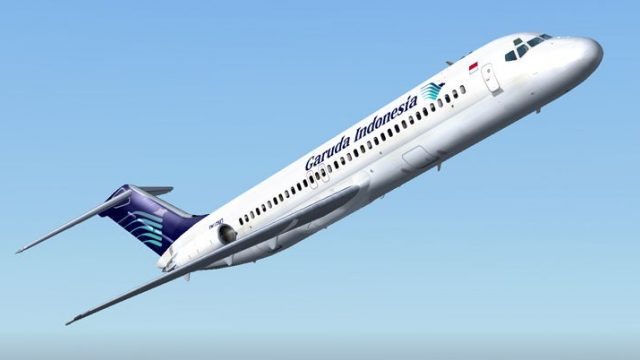
Garuda Indonesia textures bring classic short-haul DC-9-30 operations to life with a clean, period-accurate exterior repaint for the SGA model in Microsoft Flight Simulator 2004. The package focuses on the airline’s recognizable scheme and authentic presence on regional routes, and requires the freeware SGA930.zip base aircraft.
 Rate
Rate
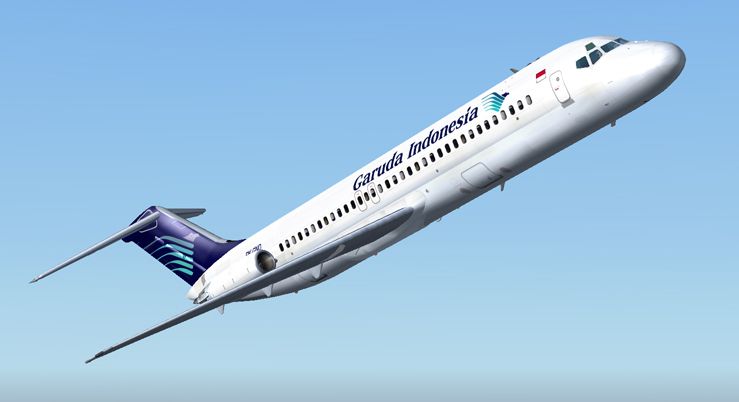
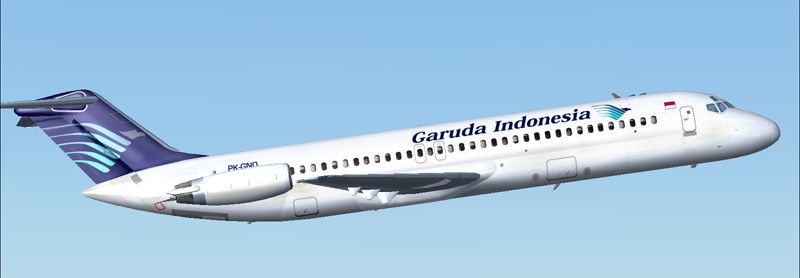
In this freeware release for Microsoft Flight Simulator 2004, you can expand your short-haul routes with Garuda-themed textures designed for the SGA DC9-30 model, ensuring an authentic reflection of this iconic Indonesian carrier’s classic operations. This repaint, created by Henry William, requires the original SGA930.zip package accessible in the Fly Away Simulation file library. Once you add these textures, you will have the opportunity to recreate a piece of Garuda’s aviation history within your simulator.
Garuda Indonesia, the national airline of Indonesia, operated the Douglas DC-9 to serve domestic routes efficiently and maintain a stable flight schedule across the archipelago. The DC-9 itself, introduced by Douglas in the mid-1960s, was specifically engineered for short to medium-distance flights, making it a fitting choice for Indonesia’s diverse geography. This repaint illustrates the recognizable Garuda livery, adding more immersion to your virtual journeys.
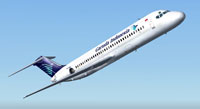
Screenshot of Garuda Douglas DC-9-30 in flight.
This package offers exclusively the Garuda exterior repaint. To complete the aircraft installation, you must have the freeware SGA DC9-30 base files (under SGA930.zip) already set up in your simulator. The complimentary texture folder enhances the model authored by Erick Cantu, complemented by flight dynamics by Fraser W. Turner, ensuring an accurate simulation of the DC-9’s handling and performance.
[fltsim.X] with the correct sequential number to avoid configuration overlap.
[fltsim.X]
title=SGA DC-9-30 Garuda
sim=SGA DC9_30
model=
panel=
sound=
texture=garuda
checklists=
atc_id=N940N
atc_id_color=0xffffffff
atc_airline=garuda
atc_flight_number=935
ui_manufacturer=Douglas
ui_type=DC-9-31
ui_variation=Garuda
description=Model: Erick Cantu
Flight Dynamics V9.1.0: Fraser W. Turner

visual_damage=0
atc_heavy=0
atc_id_font=Verdana,-11,1,600,0
atc_parking_codes=
atc_parking_types=
This repaint is the work of Henry William, who meticulously captured the Garuda color scheme with high attention to detail. Meanwhile, the underlying DC-9 model and flight dynamics allow sim pilots to experience the reliable handling traits that made the aircraft a favorite for efficient regional services.
Free for all simmers · 1.78 MB · Scanned clean Oct 2026
Download speed: Free tier is capped at 0.5 Mbps. PRO members download at full line speed.
This file is a repaint — the package below is the base model it paints onto. Install it first, or the textures will have nothing to load onto.
FS9\Aircraft\, FS9\Addon Scenery\, FS9\Gauges\, or FS9\Effects\.readme.txt or README file. It tells you exactly where files go, what dependencies are needed, and any quirks specific to this add-on.The archive gardc9hw.zip has 24 files and directories contained within it.
This list displays the first 500 files in the package. If the package has more, you will need to download it to view them.
| Filename/Directory | File Date | File Size |
|---|---|---|
| texture.garuda | 12.09.04 | 0 B |
| CONE_L.BMP | 08.08.03 | 5.43 kB |
| CONE_T.BMP | 08.08.03 | 5.43 kB |
| DC9_B_L.BMP | 05.19.04 | 256.07 kB |
| DC9xINTERIOR_L.BMP | 05.19.04 | 256.07 kB |
| DC9xINTERIOR_T.BMP | 01.28.04 | 1.00 MB |
| ENGINES_L.BMP | 05.19.04 | 256.07 kB |
| INTAKE_L.bmp | 08.08.03 | 5.43 kB |
| INTAKE_t.BMP | 08.10.03 | 42.78 kB |
| WING_LEFT_L.BMP | 05.19.04 | 256.07 kB |
| WING_RIGHT_L.BMP | 05.19.04 | 256.07 kB |
| WING_RIGHT_T.BMP | 09.24.03 | 1.00 MB |
| engines_t.bmp | 10.28.04 | 4.00 MB |
| 30FUSE_L.BMP | 10.28.04 | 4.00 MB |
| WING_LEFT_t.bmp | 11.03.04 | 4.00 MB |
| dc9_b_t.bmp | 11.03.04 | 4.00 MB |
| 30FUSE_T.bmp | 11.05.04 | 4.00 MB |
| readme.txt | 12.09.04 | 1.54 kB |
| aa.jpg | 12.09.04 | 88.27 kB |
| bb.jpg | 12.09.04 | 95.98 kB |
| small.gif | 12.09.04 | 3.80 kB |
| Garuda DC930 | 12.09.04 | 0 B |
| flyawaysimulation.txt | 10.29.13 | 959 B |
| Go to Fly Away Simulation.url | 01.22.16 | 52 B |
Only PRO members can place votes.
More FS2004 add-ons hand-picked based on this download.
FS2004 Civil Jet Aircraft
This freeware release brings fresh updates to a classic tri-engine wide-body …
 FS2004 Civil Jet Aircraft
Tested on FS2004 Original aircraft by FFX team. This is a repaint of the amaz…
 FS2004 Civil Jet Aircraft
Three liveries. Original by SGAir/FFX. Repaint by Rio Gunawan. Screenshot of …
 FS2004 Civil Jet Aircraft
A DC10 in Garuda Indonesia livery, painted in DXT3 textures. This is an AI ai…
 FS2004 Civil Jet Aircraft
A DC10 in Garuda Indonesia white hybrid livery, painted in DXT3 textures. Thi…
 FS2004 Civil Jet Aircraft
This complete freeware package brings the iconic tri-jet design of the Dougla…
 FS2004 Civil Jet Aircraft
Brand new model from SGA. The SGA DC9-30 with North Central and Eastern. Mode…
 FS2004 Civil Jet Aircraft
This freeware release offers flight simulation enthusiasts an enhanced Dougla…
Be the first to leave a comment on this download.
Be the first to share your thoughts on this download.