

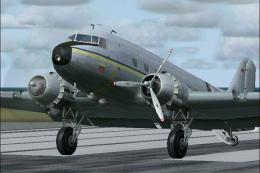
 FS2004 Propeller Aircraft
Douglas DC-3 Prop Tips Update (Red/White)
This freeware update delivers a refined layer of red and white propeller tips…
White-tipped propeller textures refresh the default Douglas DC-3 with a period-correct look favored by many real-world operators, boosting ramp visibility and vintage character. Built for Microsoft Flight Simulator 2004 repainters, the package updates Prop_DC3.bmp and adds a matching layer for Douglas_DC3_1_T.bmp to integrate cleanly with existing textures.
 Rate
Rate
This update offers a refined set of white propeller tip textures for enthusiasts who want to refresh the default Douglas DC-3 in Microsoft Flight Simulator 2004. It provides an authentic look that many real DC-3 operators prefer and includes everything needed to modify your existing texture files. Developed by Juan Ernesto Oropeza, these files are designed specifically for repainters aiming for a historically inspired aesthetic with minimal effort.
The Douglas DC-3 remains an iconic transport aircraft, recognized for its robust airframe and considerable range. In many real-world cases, its propellers often feature white-tipped edges, a detail that not only improves visibility but also lends a classic touch to this beloved airplane. This add-on package recreates that appearance in a straightforward manner.
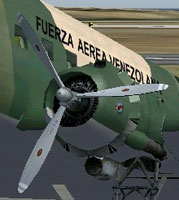
Preview showing the main propellers with newly applied white tips.
This update targets those who are familiar with repainting and modifying texture files within FS2004’s default DC-3 structure. The package includes updated Prop_DC3.bmp and the layer portion for Douglas_DC3_1_T.bmp. If you are not experienced with these files, consult someone knowledgeable before proceeding.
Douglas_DC3_1_T.bmp and Prop_DC3.bmp before making changes. This ensures you can restore them if needed.Douglas_DC3_1_T.bmp and integrate it as a new layer. Then, save your updated file.Prop_DC3.bmp in your texture folder, replacing the original after you have safely stored a backup.Many DC-3 operators around the world paint the edges of propellers white, improving both visibility and giving a refined, vintage appearance. This update captures that detail, adding historical accuracy to your simulation experience without complicating the texture editing process.
Developed by Juan Ernesto Oropeza, these texture files bring a practical and visually appealing modification to the default Douglas DC-3. The end result is a crisp, professional style for virtual pilots who appreciate subtle improvements in their aircraft repaints.
Free for all simmers · 116.5 KB · Scanned clean Oct 2026
Download speed: Free tier is capped at 0.5 Mbps. PRO members download at full line speed.
FS9\Aircraft\, FS9\Addon Scenery\, FS9\Gauges\, or FS9\Effects\.readme.txt or README file. It tells you exactly where files go, what dependencies are needed, and any quirks specific to this add-on.The archive dc3wtip.zip has 7 files and directories contained within it.
This list displays the first 500 files in the package. If the package has more, you will need to download it to view them.
| Filename/Directory | File Date | File Size |
|---|---|---|
| whitetip prop.bmp | 05.09.05 | 40.93 kB |
| Prop_DC3.bmp | 04.20.05 | 341.40 kB |
| read me wprop.txt | 05.09.05 | 869 B |
| White tips propeller.jpg | 05.09.05 | 51.06 kB |
| File_id.diz | 05.12.05 | 174 B |
| flyawaysimulation.txt | 10.29.13 | 959 B |
| Go to Fly Away Simulation.url | 01.22.16 | 52 B |
Only PRO members can place votes.
More FS2004 add-ons hand-picked based on this download.
FS2004 Propeller Aircraft
This freeware update delivers a refined layer of red and white propeller tips…
 FS2004 Propeller Aircraft
This freeware release introduces fully white propeller tips for the default D…
 FS2004 Propeller Aircraft
This is a repaint of the default DC-3 in a specially commissioned livery for …
 FS2004 Propeller Aircraft
Allows the default Douglas DC3 to be modified to allow the plane to taxi with…
 FS2004 Propeller Aircraft
Fly a Kent State University aircraft using these repaint textures of the defa…
 FS2004 Propeller Aircraft
This Repaint of the default Cessna Caravan Amphibian is presented in Navy blu…
 FS2004 Propeller Aircraft
These layered PSD files can be used in Paint Shop Pro or Photoshop to allow e…
 FS2004 Propeller Aircraft
DC-3 Airways Douglas DC-3 classic and 1940's liveries. Based on the default D…
Be the first to leave a comment on this download.
Be the first to share your thoughts on this download.