

 FS2004 Propeller Aircraft
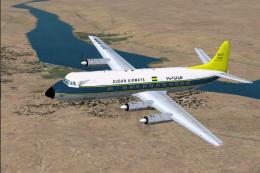
Sudan Airways Vickers Viscount
Airwork of London leased this brand new aircraft to Sudan Airways. It was del…
National Airways Vickers Viscount V807 repaint brings the New Zealand NAC scheme to Rick Piper’s V800 series in FS2004, with accurate markings and a black radome finish for ZK-BRE. Requires the base Viscount model, and includes a ready-to-use aircraft.cfg entry to simplify setup and flight selection.
 Rate
Rate
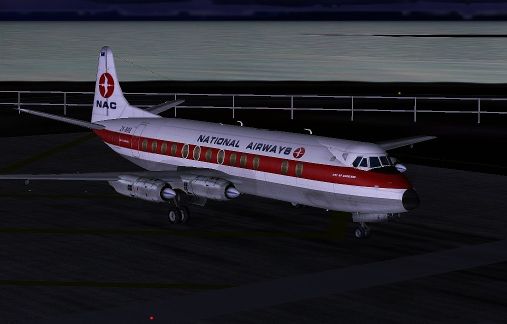
National Airways Vickers Viscount V807 texture, for Rick Piper's original V800 series. Includes installation instruction and alternative aircraft.cfg. By A.J. Pattison.
Screenshot of National Airways Vickers Viscount on runway.
This is a REPAINT of Rick Pipers excellent V800 series. The Viscounts that flew in New Zealand were V807 spec. In spite of the black radome, there was no weather radar onboard. I HIGHLY recommend the V800 panels that Rick has available on his site. They come complete with a checklist, which WILL be required by most to run a full manual startup. I also recommend the Dart soundpack ( its from a HS748 YS11, but they are Darts ).
I would like to thank Lionheart, and all the people who have assisted with the publication of this repaint. I would also like to make special mention of Capt R W Pattison, who flew City of Auckland from both front seats for a number of years, and who helped in the compilation of this texture. His assistance was invaluable.
[fltsim.0]

	title=Vickers Viscount Paint4

	sim=Viscount

	model=

	panel=

	sound=

	texture=nac

	checklists=

	description=Vickers Viscount 807 National Airways ZK-BRE.

	ui_manufacturer=Vickers

	ui_type=Viscount 800

	ui_variation=NAC.

	visual_damage=1

	atc_heavy=0

	atc_id=ZKBRE

	atc_airline=New Zealand

	atc_flight_number=361
Free for all simmers · 872.76 KB · Scanned clean Oct 2026
Download speed: Free tier is capped at 0.5 Mbps. PRO members download at full line speed.
FS9\Aircraft\, FS9\Addon Scenery\, FS9\Gauges\, or FS9\Effects\.readme.txt or README file. It tells you exactly where files go, what dependencies are needed, and any quirks specific to this add-on.The archive v807_nac.zip has 9 files and directories contained within it.
This list displays the first 500 files in the package. If the package has more, you will need to download it to view them.
| Filename/Directory | File Date | File Size |
|---|---|---|
| Aircraft.cfg | 09.07.05 | 9.61 kB |
| FILE_ID.DIZ | 09.19.05 | 253 B |
| INSTALLATION.txt | 09.19.05 | 976 B |
| NAC V807 texture.zip | 09.19.05 | 770.99 kB |
| README.txt | 09.19.05 | 1.06 kB |
| V807 at Rongotai ed.jpg | 09.08.05 | 95.90 kB |
| V807 | 09.19.05 | 0 B |
| flyawaysimulation.txt | 10.29.13 | 959 B |
| Go to Fly Away Simulation.url | 01.22.16 | 52 B |
Only PRO members can place votes.
More FS2004 add-ons hand-picked based on this download.
FS2004 Propeller Aircraft
Airwork of London leased this brand new aircraft to Sudan Airways. It was del…
 FS2004 Propeller Aircraft
Features both Aden Airways Viscount aircraft, VR-AAV and VR-AAW. This is a re…
 FS2004 Propeller Aircraft
In one of its many guises, the much used G-BDRC flew in this livery on lease …
 FS2004 Propeller Aircraft
Many short term leases saw BAF Viscounts flying in basic livery with the oper…
 FS2004 Propeller Aircraft
An early expansion saw Intra Airways of Jersey operating Viscount 810 and a s…
 FS2004 Propeller Aircraft
FSDS2 Model by Rick Piper,VASP colours by Luiz Foernges,Original panel by Sav…
 FS2004 Propeller Aircraft
A classic turbo prop airliner by Rick Piper, with full animation plus all the…
 FS2004 Propeller Aircraft
Vickers Viscount 806 Parcel Force 1994 (cargo). Features full animation plus …
Be the first to leave a comment on this download.
Be the first to share your thoughts on this download.