

 FS2004 Propeller Aircraft
Sylt Air Partenavia P68
This is a MIAT (Missing in AI Traffic) of the Sylt Air Partenavia P68 for the…
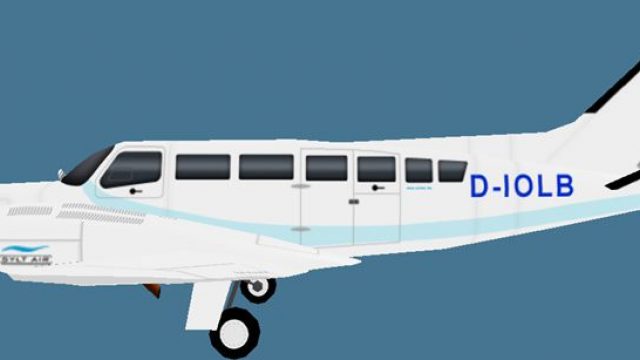
Sylt Air Cessna 404 repaint brings the German carrier’s AWU scheme and D-IOLB registration to AI traffic, adding authentic airline callsign and parking code details for busier regional ramps. Designed for FS2004, it requires the Henry Tomkiewicz HTAI C404 base model and includes both DXT3 and 32-bit texture options.
 Rate
Rate
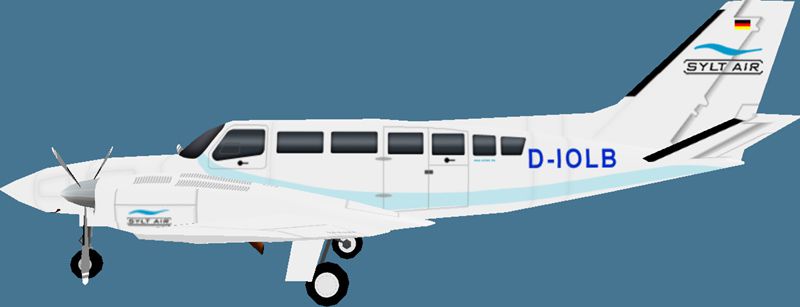
This is a MIAT (Missing in AI Traffic) of the Sylt Air Cessna C404 for the Henry Tomkiewicz Cessna C404. To be used with the HTAI C404 base files package available separately. By Phil Rademacher.

Sylt Air Cessna C404 with registration D-IOLB.
Callsign: Sylt-Air
ICAO: AWU
[fltsim.x]

title=AI Cessna 404 Sylt Air

sim=AI Cessna 404

model=

texture=Sylt Air

atc_id=D-IOLP

atc_airline=Sylt-Air

atc_parking_codes=AWU

atc_parking_types=RAMP

ui_manufacturer=AI

ui_type=404

ui_variation=Sylt Air

description=AI Paint by Phil
Now change the [fltsim.x] entry to [fltsim."number of entry before + 1"]. So if the last entry was 4, you have to change the x to a 5.
Free for all simmers · 277.21 KB · Scanned clean Oct 2026
Download speed: Free tier is capped at 0.5 Mbps. PRO members download at full line speed.
FS9\Aircraft\, FS9\Addon Scenery\, FS9\Gauges\, or FS9\Effects\.readme.txt or README file. It tells you exactly where files go, what dependencies are needed, and any quirks specific to this add-on.The archive c404awu.zip has 10 files and directories contained within it.
This list displays the first 500 files in the package. If the package has more, you will need to download it to view them.
| Filename/Directory | File Date | File Size |
|---|---|---|
| Sylt Air C404.jpg | 11.24.07 | 69.94 kB |
| texture.Sylt Air | 11.21.07 | 0 B |
| texture.Sylt Air 32bit | 11.24.07 | 0 B |
| ai404.bmp | 11.24.07 | 4.00 MB |
| ai404.bmp | 11.21.07 | 1.00 MB |
| ai404_l.bmp | 08.15.04 | 1.00 MB |
| prop-hs.bmp | 07.31.04 | 64.07 kB |
| README MIAT.txt | 07.07.09 | 2.08 kB |
| flyawaysimulation.txt | 10.29.13 | 959 B |
| Go to Fly Away Simulation.url | 01.22.16 | 52 B |
Only PRO members can place votes.
More FS2004 add-ons hand-picked based on this download.
FS2004 Propeller Aircraft
This is a MIAT (Missing in AI Traffic) of the Sylt Air Partenavia P68 for the…
 FS2004 Propeller Aircraft
Air Sunshine is a regional airline in Florida that operates also in the Carib…
 FS2004 Propeller Aircraft
FS2004 Cessna 208B Grand Caravan Air Malawi Model by Henry Tomkiewicz Repaint…
 FS2004 Propeller Aircraft
Cessna 402C for AI. Cape Air has the largest fleet of Cessna 402's in the wor…
 FS2004 Propeller Aircraft
The new Cape Air special scheme W Retreat and Spa in Vieques Island in Puerto…
 FS2004 Propeller Aircraft
Full reflective Textures & includes panel. Designed in FSDS V2 by Rey Lopez.
 FS2004 Propeller Aircraft
This contains all the files needed to install FS2002's 182RG to FS2004. Also …
 FS2004 Propeller Aircraft
Fly a Kent State University aircraft using these repaint textures of the defa…
Be the first to leave a comment on this download.
Be the first to share your thoughts on this download.