

 FS2004 Propeller Aircraft
Daves Tool Box Douglas C-124
This repaint offers a faithful depiction of the heavy-lift Douglas C-124 Glob…
Oscar Mayer-themed livery brings a bold, playful look to the JBK Douglas C-124 Globemaster II while keeping the original flight model and classic heavy-lift character intact in Microsoft Flight Simulator 2004. The repaint aligns cleanly with the aircraft’s markings and textures and requires the JBK C-124 freeware base model.
 Rate
Rate
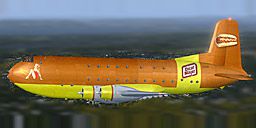
This repaint offers a distinctive Oscar Mayer-themed livery for the JBK Douglas C-124 Globemaster II in Microsoft Flight Simulator 2004. It forms a visually captivating variation of the cargo transporter while preserving all the original flight modeling and aircraft characteristics. Created by Bob Azzaro and modified with permission by Rory Thomson, this add-on provides a playful yet historically connected representation of the legendary USAF heavy-lift aircraft. Note that it requires the base freeware model, which you can find in the Fly Away Simulation mod library. It does not include the underlying Douglas C-124 model.
The Douglas C-124 Globemaster II was a strategic workhorse in the United States Air Force, especially under the Strategic Air Command (SAC). Renowned for its large cargo capacity and distinctive double-deck fuselage, it carried vital equipment to airbases in support of long-range bomber operations. In this custom repaint, you will notice an eye-catching Oscar Mayer exterior design layered onto the Globemaster II, highlighting the vibrant texture while maintaining the aircraft’s well-known features.
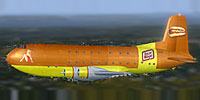
Side view of Oscar Mayer Douglas C-124 in flight.
Add this repaint by merging the correct files into your existing folder structure within Microsoft Flight Simulator 2004. Use the steps below and be sure to follow them diligently for a seamless experience.
X with the next consecutive number.
[fltsim.X]
title=JBK Douglas C124A OscarMayer
sim=JBK Douglas C124
model=
panel=
sound=
texture=OscarMayer
kb_checklists=
kb_reference=C124_ref
atc_airline=air force
atc_flight_number=1959
ui_manufacturer=Douglas
ui_type=Globemaster II
ui_variation=C-124A OscarMayer
atc_heavy=0
atc_id=1959
description=Douglas C124A of the USAF Strategic Air Command (SAC) around 1952. SAC used the Globemaster II to transport equipment and weapons between the US bomber airbases. Repaint by Bob Azzaro
ui_typerole="Military Transport"
ui_createdby="JBK"
After these steps, your Oscar Mayer C-124 texture package will be ready to fly. When loading your aircraft within Microsoft Flight Simulator 2004, look for the newly added variation in your selection menu. This repaint complements the robust design of the C-124 by paying tribute to the brand's iconic palette, all while preserving the aircraft’s operational intricacies.
Free for all simmers · 3.17 MB · Scanned clean Oct 2026
Download speed: Free tier is capped at 0.5 Mbps. PRO members download at full line speed.
FS9\Aircraft\, FS9\Addon Scenery\, FS9\Gauges\, or FS9\Effects\.readme.txt or README file. It tells you exactly where files go, what dependencies are needed, and any quirks specific to this add-on.The archive c-124_oscarmayerfs2004.zip has 15 files and directories contained within it.
This list displays the first 500 files in the package. If the package has more, you will need to download it to view them.
| Filename/Directory | File Date | File Size |
|---|---|---|
| File ID.txt | 11.27.10 | 147 B |
| readme.txt | 11.27.10 | 1.20 kB |
| texture.oscarMayer | 11.27.10 | 0 B |
| C124_leftaft_t.bmp | 11.25.10 | 2.67 MB |
| C124_leftfwd_t.bmp | 11.25.10 | 2.67 MB |
| C124_rtaft_t.bmp | 11.25.10 | 2.67 MB |
| C124_rtfwd_t.bmp | 11.25.10 | 2.67 MB |
| C124nacelle2_t.bmp | 11.25.10 | 682.75 kB |
| texture.cfg | 11.25.10 | 46 B |
| Thumbs.db | 11.25.10 | 32.50 kB |
| weinermobile.bmp | 11.25.10 | 1.37 MB |
| thumbnail.jpg | 11.27.10 | 11.40 kB |
| Thumbs.db | 11.27.10 | 4.50 kB |
| flyawaysimulation.txt | 10.29.13 | 959 B |
| Go to Fly Away Simulation.url | 01.22.16 | 52 B |
Only PRO members can place votes.
More FS2004 add-ons hand-picked based on this download.
FS2004 Propeller Aircraft
This repaint offers a faithful depiction of the heavy-lift Douglas C-124 Glob…
 FS2004 Propeller Aircraft
This repaint package features a distinctive livery created by Bob Azzaro, ref…
 FS2004 Propeller Aircraft
This freeware release introduces a detailed simulation of the American Airlin…
 FS2004 Propeller Aircraft
A repaint of the default DC-3 in Buffalo Airways livery. Textures only. By Mi…
 FS2004 Propeller Aircraft
A compilation of paints for the Radio Range version 4.0 DC-3. This was an eff…
 FS2004 Propeller Aircraft
A complete upgrade package with original model, new textures, new flight dyna…
 FS2004 Propeller Aircraft
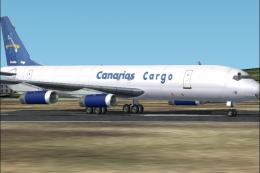
Canarias Cargo operated two DC-8-62F from the Canary Islands to some African …
 FS2004 Propeller Aircraft
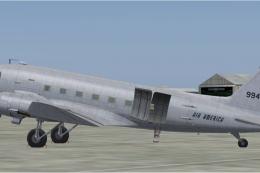
A repaint for the Douglas C47 by Manfred Jahn. FS2004 Douglas C-47 Base Pack …
Be the first to leave a comment on this download.
Be the first to share your thoughts on this download.