

 FS2004 AFCAD Files
AFCAD2 LFPG Paris CDG
LFPG Paris CDG, France, for FsFrance RealCDG v3.1 scenery. 271 gates are avai…
Ciudad Bolivar Airport (SVCB) AFCAD2 updates Jaime Ortega’s Ciudad Bolivar 2003 scenery in FS2004 with accurate parking, tower viewpoint, and AI-friendly taxi and runway logic. It supports Rutaca operations, keeps runway 12/30 available for starts while restricting traffic use, and requires the Ciudad Bolivar 2003 scenery.
 Rate
Rate
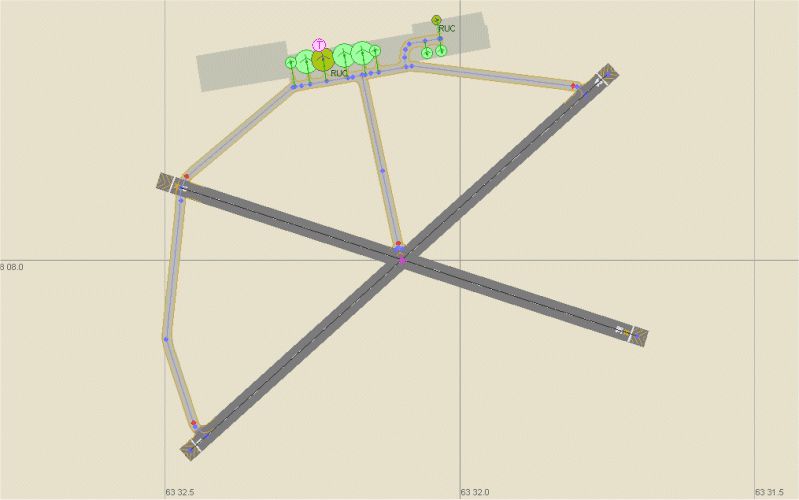
An AFCAD2 file for Ciudad Bolivar Airport in Venezuela to be used with Jaime Ortega's "Ciudad Bolivar 2003" scenery. The scenery was designed for FS2002 but works fine in FS2004. With this AFCAD Ciudad Bolivar is now able to handle AI traffic also. By Rene Tanggaard.
-fs9-1.jpg)
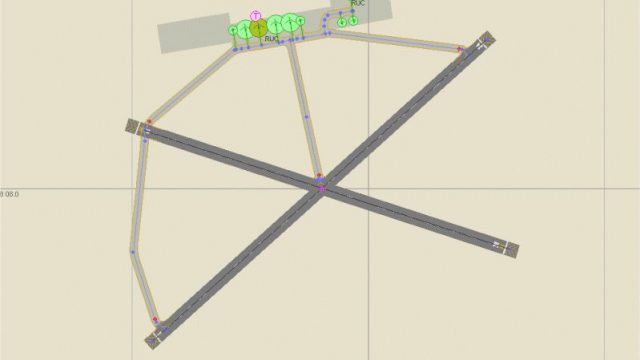
Overview of Ciudad Bolivar Airport.
Ciudad Bolivar Airport is situated on the southern bank of the Orinoco River. The airport has two runways but according to sources on the internet runway 12/30 is closed and used only for emergencies. Therefore I have decided to close this runway for traffic - however you will still be able to select runway 12/30 as starting point.
Rutaca seems to be the only major Venezuelan airline flying to Ciudad Bolivar currently, so I have added a couple of parking spots for Rutaca planes. If you want to add traffic to SVCB I can recommend downloading the Rutaca flightplans by Steffen Wengorz and textures for the planes by Rafael Ledezma. Textures for the Rutaca Boeing 737 you can find at Project AI's website.
According to airport charts the tower is quite close to the intersection of the two runways - however I decided to place the tower view at the same spot as the tower in Ortega's scenery which is at the apron.
Installation: Move the AFCAD file to the scenery directory of Ciudad Bolivar 2003.
Free for all simmers · 86.96 KB · Scanned clean Oct 2026
Download speed: Free tier is capped at 0.5 Mbps. PRO members download at full line speed.
FS9\Aircraft\, FS9\Addon Scenery\, FS9\Gauges\, or FS9\Effects\.readme.txt or README file. It tells you exactly where files go, what dependencies are needed, and any quirks specific to this add-on.The archive af2_svcb.zip has 6 files and directories contained within it.
This list displays the first 500 files in the package. If the package has more, you will need to download it to view them.
| Filename/Directory | File Date | File Size |
|---|---|---|
| AF2_SVCB.bgl | 06.22.05 | 3.27 kB |
| Read_me.txt | 06.24.05 | 1.72 kB |
| SVCB.gif | 06.24.05 | 83.04 kB |
| FILE_ID.DIZ | 06.25.05 | 363 B |
| flyawaysimulation.txt | 10.29.13 | 959 B |
| Go to Fly Away Simulation.url | 01.22.16 | 52 B |
Only PRO members can place votes.
More FS2004 add-ons hand-picked based on this download.
FS2004 AFCAD Files
LFPG Paris CDG, France, for FsFrance RealCDG v3.1 scenery. 271 gates are avai…
 FS2004 AFCAD Files
Frankfurt/Main Airport, Germany, for use with AMEDDF11.ZIP. Should solve most…
 FS2004 AFCAD Files
Includes most airports in Italy: LIRF (Rome, Fiumicino) LIMC (Milan, Malpensa…
FS2004 AFCAD Files
Files included are for Eleftherios Venizelos International Airport, Athens (L…
FS2004 AFCAD Files
FS2004 AFCAD2 File For RCKH and RCSS, Taipei Sungshan Airport and Kaohsiung A…
 FS2004 AFCAD Files
Tokyo Narita Airport (RJAA), Japan (not for the default FS2004 airport; detai…
 FS2004 AFCAD Files
Included are some new apron areas, taxiways, helipads, military parking posit…
 FS2004 AFCAD Files
Updated gates and taxiways for Amsterdam Schiphol Int'l Airport, The Netherla…
Be the first to leave a comment on this download.
Be the first to share your thoughts on this download.