

 FSX Civil Aircraft
Tigerair PH/SEAir Airbus A320
This freeware release showcases a detailed repaint of the Airbus A320 in Tige…
Tigerair Philippines and SEAir Airbus A320 minimalist white livery brings clean, accurate AI traffic visuals with crisp panel lines and tuned alpha channels for smooth rendering in Microsoft Flight Simulator X. It includes the “Sea Tiger” callsign via an EVPMOD file for authentic ATC chatter and requires the FAIB A320 base model.
 Rate
Rate
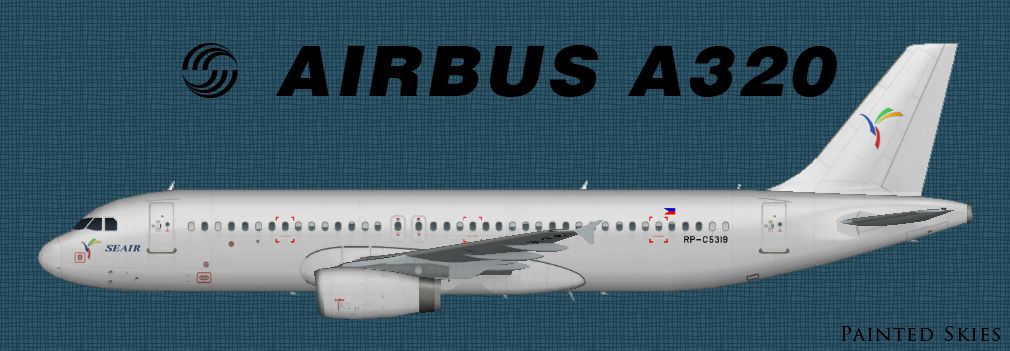
This freeware repaint showcases an Airbus A320 operated by Tigerair Philippines/SEAir, presented in a minimalist white color scheme. It has been developed by Diego Roxas with a focus on accurate detailing for enthusiasts seeking to strengthen their AI traffic environment in Microsoft Flight Simulator X. To fully utilize this file, access to the FAIB base model (FAIBA320.ZIP) is required, which is available in the Fly Away Simulation library. The associated callsign (“Sea Tiger”) comes via an EVPMOD file contained in this package, adding a layer of authenticity to live traffic interactions.
The Airbus A320, recognized for its narrow-body design and widespread commercial use, is represented here in a plain fuselage finish. Originally flown under Tigerair Philippines branding, this repaint aligns with the carrier’s rebranded Southeast Asian Airlines identity. The external textures emphasize core shaping, panel lines, and correct alpha channels for AI traffic rendering. The simplified color layout is beneficial for performance in simulation environments, especially for users managing large amounts of active traffic.
Profile view of the white Tigerair Philippines/SEAir Airbus A320 repaint.
The airline has updated its communications reference to “Sea Tiger,” and this repaint leverages that fresh callsign to match recent official data. The included EVPMOD file ensures the flight simulator’s communication phrases reflect the change, maintaining realism. Installation of this file is critical for speech synthesis to vocalize the correct identifier.
While many repaints strive for higher resolution, the developer has opted for a more optimized approach. According to Diego Roxas, his current hardware setup hinders the creation of 2048×2048 HD textures. Nonetheless, the included 1024×1024 textures aim to deliver a clean yet detailed rendition under most conditions, balancing performance and visual clarity.
texture.C5319 folder into your FAIB_A320_IAE directory (within the AI model’s main folder).fltsim.txt document, copy the relevant [fltsim.X] entry, and insert it into the aircraft.cfg file. Make sure to replace X with the next sequential repaint index.This package delivers the texture files alone, so remember to secure the freeware FAIB Airbus A320 base model before adding this repaint. Everything contained here, from the plain white aesthetic to the new callsign configuration, ultimately enriches the virtual skies within FSX’s AI environment. Enjoy the immersion!
Free for all simmers · 462.98 KB · Scanned clean Oct 2026
Download speed: Free tier is capped at 0.5 Mbps. PRO members download at full line speed.
texture.{airline}) inside FSX\SimObjects\Airplanes\{base-aircraft}\.aircraft.cfg in Notepad. Add a new [fltsim.X] section per the readme.readme.txt or README file. It tells you exactly where files go, what dependencies are needed, and any quirks specific to this add-on.The archive faib_tigerph_a320wh_x.zip has 11 files and directories contained within it.
This list displays the first 500 files in the package. If the package has more, you will need to download it to view them.
| Filename/Directory | File Date | File Size |
|---|---|---|
| faib_tigerph_a320wh_x | 09.28.13 | 0 B |
| faib_tigerph_a320wh.jpg | 09.28.13 | 259.07 kB |
| fltsim.txt | 09.28.13 | 327 B |
| readme.txt | 09.28.13 | 1.85 kB |
| Sea Tiger (Tigerair Philippines).evpmod | 09.28.13 | 3.58 kB |
| texture.C5319 | 09.28.13 | 0 B |
| FAIB_A320_IAE_T.dds | 09.28.13 | 1.00 MB |
| Thumbs.db | 09.28.13 | 10.50 kB |
| Thumbs.db | 09.28.13 | 7.00 kB |
| flyawaysimulation.txt | 10.29.13 | 959 B |
| Go to Fly Away Simulation.url | 01.22.16 | 52 B |
Only PRO members can place votes.
More FSX & P3D add-ons hand-picked based on this download.
FSX Civil Aircraft
This freeware release showcases a detailed repaint of the Airbus A320 in Tige…
 FSX Civil Aircraft
The newly rebranded A320 of Tigerair Australia (previously Tiger Airways). Re…
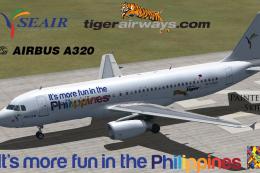 FSX Civil Aircraft
A repaint of the Project Airbus A320 model into the colors of SEAir's A320 fl…
FSX Civil Aircraft
Model by iFDG. Repaint by Chris Bajrak. Copy and paste the aircraft into the …
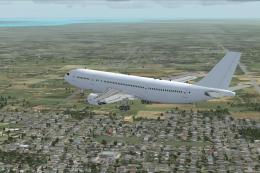 FSX Civil Aircraft
Made for FSX, but this could work on other flight simulators like FS2002, FS2…
FSX Civil Aircraft
This is to fix a problem which you would see black dots under the engines. Th…
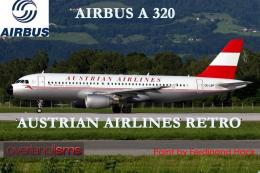 FSX Civil Aircraft
FSX Austrian Airbus A320-200, registration OE-LBP, retro livery. Textures onl…
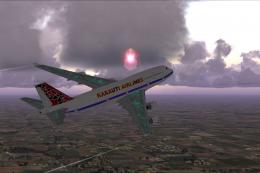 FSX Civil Aircraft
White/Purple Boeing 747-400. Fictional aircraft in white and purple color sch…
Be the first to leave a comment on this download.
Be the first to share your thoughts on this download.