

 FSX Military Aircraft
USAF Northrop F-5A Freedom Fighter 35
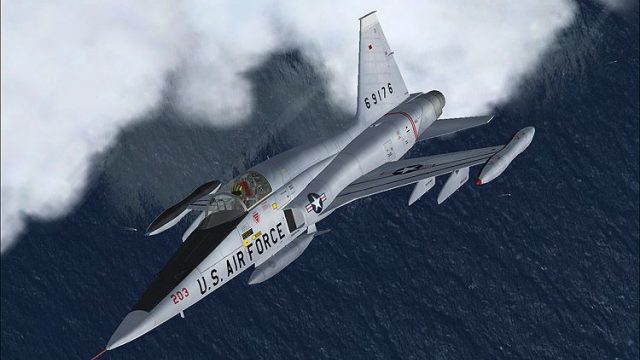
This freeware repaint showcases the Northrop F-5A Freedom Fighter 35 in a Uni…
USAF “203” repaint for the Northrop F-5A Freedom Fighter sharpens ramp presence with crisp tail codes, accurate national markings, and subtle weathering that suits varied lighting. Designed for Microsoft Flight Simulator X, it requires Tim Conrad’s freeware F-5A base model and complements the aircraft’s sleek lines and period-correct military character.
 Rate
Rate
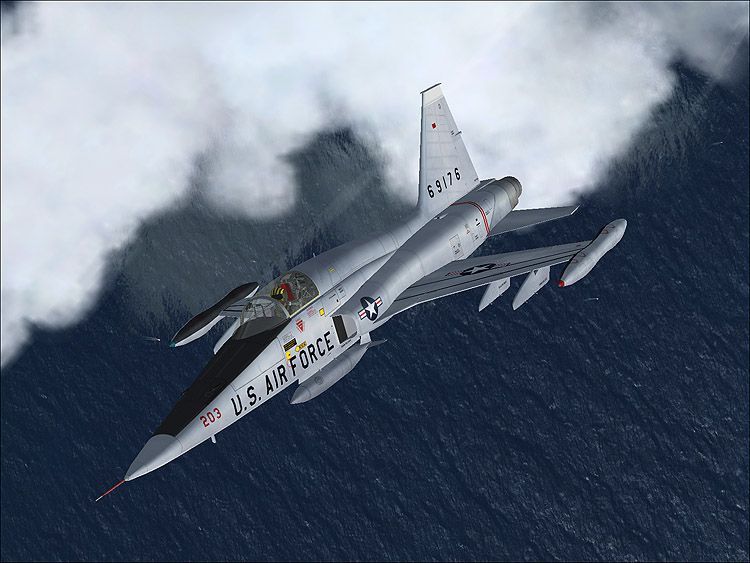
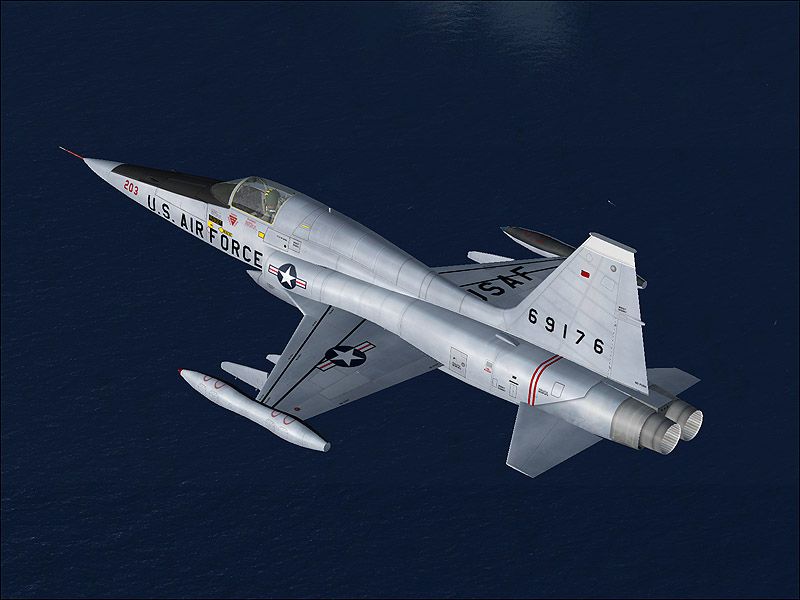

Bring a realistic edge to your Microsoft Flight Simulator X collection with this dedicated repaint of the Northrop F-5A Freedom Fighter featuring the United States Air Force “203” design. This modification interprets the jet’s slender fuselage and supersonic agility with authentic markings that stay true to the aircraft’s operational history.
Created by Henry William, this repaint highlights the signature lines and distinctive curvature of Northrop’s lightweight fighter. Notice the fine detailing across the dorsal spine and the tail fin, where the “203” identification stands out with precision. Subtle weathering effects and carefully applied roundels maintain a credible aesthetic in all lighting conditions.
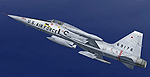
The underlying F-5A aircraft model—packaged in the F5A_PACK.ZIP—originates from Tim Conrad, known for crafting freeware releases that capture the spirit of real-world aviation. His rendition showcases a fully modeled exterior and interior, capturing the fighter’s streamlined shape, responsive control surfaces, and twin J85 engine design. Meanwhile, the cockpit integration provides a workable instrument layout for pilots looking to navigate with authentic instrumentation.
The F-5A Freedom Fighter served for decades under various air forces worldwide because of its cost-effective and reliable engineering. As a supersonic jet, it excelled in training missions and front-line duties, offering maneuverability and speed. This particular repaint, with its USAF motif, delivers that historic essence by replicating a well-known scheme used in American service.
Before installing, be sure to have the freeware base model by Tim Conrad on your system, as this package only includes the custom textures. Installation involves merging the repaint folder into the original aircraft directory and updating the aircraft configuration file. Full details for adding a repaint entry can be found in the base model’s documentation. This approach ensures the integrity of the original files while allowing the new visuals to blend seamlessly.
When viewing the F-5A Freedom Fighter in Microsoft Flight Simulator X, expect stable frame rates and balanced flight dynamics. The textures coordinate neatly with the sim’s rendering engine to avoid graphical artifacts. Moreover, advanced lighting effects have been subtly integrated to emphasize rivet lines and panel boundaries, enhancing immersion during dawn or dusk operations.
This repaint is freeware and does not include the base F-5A model. It is recommended to locate the original package in the Fly Away Simulation library to experience the complete aircraft as envisioned by Tim Conrad. Once installed, this revitalized USAF “203” paint scheme will allow you to perform immersive supersonic sorties in Microsoft Flight Simulator X with historical authenticity at the forefront.
Free for all simmers · 5.52 MB · Scanned clean Oct 2026
Download speed: Free tier is capped at 0.5 Mbps (this file takes approximately 2 mins at the cap). PRO members download at full line speed.
texture.{airline}) inside FSX\SimObjects\Airplanes\{base-aircraft}\.aircraft.cfg in Notepad. Add a new [fltsim.X] section per the readme.readme.txt or README file. It tells you exactly where files go, what dependencies are needed, and any quirks specific to this add-on.The archive tcf5_203.zip has 14 files and directories contained within it.
This list displays the first 500 files in the package. If the package has more, you will need to download it to view them.
| Filename/Directory | File Date | File Size |
|---|---|---|
| 1.jpg | 03.01.08 | 126.70 kB |
| 2.jpg | 03.01.08 | 79.27 kB |
| a.jpg | 03.01.08 | 98.79 kB |
| readme.txt | 03.01.08 | 1.61 kB |
| small.gif | 03.01.08 | 12.44 kB |
| texture.203 | 03.01.08 | 0 B |
| f5a_01_t.bmp | 03.01.08 | 16.00 MB |
| f5a_stores_t.bmp | 11.17.07 | 1.00 MB |
| thumbnail.jpg | 03.01.08 | 24.52 kB |
| Thumbs.db | 03.01.08 | 52.50 kB |
| Thumbs.db | 03.01.08 | 28.00 kB |
| tcf5_203 | 03.01.08 | 0 B |
| flyawaysimulation.txt | 10.29.13 | 959 B |
| Go to Fly Away Simulation.url | 01.22.16 | 52 B |
Only PRO members can place votes.
More FSX & P3D add-ons hand-picked based on this download.
FSX Military Aircraft
This freeware repaint showcases the Northrop F-5A Freedom Fighter 35 in a Uni…
 FSX Military Aircraft
F-5 Freedom Fighter. This is a repaint of Tim Conrad's F5 Freedom Fighter upd…
 FSX Military Aircraft
FSX Royal Norwegian Air Force Northrop F-5A Freedom Fighter, 338 Squadron. Mo…
 FSX Military Aircraft
FSX Imperial Iranian Air Force Northrop F-5A Freedom Fighter. Model by Tim Co…
 FSX Military Aircraft
FSX USAF Boeing C-17 Sound Of Freedom. A repaint of Mike Stone's C-17. This a…
 FSX Military Aircraft
USAF F-16D 301st Fighter Wing, depicting '571' of the 301st Fighter Wing of F…
 FSX Military Aircraft
FSX Islamic Republic Of Iran Air Force Northrop RF-5A Freedom Fighter. Model …
 FSX Military Aircraft
Northrop Grumman B-2A Block 30 Spirit stealth bomber. The B-2 maintains stabi…
Be the first to leave a comment on this download.
Be the first to share your thoughts on this download.