

 FSX Civil Aircraft
China Eastern Airbus A321-231
China Eastern Airbus A321-231. Project Airbus Airbus A321-231 China Eastern B…
China Eastern (Qinghai) Airbus A319S livery brings authentic airline markings and registrations to AI traffic, supplied in crisp DDS textures for reliable performance and sharp detail. Designed for Microsoft Flight Simulator X, it requires the FAIB Airbus A319S base model and includes ready-to-use configuration values for accurate airline and parking behavior.
 Rate
Rate
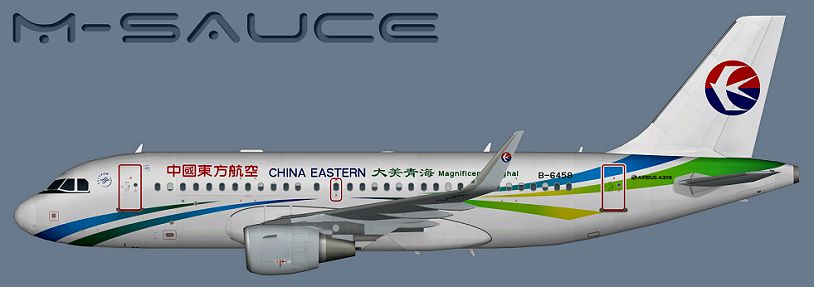
A China Eastern (Qinghai) Airbus A319S for the model by FSX AI Bureau (FAIBA319.ZIP). By Mariano Bonaccorso.
-Airbus-A319S-fsx-1.jpg)
Profile view of China Eastern (Qinghai) Airbus A319S.
Installation:
Just drop this texture folder into the appropriate aircraft folder and then add it to that aircraft's configuration text file. The entry below is an example with the appropriate settings for this repaint to show up in MY SIMULATOR. Your entry will most likely vary, so make sure to modify it for YOUR SIMULATOR. If you don't know what I'm talking about, then sit down and read the documents that came with the model of this repaint as well as the aircraft container section of the flight simulator SDK.
Inside the texture folder provided for this repaint you will find the main texture(s) in DDS format. This is the recommended texture format as per the FSX SDK. If you would like to use a different texture format in your sim, then use the Targa file provided to convert as desired without any loss of quality.
NOTE: Replace the "X" in the "[Fltsim.X]" line with the next number in sequence.
[fltsim.X]

title=AI A319S CES_Qinghai

sim=A32X

model=CFM

texture=CES_Qinghai

atc_airline=CHINA EASTERN

atc_id=B-6458

atc_parking_codes=CES

atc_parking_types=GATE

ui_manufacturer=Airbus

ui_type=A319S

ui_variation=China Eastern

description=AI Aircraft from FAIB
Free for all simmers · 5.04 MB · Scanned clean Oct 2026
Download speed: Free tier is capped at 0.5 Mbps (this file takes approximately 1 min at the cap). PRO members download at full line speed.
texture.{airline}) inside FSX\SimObjects\Airplanes\{base-aircraft}\.aircraft.cfg in Notepad. Add a new [fltsim.X] section per the readme.readme.txt or README file. It tells you exactly where files go, what dependencies are needed, and any quirks specific to this add-on.The archive faib_a319s_ces_qinghai.zip has 8 files and directories contained within it.
This list displays the first 500 files in the package. If the package has more, you will need to download it to view them.
| Filename/Directory | File Date | File Size |
|---|---|---|
| FAIB_A319_CFM_T.dds | 01.10.15 | 5.33 MB |
| Targa | 01.10.15 | 0 B |
| CES_CFM_Shark_Qinghai.tga | 01.10.15 | 16.00 MB |
| Installation.txt | 01.10.15 | 1.70 kB |
| Preview.png | 01.10.15 | 198.16 kB |
| Thumbnail.png | 01.10.15 | 7.34 kB |
| flyawaysimulation.txt | 10.29.13 | 959 B |
| Go to Fly Away Simulation.url | 01.22.16 | 52 B |
Only PRO members can place votes.
More FSX & P3D add-ons hand-picked based on this download.
FSX Civil Aircraft
China Eastern Airbus A321-231. Project Airbus Airbus A321-231 China Eastern B…
 FSX Civil Aircraft
This add-on provides repaints of China Eastern Airlines’ Airbus A330 fleet fo…
 FSX Civil Aircraft
China Eastern Airbus A340. Tom Airbus A340 Series China Eastern repaints for …
 FSX Civil Aircraft
This is a repaint of China Eastern Airlinrs "Expo 2010 Colors" on the Commerc…
 FSX Civil Aircraft
This package contains texture files only, original aircraft package is availa…
 FSX Civil Aircraft
This fully freeware repaint showcases the “Magnificent Qinghai” theme on a Ch…
 FSX Civil Aircraft
A China Eastern old livery Airbus A319 IAE for the model by FSX AI Bureau (FA…
 FSX Civil Aircraft
China Eastern Airlines 737-800NGX Yunnan Orange Peacock, registration B-5795.…
Be the first to leave a comment on this download.
Be the first to share your thoughts on this download.