

 FSX Civil Aircraft
China Eastern Airbus A321-231
China Eastern Airbus A321-231. Project Airbus Airbus A321-231 China Eastern B…
China Eastern’s “Magnificent Qinghai” Airbus A320 livery brings crisp promotional artwork, accurate logos, and smooth color gradients to AI traffic in Microsoft Flight Simulator X. The repaint includes DDS textures with optional legacy formats for flexibility, and requires the FSX AI Bureau FAIB A320 base model for proper display.
 Rate
Rate
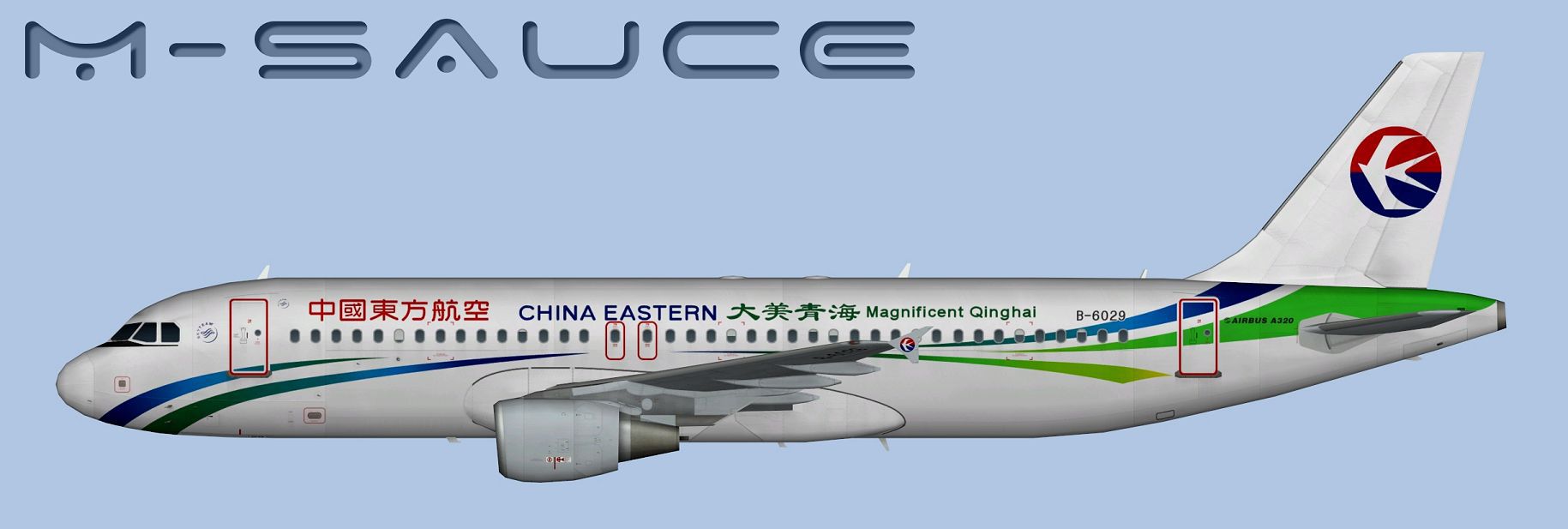
This fully freeware repaint showcases the “Magnificent Qinghai” theme on a China Eastern Airbus A320. It is specifically crafted for the FSX AI Bureau model (FAIBA320.ZIP). Created by the developer FSX AI Bureau and painted by Mariano Bonaccorso, this add-on offers high-fidelity external textures and accurate airline markings for discerning simulator enthusiasts.
The Airbus A320 is a short-to-medium range jet frequently employed by carriers worldwide, and China Eastern’s “Magnificent Qinghai” scheme highlights a promotional design focused on the scenic Qinghai region in China. This repaint captures the airline’s logos, color gradations, and specialized motifs. The winglets and fuselage display dynamic color transitions, reflecting the aesthetic feel of the original aircraft’s promotional message.

Above is a side profile of the China Eastern “Magnificent Qinghai” Airbus A320 in simulator.
Inside the included texture directory, you will find files prepared in DDS format for FSX. An additional FS9 folder hosts BMP files if you prefer using older simulator versions. In both cases, the layouts follow the established guidelines of the FSX and FS9 SDK, ensuring high compatibility. For any alternative compression or format, a separate TGA set is also provided, enabling tailored conversions with no discernible quality reduction.
[fltsim.X]

title=AI A320 CES_Qinghai

sim=FAIB_A320

model=CFM

texture=CES_Qinghai

atc_airline=CHINA EASTERN

atc_parking_codes=CES

atc_parking_types=GATE

ui_manufacturer=Airbus

ui_type=A320

ui_variation=China Eastern

description=AI Aircraft from FAIB
When adjusting the above lines, verify that “model=CFM” aligns with the folder structure for the CFM-powered A320 within your simulator’s directory. Also confirm that any references, such as “FAIB_A320,” match the core file naming from your base model installation.
For those new to customizing or adding liveries, consult your flight simulator’s SDK documentation and the original notes packaged with the FAIB model. Proper configuration of the aircraft container ensures the repaint displays correctly.
This freeware package comes courtesy of FSX AI Bureau’s solid A320 AI framework and detailed paintwork by Mariano Bonaccorso. Users who enjoy immersive passenger traffic representations or desire to populate virtual airports with realistic China Eastern aircraft will find this repaint an excellent addition.
Free for all simmers · 7.32 MB · Scanned clean Oct 2026
Download speed: Free tier is capped at 0.5 Mbps (this file takes approximately 2 mins at the cap). PRO members download at full line speed.
texture.{airline}) inside FSX\SimObjects\Airplanes\{base-aircraft}\.aircraft.cfg in Notepad. Add a new [fltsim.X] section per the readme.readme.txt or README file. It tells you exactly where files go, what dependencies are needed, and any quirks specific to this add-on.The archive faib_a320_ces_qinghai.zip has 12 files and directories contained within it.
This list displays the first 500 files in the package. If the package has more, you will need to download it to view them.
| Filename/Directory | File Date | File Size |
|---|---|---|
| FAIB_A320_CFM_T.dds | 01.06.14 | 5.33 MB |
| FS9 | 01.06.14 | 0 B |
| FAIB_A320_CFM_L.bmp | 01.02.14 | 1.33 MB |
| FAIB_A320_CFM_T.bmp | 01.06.14 | 682.74 kB |
| Targas | 01.06.14 | 0 B |
| CES_Qinghai.tga | 01.06.14 | 16.00 MB |
| FS9_CES_Qinghai.tga | 01.06.14 | 4.00 MB |
| Installation.txt | 01.06.14 | 1.85 kB |
| Preview.jpg | 01.06.14 | 97.81 kB |
| Thumbnail.png | 01.06.14 | 5.99 kB |
| flyawaysimulation.txt | 10.29.13 | 959 B |
| Go to Fly Away Simulation.url | 01.22.16 | 52 B |
Only PRO members can place votes.
More FSX & P3D add-ons hand-picked based on this download.
FSX Civil Aircraft
China Eastern Airbus A321-231. Project Airbus Airbus A321-231 China Eastern B…
 FSX Civil Aircraft
This add-on provides repaints of China Eastern Airlines’ Airbus A330 fleet fo…
 FSX Civil Aircraft
China Eastern Airbus A340. Tom Airbus A340 Series China Eastern repaints for …
 FSX Civil Aircraft
This is a repaint of China Eastern Airlinrs "Expo 2010 Colors" on the Commerc…
 FSX Civil Aircraft
This package contains texture files only, original aircraft package is availa…
 FSX Civil Aircraft
A China Eastern old livery Airbus A319 IAE for the model by FSX AI Bureau (FA…
 FSX Civil Aircraft
A China Eastern (Qinghai) Airbus A319S for the model by FSX AI Bureau (FAIBA3…
 FSX Civil Aircraft
China Eastern Airlines 737-800NGX Yunnan Orange Peacock, registration B-5795.…
Be the first to leave a comment on this download.
Be the first to share your thoughts on this download.