

 FSX Civil Aircraft
Continental Boeing 737-800. B737-800
Continental Boeing 737-800. Fictional textures for the default B737-800. Repa…
Oahu Air Boeing 737-800 brings a fictional island-hopper livery to the TDS model in FS2004, paired with high-resolution textures and a richly animated airframe including flexing wings, steering gear, spoilers, reversers, doors, and rolling wheels. Detailed night lighting, ground service vehicles, and tuned flight dynamics complete the package; requires TDS_B737-800_BASE_PACKAGE.ZIP.
 Rate
Rate
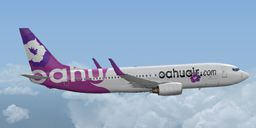
A fictional texture set only for the TDS B737-800 (TDS_B737-800_BASE_PACKAGE.ZIP). Model developed by Tenkuu Developers Studio, features high resolution textures, dynamic flexing wings, nose gear steering, rudder lock, ground spoilers, low speed aileron locks at high speed, fully animated control surfaces, fully independent suspension, trim animation, opening passenger doors, rolling wheels, animated thrust reversers with reverser block doors, detailed textures, full night lighting, ground service vehicles and more. Model design by Hiroshi Igami. Flight dynamics design by Nick Wilkinson, with assistance from David Biggar. Master textures and paint kit by Kyle Schurb. Painted by Triadi Sudarmawan.

Screenshot of Oahu Air Boeing 737-800 in flight.
Installation:
About the group name TDS:
Many people knows there are SkySpirit series models which have roots at Project Opensky. TDS is a small group made by former Project Opensky (POSKY) members, building a new models. TDS stands for Tenkuu Developers Studio. The word, "Tenkuu" is Japanese, and it means "Heaven's Sky."
Free for all simmers · 3.09 MB · Scanned clean Oct 2026
Download speed: Free tier is capped at 0.5 Mbps. PRO members download at full line speed.
This file is a repaint — the package below is the base model it paints onto. Install it first, or the textures will have nothing to load onto.
texture.{airline}) inside FSX\SimObjects\Airplanes\{base-aircraft}\.aircraft.cfg in Notepad. Add a new [fltsim.X] section per the readme.readme.txt or README file. It tells you exactly where files go, what dependencies are needed, and any quirks specific to this add-on.The archive oahu-1.zip has 15 files and directories contained within it.
This list displays the first 500 files in the package. If the package has more, you will need to download it to view them.
| Filename/Directory | File Date | File Size |
|---|---|---|
| OAHU | 01.26.15 | 0 B |
| [fltsim.X].txt | 01.27.15 | 1.47 kB |
| readme.txt | 01.18.14 | 3.85 kB |
| texture.oahu | 01.27.15 | 0 B |
| TDS738_FUSEL_FRONT_T.bmp | 01.24.15 | 4.00 MB |
| TDS738_FUSEL_LIGHTSPLASH.bmp | 01.24.15 | 4.00 MB |
| TDS738_FUSEL_REAR_T.bmp | 01.26.15 | 4.00 MB |
| TDS738_FUSER_FRONT_T.bmp | 01.24.15 | 4.00 MB |
| TDS738_FUSER_LIGHTSPLASH.bmp | 01.24.15 | 4.00 MB |
| TDS738_FUSER_REAR_T.bmp | 01.26.15 | 4.00 MB |
| TDS738_SELFILLUMINATION.bmp | 04.27.14 | 4.00 MB |
| texture.cfg | 08.14.06 | 137 B |
| thumbnail.jpg | 01.24.15 | 33.60 kB |
| flyawaysimulation.txt | 10.29.13 | 959 B |
| Go to Fly Away Simulation.url | 01.22.16 | 52 B |
Only PRO members can place votes.
More FSX & P3D add-ons hand-picked based on this download.
FSX Civil Aircraft
Continental Boeing 737-800. Fictional textures for the default B737-800. Repa…
 FSX Civil Aircraft
FSX Air Berlin Boeing 737-800. Model by Project Open Sky. Repaint by Misha Gr…
 FSX Civil Aircraft
FSX Norwegian Air Shuttle Boeing 737-800, registration LN-NOB. Textures only …
 FSX Civil Aircraft
This freeware package enhances the default Boeing 737-800 in Microsoft Flight…
 FSX Civil Aircraft
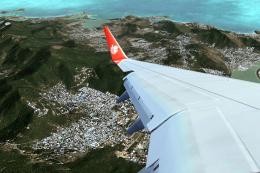
Lion Air Boeing 737-800, registration PK-LJQ (the first Boeing 737-800 in Lio…
 FSX Civil Aircraft
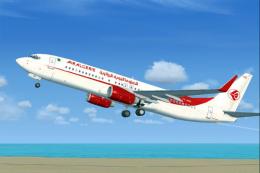
This freeware repaint offers a crisp 32-bit Air Algerie livery for the defaul…
 FSX Civil Aircraft
Air Europa Boeing 737-800. Air Europa Pepe Travel repaint for the default B73…
 FSX Civil Aircraft
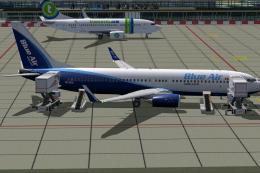
Take flight in a complete Boeing 737-800 package adorned with Blue Air Web.co…
Be the first to leave a comment on this download.
Be the first to share your thoughts on this download.