

 FSX Military Aircraft
RAF Red Arrows Hawk T.1
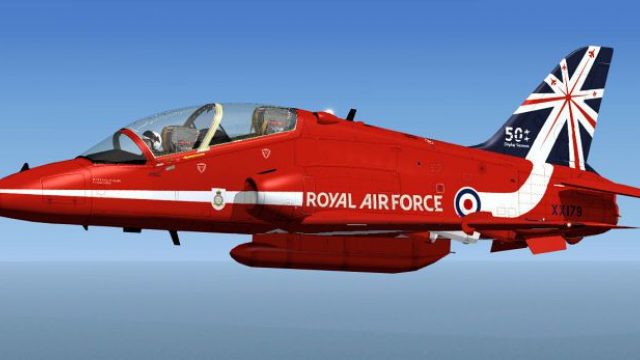
This is a repaint for the Skysim Hawk T.1 in the new Red Arrows 50th Annivers…
Bring the RAF Red Arrows Hawk T1a to life with crisp 50th anniversary markings and authentic Royal Air Force display identity, ideal for formation and aerobatic flying in FSX. The livery set targets the Skysim BAe Hawk package and requires the payware Hawk from Skysim for full use.
 Rate
Rate
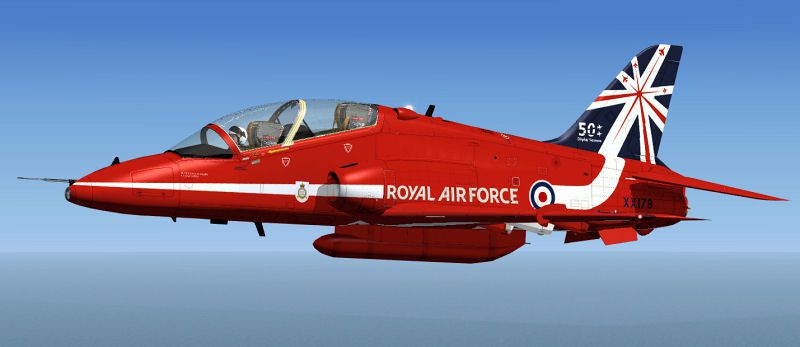
RAF Hawk T1a Red Arrows in special 50th anniversary textures. These textures depict the Royal Air Force Hawk of the Red Arrows wearing the special 50th markings. Requires the payware Hawk from Skysim. Textures by UKMIL.
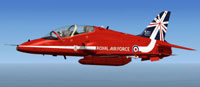
Screenshot of RAF Hawk T1a Red Arrows in flight.
Installation:
[fltsim.xx]

title=BAe Hawk T.Mk.1 FrontSeat 2014

sim=HawkT1

model=frontseat

panel=

sound=

texture=2014

kb_checklists=HawkT1_check

kb_reference=HawkT1_ref

ui_manufacturer="BAe"

ui_type="Hawk T.Mk1"

ui_variation="2014 50th"

ui_typerole="Single Engine Jet Trainer"

ui_createdby="Skysim"

atc_id=RED1

atc_airline=AIRFORCE

atc_flight_number=179

description=Hawk 90th 2008

\n\2008 Rick Piper & UKMIL
Free for all simmers · 917.35 KB · Scanned clean Oct 2026
Download speed: Free tier is capped at 0.5 Mbps. PRO members download at full line speed.
texture.{airline}) inside FSX\SimObjects\Airplanes\{base-aircraft}\.aircraft.cfg in Notepad. Add a new [fltsim.X] section per the readme.readme.txt or README file. It tells you exactly where files go, what dependencies are needed, and any quirks specific to this add-on.The archive xx179.zip has 13 files and directories contained within it.
This list displays the first 500 files in the package. If the package has more, you will need to download it to view them.
| Filename/Directory | File Date | File Size |
|---|---|---|
| README.txt | 02.18.14 | 1.23 kB |
| Texture.2014 | 02.18.14 | 0 B |
| fuselage_t.dds | 02.18.14 | 4.00 MB |
| Hawkpilots.dds | 06.21.08 | 128.12 kB |
| texture.cfg | 05.16.08 | 127 B |
| thumbnail.jpg | 02.18.14 | 20.71 kB |
| wing_t.dds | 06.19.08 | 4.00 MB |
| Thumbs.db | 01.23.07 | 66.00 kB |
| xx179.jpg | 02.18.14 | 46.68 kB |
| xx179thm.jpg | 02.18.14 | 20.71 kB |
| xx179 | 02.18.14 | 0 B |
| flyawaysimulation.txt | 10.29.13 | 959 B |
| Go to Fly Away Simulation.url | 01.22.16 | 52 B |
Only PRO members can place votes.
More FSX & P3D add-ons hand-picked based on this download.
FSX Military Aircraft
This is a repaint for the Skysim Hawk T.1 in the new Red Arrows 50th Annivers…
 FSX Military Aircraft
RAF Hawk T1A. A repaint for the Sky Sim Hawk T1A - front seat only. A livery …
 FSX Military Aircraft
FSX BAe Hawk T1a. Welcome to the BAE Hawk T1a package for FS2004. This is a f…
 FSX Military Aircraft
A repaint of the David Brice and David Friswell T45 Goshawk / T1 Hawk. The pa…
 FSX Military Aircraft
Red Arrows F-18 Hornet. The FSX Acceleration F/A-18 in RAF Red Arrows livery.…
 FSX Military Aircraft
FSX RAF Black BAE Hawk FTS. A repaint of David Brice and David Friswell's T45…
 FSX Military Aircraft
FSX Hawk T1 RAF 4th FTS A repaint of David Brice and David Friswell's T45 Gos…
 FSX Military Aircraft
RAF Mk1 Hawk, 208 Sqn, RAF Valley. Here is a repaint for the SkySim Hawk Mk1 …
Be the first to leave a comment on this download.
Be the first to share your thoughts on this download.