

 FSX Other Aircraft & Vehicles
Star Trek USS Enterprise NX01
Experience one of humanity’s earliest fictional starships from the Star Trek …
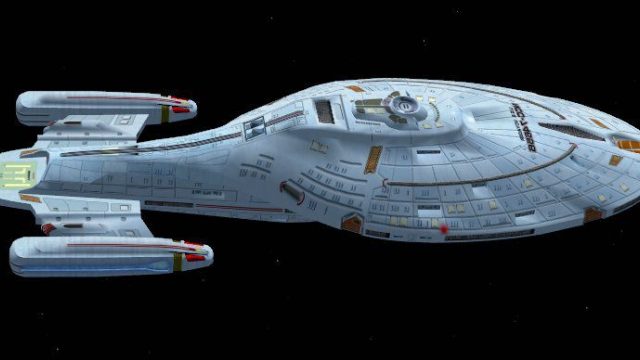
Star Trek’s USS Voyager arrives as a flyable sci-fi spacecraft with a detailed exterior model, a responsive virtual cockpit, and tuned flight dynamics built for extreme indicated speeds, high G loads, and stability under heavy dynamic pressure. In Microsoft Flight Simulator X, vectored thrust, SuperSpoilers, and deflection flaps enable agile hovering, rapid transitions, and controlled short-field operations.
 Rate
Rate
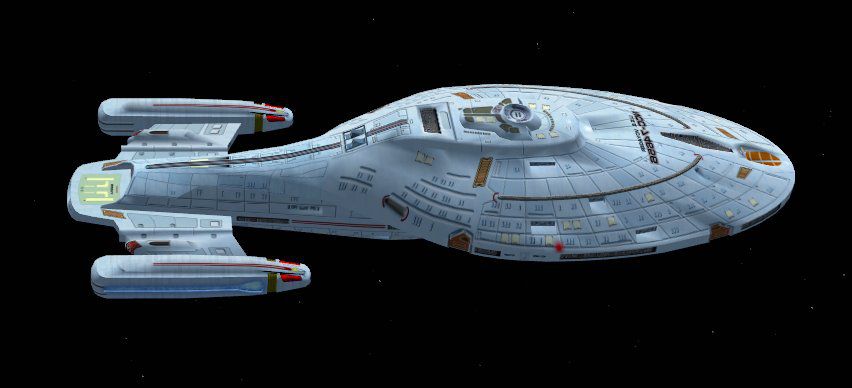
This freeware release brings the iconic Star Trek USS Voyager into Microsoft Flight Simulator X in a fully self-contained package. The developer, Bruce Fitzgerald, has crafted a detailed futuristic craft that merges sci-fi aesthetics with robust aerodynamic performance. This spacecraft is designed to operate at exceptionally high speeds, withstand intense dynamic pressure, and maintain precise control even under formidable G loads.
Drawing inspiration from the fictional Intrepid-class starship featured in the Star Trek: Voyager series, this add-on captures the vessel’s distinct curves and sleek lines in the FSX environment. Many sim pilots will appreciate how the visual model is shaped to replicate the advanced hull contours while respecting practical in-sim flight handling.
With a maximum indicated speed of 2667 knots (as measured by GPS-GS within FSX), the USS Voyager add-on demonstrates significant thrust and stability across the entire envelope. Thanks to carefully modeled flight dynamics, it sustains smooth handling during rapid acceleration and abrupt maneuvers.
Among the vessel’s technical highlights is the vectored thrust system, which optimizes propulsion across various stages of flight. This feature directs thrust flow to manage vertical and horizontal movement, especially useful for hovering or transitioning to forward flight. Adapting the thrust angle in real time grants users impressive agility even at the highest altitudes.
Additional functionalities, such as SuperSpoilers and specialized deflection flaps, enhance responsiveness during takeoffs, landings, and quick deceleration. These spoilers alter lift and drag, delivering policed control at advanced speeds. When combined with the deflection flap mechanism, the starship can maintain near-hover conditions, which elevates short-field performance in unconventional airports or landing pads within FSX.
Whether soaring at supersonic speeds over virtual skies or practicing precise hovering in all-weather conditions, this USS Voyager recreation remains stable and resilient. Its design holds firm under extreme loads, reflecting a robust framework well-suited for those seeking experimental flight scenarios in Microsoft Flight Simulator X.
This project, created by Bruce Fitzgerald, is shared as a freeware mod, enabling flight sim fans to explore futuristic travel without additional costs. By focusing on meticulous 3D modeling and carefully tuned flight physics, the creator brings sci-fi immersion into a realistic simulator platform, further broadening the boundaries of the FSX experience.
Free for all simmers · 9.69 MB · Scanned clean Oct 2026
Download speed: Free tier is capped at 0.5 Mbps (this file takes approximately 3 mins at the cap). PRO members download at full line speed.
SimObjects\Airplanes\, Addon Scenery\, Effects\, or Gauges\.readme.txt or README file. It tells you exactly where files go, what dependencies are needed, and any quirks specific to this add-on.The archive voyager.zip has 84 files and directories contained within it.
This list displays the first 500 files in the package. If the package has more, you will need to download it to view them.
| Filename/Directory | File Date | File Size |
|---|---|---|
| in1_glow.bmp | 12.25.07 | 1.00 MB |
| in1_T_LM.bmp | 01.31.08 | 1.00 MB |
| in2_glow.bmp | 12.25.07 | 1.00 MB |
| in2_T_LM.bmp | 01.31.08 | 1.00 MB |
| in3_glow.bmp | 01.27.08 | 1.00 MB |
| in3_T_LM.bmp | 01.31.08 | 1.00 MB |
| in4_glow.bmp | 12.25.07 | 1.00 MB |
| in4_T_LM.bmp | 01.31.08 | 1.00 MB |
| thumbnail.jpg | 12.25.07 | 39.36 kB |
| Thumbs.db | 01.31.08 | 27.00 kB |
| c.wav | 11.26.04 | 42.64 kB |
| CABIN.wav | 11.26.04 | 103.08 kB |
| L.wav | 11.26.04 | 42.64 kB |
| laapdis.wav | 11.26.04 | 11.25 kB |
| LAN11.wav | 11.26.04 | 53.38 kB |
| LAN12.wav | 11.26.04 | 51.10 kB |
| LAN13.wav | 11.26.04 | 199.57 kB |
| LAN14.wav | 11.26.04 | 312.65 kB |
| LAN1SHUT.wav | 11.26.04 | 88.94 kB |
| LAN1STRT.wav | 11.26.04 | 239.01 kB |
| LAN21.wav | 11.26.04 | 35.16 kB |
| LAN22.wav | 11.26.04 | 60.47 kB |
| LAN23.wav | 11.26.04 | 55.94 kB |
| LAN24.wav | 11.26.04 | 62.72 kB |
| LAN2SHUT.wav | 11.26.04 | 89.37 kB |
| LAN2STRT.wav | 11.26.04 | 320 B |
| LAOVER.wav | 11.26.04 | 50.36 kB |
| LBN11.wav | 11.26.04 | 96.15 kB |
| LBN12.wav | 11.26.04 | 51.10 kB |
| LBN13.wav | 11.26.04 | 199.57 kB |
| LBN14.wav | 11.26.04 | 312.65 kB |
| LBN1SHUT.wav | 11.26.04 | 894 B |
| LBN1STRT.wav | 11.26.04 | 169.37 kB |
| LBN21.wav | 11.26.04 | 35.16 kB |
| LBN22.wav | 11.26.04 | 60.47 kB |
| LBN23.wav | 11.26.04 | 55.94 kB |
| LBN24.wav | 11.26.04 | 62.72 kB |
| LBN2SHUT.wav | 11.26.04 | 894 B |
| LMFLAPS.wav | 11.26.04 | 25.17 kB |
| LMGEARDN.wav | 11.26.04 | 26.49 kB |
| LMGEARUP.wav | 11.26.04 | 14.65 kB |
| R.wav | 11.26.04 | 42.64 kB |
| Sound.cfg | 11.26.04 | 12.23 kB |
| stall.wav | 11.26.04 | 36.69 kB |
| XLAN11.wav | 11.26.04 | 89.04 kB |
| XLAN12.wav | 11.26.04 | 79.75 kB |
| XLAN13.wav | 11.26.04 | 59.36 kB |
| XLAN14.wav | 11.26.04 | 83.46 kB |
| XLAN1SHUT.wav | 11.26.04 | 88.94 kB |
| XLAN1STRT.wav | 11.26.04 | 239.01 kB |
| XLAN21.wav | 11.26.04 | 102.34 kB |
| XLAN22.wav | 11.26.04 | 102.57 kB |
| XLAN23.wav | 11.26.04 | 202.78 kB |
| XLAN24.wav | 11.26.04 | 207.18 kB |
| XLAN2SHUT.wav | 11.26.04 | 894 B |
| XLAN2STRT.wav | 11.26.04 | 320 B |
| XLAN2T.wav | 11.26.04 | 354 B |
| XLBN11.wav | 11.26.04 | 89.04 kB |
| XLBN12.wav | 11.26.04 | 79.75 kB |
| XLBN13.wav | 11.26.04 | 59.36 kB |
| XLBN14.wav | 11.26.04 | 83.46 kB |
| XLBN1SHUT.wav | 11.26.04 | 894 B |
| XLBN1STRT.wav | 11.26.04 | 184 B |
| XLBN21.wav | 11.26.04 | 102.34 kB |
| XLBN22.wav | 11.26.04 | 102.57 kB |
| XLBN23.wav | 11.26.04 | 202.78 kB |
| XLBN24.wav | 11.26.04 | 207.18 kB |
| XLBN2SHUT.WAV | 11.26.04 | 894 B |
| XLBN2T.wav | 11.26.04 | 354 B |
| 737_compass.BMP | 05.12.06 | 95.51 kB |
| 737_Panel_Decals_2.bmp | 05.12.06 | 257.05 kB |
| 737-800_panel_background.bmp | 05.12.06 | 769.05 kB |
| 737-800_panel_background_night.bmp | 05.12.06 | 769.05 kB |
| B737_800.cab | 05.11.07 | 2.01 MB |
| panel.cfg | 07.27.06 | 6.08 kB |
| Thumbs.db | 01.27.08 | 7.00 kB |
| upper_640.bmp | 05.12.06 | 18.99 kB |
| model.cfg | 01.27.08 | 23 B |
| vgr2.mdl | 01.31.08 | 825.93 kB |
| readme.txt | 01.31.08 | 1.59 kB |
| starship.air | 01.04.08 | 12.84 kB |
| aircraft.cfg | 01.31.08 | 8.25 kB |
| flyawaysimulation.txt | 10.29.13 | 959 B |
| Go to Fly Away Simulation.url | 01.22.16 | 52 B |
Only PRO members can place votes.
More FSX & P3D add-ons hand-picked based on this download.
FSX Other Aircraft & Vehicles
Experience one of humanity’s earliest fictional starships from the Star Trek …
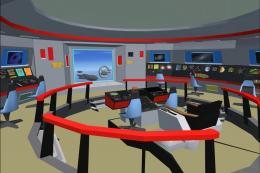 FSX Other Aircraft & Vehicles
FSX STAR TREK ENTERPRISE - Version 1.0- A tribute to TOS (The Original Series…
 FSX Other Aircraft & Vehicles
A fully-featured, freeware aircraft carrier add-on for all versions of Micros…
 FSX Other Aircraft & Vehicles
FSX CVN-76 USS Ronald Reagan This is the Acceleration AI carrier made flyable…
 FSX Other Aircraft & Vehicles
FSX CV-6 USS Enterprise. Aircraft carrier features hardened flight deck and h…
 FSX Other Aircraft & Vehicles
USS Macon (ZRS-5) AI. The Macon AI's consist of a fully animated version suit…
 FSX Other Aircraft & Vehicles
The DDG-62 USS Fitzgerald is a meticulously converted AI warship brought to a…
 FSX Other Aircraft & Vehicles
FSX BB62 USS New Jersey. Battleship features AI version included for use with…
Read what other simmers think, or add your own.


Im having trouble with this add-on its not working i copy the files in to the corect folder and then i start fsx and its not their what am i doing wrong thanks