

 FSX Civil Aircraft
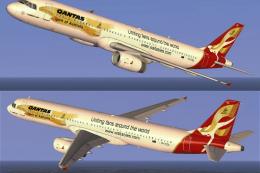
Qantas Airbus A321 in World Cup livery
Step into an immersive environment featuring the Qantas Airbus A321 adorned i…
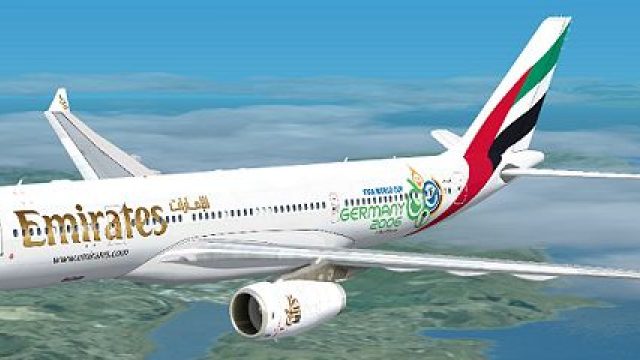
Emirates’ Airbus A330-200 “World Cup 2006” livery brings the airline’s commemorative tournament artwork to life with crisp, accurate exterior detailing for Microsoft Flight Simulator X. Textures-only, it requires the Thomas Ruth A330-200 base model and preserves the wide-body’s authentic presence for regional and long-haul routes.
 Rate
Rate
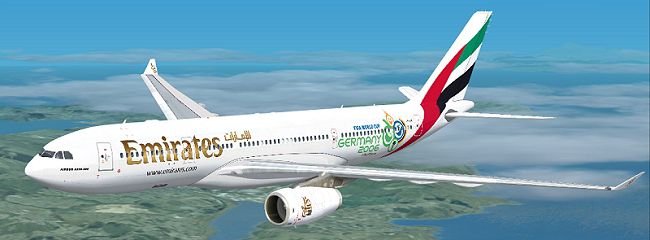
This repaint provides a customized Emirates Airbus A330-200 "World Cup 2006" variant for Microsoft Flight Simulator X enthusiasts who value authentic liveries and seamless integration. It offers a faithful recreation of Emirates’ commemorative design from 2006, showcasing a distinctive exterior linked to a historic tournament.
This modification focuses on accurately reproducing the Emirates “World Cup 2006” art on the well-known Airbus A330-200 platform created by Thomas Ruth. The A330-200—recognized for its efficient twin Rolls-Royce powerplants (denoted as “RR” in the model folder structure)—is a capable wide-body jet operated by various global carriers for both medium and long routes. Emirates, a Dubai-based airline, utilized this type extensively for regional high-density operations, making it an integral part of their fleet strategy.
Please note that this freeware release is textures-only, so acquiring the original Thomas Ruth A330-200 (TOM330.ZIP) from the Fly Away Simulation library is necessary. The new textures come courtesy of Jon Murchison, who meticulously crafted the repaint to capture this special commemorative layout. Once installed, the final result visually immerses simmers in an Emirates livery that honors a memorable 2006 event.
[fltsim.X]
title=EMIRATES WORLD CUP 06 A330-200
sim=TomA332
model=RR
panel=
sound=
texture=EMWC06
kb_checklists=
kb_reference=
atc_id=
atc_airline=Emirates
atc_flight_number=1123
atc_heavy=1
ui_manufacturer=Airbus
ui_type="A330-200"
ui_variation="Emirates - World Cup"
description=
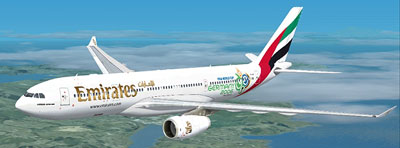
Upon completion of this process, flight sim enthusiasts can enjoy the vivid “World Cup 2006” artwork adorning the Emirates Airbus A330-200 model. This configuration underscores the airline’s unique branding approach from that memorable sporting era while preserving Thomas Ruth’s aerodynamic fidelity and handling performance within the simulator.
Free for all simmers · 2.13 MB · Scanned clean Oct 2026
Download speed: Free tier is capped at 0.5 Mbps. PRO members download at full line speed.
texture.{airline}) inside FSX\SimObjects\Airplanes\{base-aircraft}\.aircraft.cfg in Notepad. Add a new [fltsim.X] section per the readme.readme.txt or README file. It tells you exactly where files go, what dependencies are needed, and any quirks specific to this add-on.The archive emwc06.zip has 25 files and directories contained within it.
This list displays the first 500 files in the package. If the package has more, you will need to download it to view them.
| Filename/Directory | File Date | File Size |
|---|---|---|
| EMWC06.jpg | 03.23.09 | 99.43 kB |
| README _INSTALL.txt | 03.23.09 | 1.37 kB |
| A321_1_L.dds | 03.12.09 | 1.00 MB |
| A321_2_L.dds | 03.12.09 | 256.12 kB |
| A330_VC01.dds | 03.12.09 | 1.00 MB |
| A330_VC01L.dds | 03.12.09 | 1.00 MB |
| Airbus_A321_1_L.dds | 03.12.09 | 1.00 MB |
| Airbus_A321_2_L.dds | 03.12.09 | 1.00 MB |
| Airbus_A321_3_L.dds | 03.12.09 | 4.12 kB |
| Airbus_A321_4_L.dds | 03.12.09 | 1.00 MB |
| glass.dds | 03.12.09 | 64.12 kB |
| glass_spec.dds | 03.12.09 | 4.12 kB |
| main.dds | 03.23.09 | 4.00 MB |
| main_bump.dds | 03.12.09 | 4.00 MB |
| main_light.dds | 03.12.09 | 1.00 MB |
| main_spec.dds | 03.12.09 | 64.12 kB |
| texture.cfg | 03.12.09 | 165 B |
| thumbnail.jpg | 03.23.09 | 24.17 kB |
| VCblend.dds | 03.12.09 | 1.12 kB |
| wing_bump.dds | 03.12.09 | 1.00 MB |
| wing_l.dds | 03.23.09 | 1.00 MB |
| wing_r.dds | 03.23.09 | 1.00 MB |
| wing_spec.dds | 03.12.09 | 64.12 kB |
| flyawaysimulation.txt | 10.29.13 | 959 B |
| Go to Fly Away Simulation.url | 01.22.16 | 52 B |
Only PRO members can place votes.
More FSX & P3D add-ons hand-picked based on this download.
FSX Civil Aircraft
Step into an immersive environment featuring the Qantas Airbus A321 adorned i…
 FSX Civil Aircraft
FSX Asiana Boeing 747-400 GE, registration HL-7423, in World Cup livery. Text…
 FSX Civil Aircraft
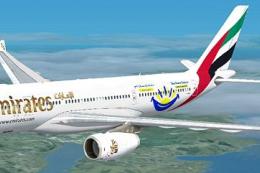
Emirates Airbus A330-200 "Dubai Summer Surprises 2008". Textures only for Tho…
 FSX Civil Aircraft
This freeware repaint offers a refreshed exterior for the default AI McDonnel…
 FSX Civil Aircraft
A repaint for the payware PMDG B737-800 of the Fifa World Cup tour plane for …
 FSX Civil Aircraft
Immerse yourself in a detailed Emirates-themed aircraft repaint designed for …
 FSX Civil Aircraft
Emirates Airbus A330-300. Model by Thomas Ruth (TOMA333B-1.ZIP). Emirates Air…
 FSX Civil Aircraft
This freeware repaint brings a refreshed look to the default Orbit Airlines f…
Read what other simmers think, or add your own.

