

 FSX Civil Aircraft
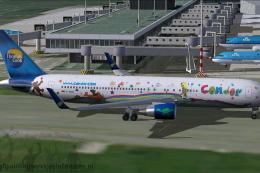
Condor "Heart of Children" Boeing 767-300, Thomas Cook Tail
Experience a unique presentation of Condor’s charitable “Heart of Children” p…
Condor/Thomas Cook Airbus A320 liveries capture three branding eras from 2002, 2004, and 2009 with crisp logo and color variations for authentic holiday-charter operations in Microsoft Flight Simulator X. Requires the Project Airbus A320 base model, including a fully functional virtual cockpit, animated doors, realistic lighting, dynamic shine, and refined ground and engine effects.
 Rate
Rate
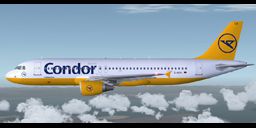
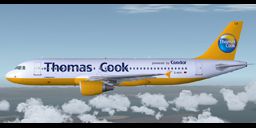
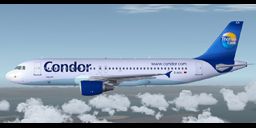
This complete freeware package features three distinct Condor/Thomas Cook Airbus A320 repaints by Marco Fischbach, utilizing the renowned Project Airbus base model. It has been tested with Service Pack 2 and includes a fully functional virtual cockpit for Microsoft Flight Simulator X. These liveries showcase various design phases of the airline from 2002, 2004, and 2009. Each variant highlights subtle logo changes and color modifications, ensuring a realistic representation of Condor’s well-known vacation operator branding under Thomas Cook. Extracting everything into your simulator is straightforward, and once installed, you can transport holidaymakers to popular destinations with true-to-life visual detail.
The Airbus A320 is a short- to medium-range aircraft introduced by Airbus in the late 1980s, featuring fly-by-wire technology and efficient aerodynamics. Condor, a German leisure carrier, has operated the A320 family extensively, especially under the Thomas Cook Group banner. Over the years, Condor/Thomas Cook introduced updated tail designs, revised fuselage titles, and unique logo placements, all accurately reflected in these three repaints.
The Project Airbus A320 model (designed using XML techniques) emphasizes realistic aircraft behavior. Below is a highlight of system functionalities:
These doors function via default and additional simulator key mappings:
Shift + E)Unzip the provided archive into your Flight Simulator X/Aircraft directory, ensuring all Effects files are placed into the main Flight Simulator X/Effects folder. After that, load up the simulator, select the new Condor/Thomas Cook A320 variations, and experience each era’s livery details.
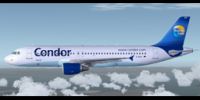
Classic Condor style on the Airbus A320.
The textures in this set include both legacy and modern branding, capturing iconic paint schemes that appeared over several years. The earliest scheme dates to around 2002 and includes older Condor titling, while the more recent 2009 version reflects the Thomas Cook branding shift. This range of liveries was created to satisfy enthusiasts wanting maximum authenticity in airline themes. According to the author, Marco Fischbach, these textures were refined to address small design nuances often overlooked in other packages.
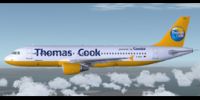
Later Thomas Cook branding on the Airbus A320.
Many individuals contributed to the foundation of this model and ensured its functionality:
Guest painters and collaborators include Ben Jones, Dickson Chan, Jaco du Preez, Sheldon Fernandes, and Terence Pereira. Their efforts helped refine various details. Flight dynamics were tested and evaluated by real-world flight professionals, including Capt. Manny Osias, F/O Spike Acenas, Mark Bolatete, and Kester Masias, further enhancing realism.
Below is an excerpt from the package configuration file, reflecting geometry definitions for door placement and nose gear position:
[Descr]
Type=W320
[Geom]
Nosegear= 11.45
Door1=-2, 11.35, 3.35, 5
Door4=-1.8,-13.15, 3.7,-5
Front= 1.5, 8.4, 1.8
Rear= 1.5,-6.25, 1.8
This freeware release on Fly Away Simulation offers a fully functional Project Airbus A320 base model bundled with accurately detailed Condor/Thomas Cook repaints. By installing it, pilots can immerse themselves in multiple airline era transitions while enjoying modern and legacy branding throughout virtual skies.
Free for all simmers · 44.77 MB · Scanned clean Oct 2026
Download speed: Free tier is capped at 0.5 Mbps (this file takes approximately 13 mins at the cap). PRO members download at full line speed.
FSX\SimObjects\Airplanes\. The folder must contain an aircraft.cfg file. Effects go into FSX\Effects\; gauges go into FSX\Gauges\.readme.txt or README file. It tells you exactly where files go, what dependencies are needed, and any quirks specific to this add-on.The archive fsx_pa320_condor.zip has 137 files and directories contained within it.
This list displays the first 500 files in the package. If the package has more, you will need to download it to view them.
| Filename/Directory | File Date | File Size |
|---|---|---|
| PA320 Condor | 11.27.09 | 0 B |
| Aircraft.cfg | 12.02.09 | 16.88 kB |
| Effects.zip | 11.25.09 | 6.42 kB |
| model | 11.25.09 | 0 B |
| A320_200_CFM_NoVC.mdl | 03.04.09 | 2.04 MB |
| Airbus_A321_interior.mdl | 08.22.07 | 1.06 MB |
| Model.cfg | 09.21.09 | 67 B |
| pa320-cfm56-2.air | 06.18.07 | 8.76 kB |
| panel | 11.25.09 | 0 B |
| Airbus_A321.cab | 09.26.07 | 2.72 MB |
| airbus_a321_panel_background.bmp | 06.18.07 | 769.05 kB |
| airbus_a321_panel_background_night.bmp | 06.18.07 | 769.05 kB |
| panel.cfg | 10.09.07 | 5.64 kB |
| sound | 11.26.09 | 0 B |
| Sound.cfg | 08.08.07 | 33 B |
| texture.2002 | 12.02.09 | 0 B |
| A320_1_l.bmp | 10.21.09 | 4.00 MB |
| A320_1_t.bmp | 11.30.09 | 4.00 MB |
| A320_2_l.bmp | 07.29.07 | 256.07 kB |
| A320_2_t.bmp | 12.02.09 | 4.00 MB |
| A320_fuse_1_l.bmp | 12.02.09 | 4.00 MB |
| A320_fuse_1_t.bmp | 11.27.09 | 4.00 MB |
| A320_fuse_2_l.bmp | 12.02.09 | 4.00 MB |
| A320_fuse_2_t.bmp | 11.27.09 | 4.00 MB |
| A320_fuse_3_l.bmp | 12.02.09 | 4.00 MB |
| A320_fuse_3_t.bmp | 11.27.09 | 4.00 MB |
| A320_misc_1.bmp | 12.02.09 | 1.00 MB |
| A320_misc_2.bmp | 11.29.08 | 4.00 MB |
| A320_wing_1_l.bmp | 08.30.07 | 1.00 MB |
| A320_wing_1_t.bmp | 11.26.09 | 4.00 MB |
| A320_wing_1_t.psd | 12.02.09 | 311.55 kB |
| A320_wing_2_l.bmp | 08.30.07 | 1.00 MB |
| A320_wing_2_t.bmp | 11.26.09 | 4.00 MB |
| A321_1_T.dds | 06.18.07 | 1.33 MB |
| A321_1_T_Bump.dds | 06.18.07 | 1.00 MB |
| A321_1_T_LM.dds | 06.18.07 | 170.79 kB |
| A321_1_T_spec.dds | 06.18.07 | 1.33 MB |
| A321_2_T.dds | 06.18.07 | 1.33 MB |
| A321_2_T_Bump.dds | 06.18.07 | 1.00 MB |
| A321_2_T_LM.dds | 06.18.07 | 170.79 kB |
| A321_2_T_spec.dds | 06.18.07 | 1.33 MB |
| A321_Interior_T.dds | 06.18.07 | 341.45 kB |
| A321_reflection.dds | 06.18.07 | 170.79 kB |
| Airbus_A321_1_C.dds | 06.18.07 | 682.79 kB |
| Airbus_A321_1_night_C.dds | 06.18.07 | 682.79 kB |
| Airbus_A321_2_C.dds | 06.18.07 | 682.79 kB |
| Airbus_A321_2_night_C.dds | 06.18.07 | 682.79 kB |
| Airbus_A321_3_C.dds | 06.18.07 | 682.79 kB |
| Airbus_A321_3_night_C.dds | 06.18.07 | 682.79 kB |
| Airbus_A321_4_C.dds | 06.18.07 | 682.79 kB |
| Airbus_A321_4_night_C.dds | 06.18.07 | 682.79 kB |
| Airbus_Pilots.dds | 06.18.07 | 42.79 kB |
| Fresnel_Ramp.dds | 06.18.07 | 640 B |
| thumbnail.jpg | 11.30.09 | 42.63 kB |
| texture.2004 | 12.02.09 | 0 B |
| A320_1_l.bmp | 10.21.09 | 4.00 MB |
| A320_1_t.bmp | 11.30.09 | 4.00 MB |
| A320_2_l.bmp | 07.29.07 | 256.07 kB |
| A320_2_t.bmp | 12.02.09 | 4.00 MB |
| A320_fuse_1_l.bmp | 12.02.09 | 4.00 MB |
| A320_fuse_1_t.bmp | 11.27.09 | 4.00 MB |
| A320_fuse_2_l.bmp | 12.02.09 | 4.00 MB |
| A320_fuse_2_t.bmp | 11.27.09 | 4.00 MB |
| A320_fuse_3_l.bmp | 12.02.09 | 4.00 MB |
| A320_fuse_3_t.bmp | 11.27.09 | 4.00 MB |
| A320_misc_1.bmp | 12.02.09 | 1.00 MB |
| A320_misc_2.bmp | 11.29.08 | 4.00 MB |
| A320_wing_1_l.bmp | 08.30.07 | 1.00 MB |
| A320_wing_1_t.bmp | 11.26.09 | 4.00 MB |
| A320_wing_2_l.bmp | 08.30.07 | 1.00 MB |
| A320_wing_2_t.bmp | 11.26.09 | 4.00 MB |
| A321_1_T.dds | 06.18.07 | 1.33 MB |
| A321_1_T_Bump.dds | 06.18.07 | 1.00 MB |
| A321_1_T_LM.dds | 06.18.07 | 170.79 kB |
| A321_1_T_spec.dds | 06.18.07 | 1.33 MB |
| A321_2_T.dds | 06.18.07 | 1.33 MB |
| A321_2_T_Bump.dds | 06.18.07 | 1.00 MB |
| A321_2_T_LM.dds | 06.18.07 | 170.79 kB |
| A321_2_T_spec.dds | 06.18.07 | 1.33 MB |
| A321_Interior_T.dds | 06.18.07 | 341.45 kB |
| A321_reflection.dds | 06.18.07 | 170.79 kB |
| Airbus_A321_1_C.dds | 06.18.07 | 682.79 kB |
| Airbus_A321_1_night_C.dds | 06.18.07 | 682.79 kB |
| Airbus_A321_2_C.dds | 06.18.07 | 682.79 kB |
| Airbus_A321_2_night_C.dds | 06.18.07 | 682.79 kB |
| Airbus_A321_3_C.dds | 06.18.07 | 682.79 kB |
| Airbus_A321_3_night_C.dds | 06.18.07 | 682.79 kB |
| Airbus_A321_4_C.dds | 06.18.07 | 682.79 kB |
| Airbus_A321_4_night_C.dds | 06.18.07 | 682.79 kB |
| Airbus_Pilots.dds | 06.18.07 | 42.79 kB |
| Fresnel_Ramp.dds | 06.18.07 | 640 B |
| thumbnail.jpg | 11.30.09 | 42.48 kB |
| texture.2009 | 12.02.09 | 0 B |
| A320_1_l.bmp | 10.21.09 | 4.00 MB |
| A320_1_t.bmp | 12.02.09 | 4.00 MB |
| A320_2_l.bmp | 07.29.07 | 256.07 kB |
| A320_2_t.bmp | 12.02.09 | 4.00 MB |
| A320_fuse_1_l.bmp | 12.02.09 | 4.00 MB |
| A320_fuse_1_t.bmp | 11.30.09 | 4.00 MB |
| A320_fuse_2_l.bmp | 12.02.09 | 4.00 MB |
| A320_fuse_2_t.bmp | 11.30.09 | 4.00 MB |
| A320_fuse_3_l.bmp | 12.02.09 | 4.00 MB |
| A320_fuse_3_t.bmp | 11.30.09 | 4.00 MB |
| A320_misc_1.bmp | 12.02.09 | 1.00 MB |
| A320_misc_2.bmp | 11.29.08 | 4.00 MB |
| A320_wing_1_l.bmp | 08.30.07 | 1.00 MB |
| A320_wing_1_t.bmp | 11.30.09 | 4.00 MB |
| A320_wing_2_l.bmp | 08.30.07 | 1.00 MB |
| A320_wing_2_t.bmp | 11.30.09 | 4.00 MB |
| A321_1_T.dds | 06.18.07 | 1.33 MB |
| A321_1_T_Bump.dds | 06.18.07 | 1.00 MB |
| A321_1_T_LM.dds | 06.18.07 | 170.79 kB |
| A321_1_T_spec.dds | 06.18.07 | 1.33 MB |
| A321_2_T.dds | 06.18.07 | 1.33 MB |
| A321_2_T_Bump.dds | 06.18.07 | 1.00 MB |
| A321_2_T_LM.dds | 06.18.07 | 170.79 kB |
| A321_2_T_spec.dds | 06.18.07 | 1.33 MB |
| A321_Interior_T.dds | 06.18.07 | 341.45 kB |
| A321_reflection.dds | 06.18.07 | 170.79 kB |
| Airbus_A321_1_C.dds | 06.18.07 | 682.79 kB |
| Airbus_A321_1_night_C.dds | 06.18.07 | 682.79 kB |
| Airbus_A321_2_C.dds | 06.18.07 | 682.79 kB |
| Airbus_A321_2_night_C.dds | 06.18.07 | 682.79 kB |
| Airbus_A321_3_C.dds | 06.18.07 | 682.79 kB |
| Airbus_A321_3_night_C.dds | 06.18.07 | 682.79 kB |
| Airbus_A321_4_C.dds | 06.18.07 | 682.79 kB |
| Airbus_A321_4_night_C.dds | 06.18.07 | 682.79 kB |
| Airbus_Pilots.dds | 06.18.07 | 42.79 kB |
| Fresnel_Ramp.dds | 06.18.07 | 640 B |
| thumbnail.jpg | 11.30.09 | 40.93 kB |
| Jetheat_t.bmp | 11.30.07 | 16.07 kB |
| Jetheat_t.bmp | 11.30.07 | 16.07 kB |
| Jetheat_t.bmp | 11.30.07 | 16.07 kB |
| Readme.txt | 12.02.09 | 4.97 kB |
| intelliscene.cfg | 08.03.08 | 142 B |
| flyawaysimulation.txt | 10.29.13 | 959 B |
| Go to Fly Away Simulation.url | 01.22.16 | 52 B |
Only PRO members can place votes.
More FSX & P3D add-ons hand-picked based on this download.
FSX Civil Aircraft
Experience a unique presentation of Condor’s charitable “Heart of Children” p…
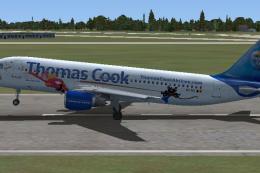 FSX Civil Aircraft
Thomas Cook Airlines Airbus A320 "Mega Mindy". This paint of the Thomas Cook …
 FSX Civil Aircraft
FSX Thomas Cook Airbus A330. Model by Project Open Sky. By Mark Huges. Featur…
 FSX Civil Aircraft
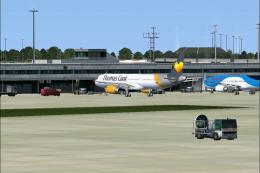
This is a Thomas Cook repaint for the default Airbus A321 series aircraft. Th…
 FSX Civil Aircraft
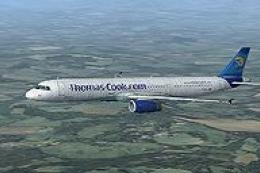
Thomas Cook Airbus A321, registration G-OMYJ. Textures for the default Airbus…
 FSX Civil Aircraft
Thomas Cook Airbus A321. Textures only for the default A321 by R. Svit. This …
 FSX Civil Aircraft
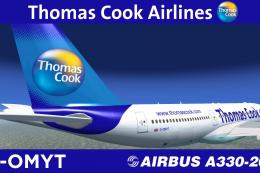
Texture only package for use with the Thomas Ruth A330-200 model (TOMA332B.ZI…
 FSX Civil Aircraft
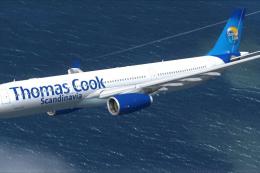
This is a semi-photoreal repaint of the Commercial Level Simulations Airbus A…
Read what other simmers think, or add your own.
