

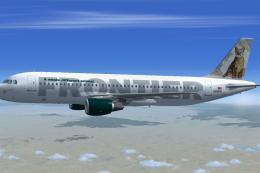
 FSX Civil Aircraft
Frontier Airlines Airbus A320-214
Experience an authentic rendition of Frontier Airlines’ “Charlie” the Cougar,…
Frontier Airlines-inspired Airbus A320 package pairs a detailed Project Airbus CFM model with a custom tail photo and fantasy N79FR livery, plus a default A321 virtual cockpit for familiar handling. Expect XML-driven touches like dynamic jetwash, drooping control surfaces, realistic spoilers, door animations, tuned lighting, wing views, and timed gear cycles in Microsoft Flight Simulator X.
 Rate
Rate
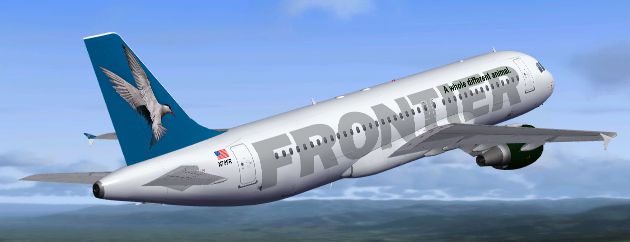
This complete freeware package brings flight sim enthusiasts a custom rendition of an Airbus A320 dressed in a unique, non-official Frontier Airlines paint scheme. It integrates an original tail photograph by the developer, Barrie May, combined with the excellent Project Airbus base model. The repaint is credited to Private Custard, delivering a fantasy registration (N79FR) that merges a virtual cockpit from the default A321. This add-on is fully compatible with Microsoft Flight Simulator X and specifically tested alongside the Acceleration expansion.
Author/Developer: Barrie May
Livery Artist: Private Custard
Base Model: Project Airbus
The underlying airframe is based on the successful Project Airbus A320 CFM design. Project Airbus has consistently focused on realistic modeling, texturing, and systems replication across the Airbus family. The team behind this effort began collaborating in the early 2000s, bringing new features to the flight simulation community that elevated freeware releases to new levels of authenticity.
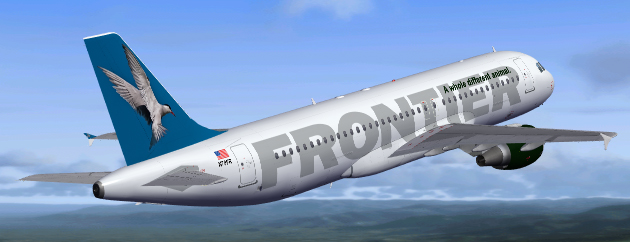
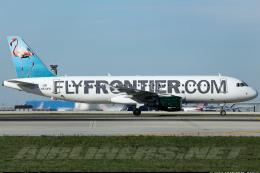
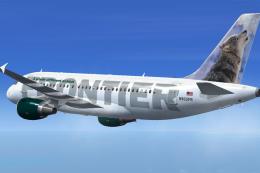
Visual reference showing the custom Frontier Airlines A320 in simulated flight.
Project Airbus was formed during a transformative period in the flight sim community. Its founding can be traced to an early collaboration between Thomas Ruth, known for designing an A300, and Trevor Slack, who provided continuous feedback and enhancements. With supportive contributions from creators such as Nicholas Wu and others, the A300 model evolved into a groundbreaking freeware release.
Subsequently, names like Thomas Kwong, Alexander Kvitta, Peter Binamira, Michael Karam, and many more joined, guiding further development. The A320 was a major milestone showcasing advanced animations and accurate flight dynamics. Although the group experienced challenges, they regrouped and introduced the next generation A320 model. To this day, the spirit of constant refinement is a hallmark of Project Airbus.
TURN WORD WRAP ON
1. Extract the contents of this ZIP archive into the FSX “Aircraft” folder (or “SimObjects/Airplanes,” depending on setup).
2. Move the files found in the provided “Effects” directory into your main Flight Simulator X “Effects” folder.
3. Launch FSX and select the newly installed Airbus A320 under the Frontier Airlines fantasy registration.
This particular A320 includes numerous XML-controlled enhancements for enthusiasts seeking a more in-depth simulation. The following list outlines some major highlights:
An additional selection of features enriches the simulation:
Project Airbus has been nurtured by a dedicated team:
Gratitude is extended to guest painters and contributors, including Ben Jones, Dickson Chan, Jaco du Preez, Sheldon Fernandes, and Terence Pereira, for making this freeware release possible. Flight dynamics testing and refinement were supported by Capt. Manny Osias, F/O Spike Acenas, Mark Bolatete, and Kester Masias, whose feedback ensured accurate performance handling.
Free for all simmers · 34.79 MB · Scanned clean Oct 2026
Download speed: Free tier is capped at 0.5 Mbps (this file takes approximately 10 mins at the cap). PRO members download at full line speed.
FSX\SimObjects\Airplanes\. The folder must contain an aircraft.cfg file. Effects go into FSX\Effects\; gauges go into FSX\Gauges\.readme.txt or README file. It tells you exactly where files go, what dependencies are needed, and any quirks specific to this add-on.The archive pa320frontier.zip has 128 files and directories contained within it.
This list displays the first 500 files in the package. If the package has more, you will need to download it to view them.
| Filename/Directory | File Date | File Size |
|---|---|---|
| Airbus A320-216 Frontier Airlines | 02.27.11 | 0 B |
| Aircraft.cfg | 02.26.11 | 15.59 kB |
| effects.zip | 06.16.07 | 5.94 kB |
| model | 02.27.11 | 0 B |
| A320_200_CFM_NoVC.mdl | 07.03.09 | 2.04 MB |
| Airbus_A321_interior.mdl | 11.19.07 | 1.06 MB |
| model.cfg | 06.29.10 | 65 B |
| pa320-cfm56-2.air | 06.18.07 | 8.76 kB |
| panel | 02.27.11 | 0 B |
| Airbus_A321.CAB | 04.16.10 | 2.71 MB |
| airbus_a321_panel_background.bmp | 05.12.06 | 769.05 kB |
| airbus_a321_panel_background_night.bmp | 05.12.06 | 769.05 kB |
| panel.cfg | 05.29.07 | 5.55 kB |
| Readme.txt | 02.26.11 | 6.12 kB |
| sound | 02.27.11 | 0 B |
| a321_abuzz.wav | 08.01.06 | 542.26 kB |
| a321_an11.wav | 08.01.06 | 160.58 kB |
| a321_an12.wav | 08.01.06 | 111.41 kB |
| a321_an13.wav | 08.01.06 | 115.19 kB |
| a321_an14.wav | 08.01.06 | 114.41 kB |
| a321_an1strt.wav | 08.01.06 | 1.30 MB |
| a321_an21.wav | 08.01.06 | 207.00 kB |
| a321_an22.wav | 08.01.06 | 256.92 kB |
| a321_an23.wav | 08.01.06 | 147.36 kB |
| a321_an24.wav | 08.01.06 | 162.15 kB |
| a321_an2shut.wav | 08.01.06 | 1.00 MB |
| a321_an2strt.wav | 08.01.06 | 297.20 kB |
| a321_an2t.wav | 08.01.06 | 450.59 kB |
| a321_bbuzz.wav | 08.01.06 | 542.26 kB |
| a321_bn11.wav | 08.01.06 | 186.51 kB |
| a321_bn12.wav | 08.01.06 | 107.45 kB |
| a321_bn13.wav | 08.01.06 | 107.70 kB |
| a321_bn14.wav | 08.01.06 | 117.23 kB |
| a321_bn1strt.wav | 08.01.06 | 1.52 MB |
| a321_bn21.wav | 08.01.06 | 206.17 kB |
| a321_bn22.wav | 08.01.06 | 247.70 kB |
| a321_bn23.wav | 08.01.06 | 150.48 kB |
| a321_bn24.wav | 08.01.06 | 165.92 kB |
| a321_bn2shut.wav | 08.01.06 | 1.00 MB |
| a321_bn2strt.wav | 08.01.06 | 297.20 kB |
| a321_bn2t.wav | 08.01.06 | 450.59 kB |
| baapdis.wav | 06.23.06 | 13.69 kB |
| baglide.wav | 06.23.06 | 7.19 kB |
| ban1shut.wav | 06.23.06 | 206.75 kB |
| ban1strt.wav | 06.23.06 | 389.31 kB |
| ban2shut.wav | 06.23.06 | 259.75 kB |
| ban2strt.wav | 06.23.06 | 62.25 kB |
| baover.wav | 06.23.06 | 22.23 kB |
| bbn1shut.wav | 06.23.06 | 212.25 kB |
| bbn1strt.wav | 06.23.06 | 342.81 kB |
| bbn2shut.wav | 06.23.06 | 254.25 kB |
| bbn2strt.wav | 06.23.06 | 50.25 kB |
| bmflaps.wav | 06.23.06 | 73.81 kB |
| bmgeardn.wav | 06.23.06 | 119.19 kB |
| bmgearup.wav | 06.23.06 | 122.19 kB |
| bmgwarn.wav | 06.23.06 | 14.73 kB |
| door_large_close.wav | 06.23.06 | 131.81 kB |
| door_large_open.wav | 06.23.06 | 116.30 kB |
| sound.cfg | 06.23.06 | 20.23 kB |
| xa321a-n1f01.wav | 06.23.06 | 165.15 kB |
| xa321a-n1f02.wav | 06.23.06 | 199.32 kB |
| xa321a-n1f03.wav | 06.23.06 | 122.38 kB |
| xa321a-n1f04.wav | 06.23.06 | 133.14 kB |
| xa321a-n2r01.wav | 06.23.06 | 182.89 kB |
| xa321a-n2r02.wav | 06.23.06 | 144.77 kB |
| xa321a-n2r03.wav | 06.23.06 | 135.38 kB |
| xa321a-n2r04.wav | 06.23.06 | 160.90 kB |
| xa321b-n1f01.wav | 06.23.06 | 165.15 kB |
| xa321b-n1f02.wav | 06.23.06 | 199.32 kB |
| xa321b-n1f03.wav | 06.23.06 | 122.38 kB |
| xa321b-n1f04.wav | 06.23.06 | 133.14 kB |
| xa321b-n2r01.wav | 06.23.06 | 182.89 kB |
| xa321b-n2r02.wav | 06.23.06 | 144.77 kB |
| xa321b-n2r03.wav | 06.23.06 | 135.38 kB |
| xa321b-n2r04.wav | 06.23.06 | 162.78 kB |
| xa321_an1shut.wav | 06.23.06 | 212.25 kB |
| xa321_an1strt.wav | 06.23.06 | 496.81 kB |
| xa321_an2shut.wav | 06.23.06 | 227.75 kB |
| xa321_an2strt.wav | 06.23.06 | 496.81 kB |
| xa321_an2t.wav | 06.23.06 | 108.81 kB |
| xa321_bn1shut.wav | 06.23.06 | 220.25 kB |
| xa321_bn1strt.wav | 06.23.06 | 460.81 kB |
| xa321_bn2shut.wav | 06.23.06 | 217.75 kB |
| xa321_bn2strt.wav | 06.23.06 | 460.81 kB |
| xa321_bn2t.wav | 06.23.06 | 119.31 kB |
| xban1shut.wav | 06.23.06 | 212.25 kB |
| xban1strt.wav | 06.23.06 | 496.81 kB |
| xban2shut.wav | 06.23.06 | 227.75 kB |
| xban2strt.wav | 06.23.06 | 60.75 kB |
| xbbn1shut.wav | 06.23.06 | 220.25 kB |
| xbbn1strt.wav | 06.23.06 | 460.81 kB |
| xbbn2shut.wav | 06.23.06 | 217.75 kB |
| xbbn2strt.wav | 06.23.06 | 58.25 kB |
| texture | 02.27.11 | 0 B |
| A320_1_t.bmp | 02.26.11 | 4.00 MB |
| A320_2_t.bmp | 02.26.11 | 4.00 MB |
| A320_fuse_1_t.bmp | 02.26.11 | 4.00 MB |
| A320_fuse_2_t.bmp | 02.26.11 | 4.00 MB |
| A320_fuse_3_t.bmp | 02.26.11 | 4.00 MB |
| A320_misc_1.bmp | 02.26.11 | 1.00 MB |
| A320_misc_2.bmp | 02.26.11 | 4.00 MB |
| A320_wing_1_t.bmp | 02.26.11 | 4.00 MB |
| A320_wing_2_t.bmp | 02.26.11 | 4.00 MB |
| A321_1_T.dds | 09.04.06 | 1.33 MB |
| A321_1_T_Bump.dds | 09.04.06 | 1.00 MB |
| A321_1_T_LM.dds | 09.04.06 | 170.79 kB |
| A321_1_T_spec.dds | 09.04.06 | 1.33 MB |
| A321_2_T.dds | 09.04.06 | 1.33 MB |
| A321_2_T_Bump.dds | 09.04.06 | 1.00 MB |
| A321_2_T_LM.dds | 09.04.06 | 170.79 kB |
| A321_2_T_spec.dds | 09.04.06 | 1.33 MB |
| A321_Interior_T.dds | 09.04.06 | 341.45 kB |
| A321_reflection.dds | 09.04.06 | 170.79 kB |
| Airbus_A321_1_C.dds | 09.04.06 | 682.79 kB |
| Airbus_A321_1_night_C.dds | 09.04.06 | 682.79 kB |
| Airbus_A321_2_C.dds | 09.04.06 | 682.79 kB |
| Airbus_A321_2_night_C.dds | 09.04.06 | 682.79 kB |
| Airbus_A321_3_C.dds | 09.04.06 | 682.79 kB |
| Airbus_A321_3_night_C.dds | 09.04.06 | 682.79 kB |
| Airbus_A321_4_C.dds | 09.04.06 | 682.79 kB |
| Airbus_A321_4_night_C.dds | 09.04.06 | 682.79 kB |
| Airbus_Pilots.dds | 09.04.06 | 42.79 kB |
| Fresnel_Ramp.dds | 09.04.06 | 640 B |
| texture.cfg | 08.14.06 | 137 B |
| thumbnail.jpg | 02.26.11 | 118.48 kB |
| thumbnail.jpg | 02.26.11 | 118.48 kB |
| flyawaysimulation.txt | 10.29.13 | 959 B |
| Go to Fly Away Simulation.url | 01.22.16 | 52 B |
Only PRO members can place votes.
More FSX & P3D add-ons hand-picked based on this download.
FSX Civil Aircraft
Experience an authentic rendition of Frontier Airlines’ “Charlie” the Cougar,…
 FSX Civil Aircraft
This is one of the Airbus A320's of the Frontier Airlines fleet with the new …
 FSX Civil Aircraft
This is one of the Airbus A320's of the Frontier Airlines fleet with the new …
 FSX Civil Aircraft
This is a repaint of Project Airbus A320-200 model in the colors of Frontier …
 FSX Civil Aircraft
Texture for the Aerosoft A320 in the Frontier Airlines new livery. Requires t…
 FSX Civil Aircraft
A fix for the Frontier Airlines N223FR texture for the SMS A320. It fixes the…
 FSX Civil Aircraft
This complete freeware package features a meticulously repainted Airbus A319 …
 FSX Civil Aircraft
This aircraft has highly detailed photorealistic textures. This model has bee…
Read what other simmers think, or add your own.
