

 FSX Civil Aircraft
Thai Airways Airbus A330-343
Enhance your virtual flying experience with this detailed rendition of Thai A…
Lufthansa Airbus A330-343 livery for Tom Ruth’s A330 brings crisp exterior textures, accurate D-AIKD registration details, and authentic airline markings for mid-to-long-range widebody operations in Microsoft Flight Simulator X. Requires the Tom Ruth A330-300 base pack, pairing a modern corporate scheme with a clean, realistic presentation on the Ramp and in flight.
 Rate
Rate
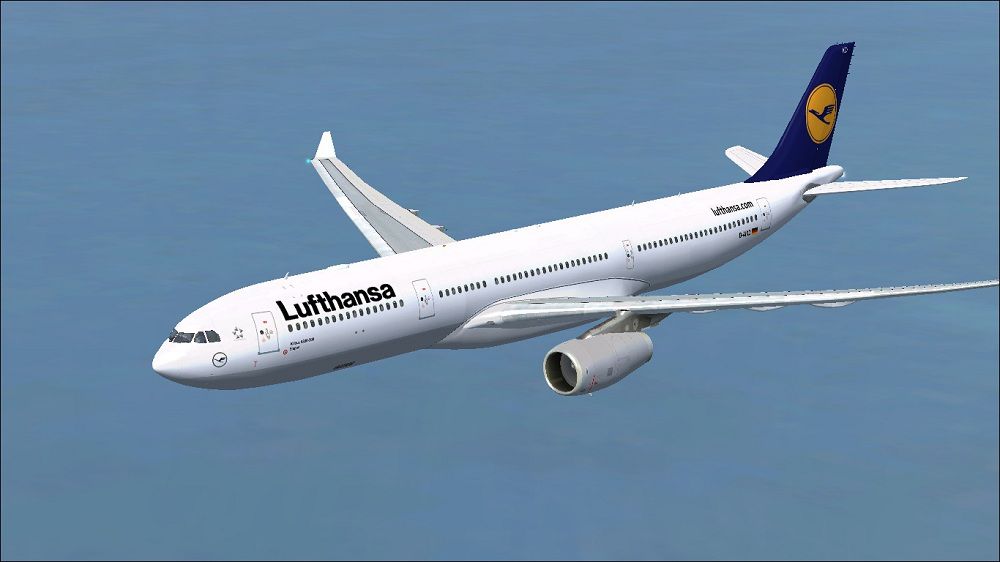
This freeware repaint brings Lufthansa’s distinctive colors to Tom Ruth’s Airbus A330-343 in Microsoft Flight Simulator X, featuring the real-world registration D-AIKD (Manufacturer Serial Number 629). Developed by Paul Craig and based on Thomas Ruth’s superb A330 model, this package offers vivid external textures and detailed markings representative of Germany’s iconic flag carrier. Enthusiasts who enjoy simulating mid-to-long-range routes will appreciate how this twin-aisle widebody showcases Lufthansa’s commitment to fuel efficiency and passenger comfort. Below, you will find a thorough guide for integrating these custom textures into your simulator.

Lufthansa Airbus A330-343 in flight.
This repaint is textures only and does not include the underlying aircraft model. To operate correctly, it requires you to have installed the freeware Thomas Ruth A330-300 base pack (TOMA333B-1.ZIP) beforehand. That base file set is available via the Fly Away Simulation mod library.
After collecting the necessary package, locate your main Tom Ruth A330-300 folder. By default, you can find it at:
OS (C)/Program Files(x86)/Microsoft Games/Microsoft Flight Simulator X/SimObjects/Airplanes/Tom_A330-300
aircraft.cfg file.Within the aircraft.cfg file, you will need to add a new entry for this repaint. Replace the ‘X’ shown below with the next sequential number in the existing [fltsim] series, making sure each entry is consecutive.
[fltsim.X]
title=Lufthansa A330-343
sim=TomA333
model=RR
panel=330
sound=
texture=Lufthansa
kb_checklists=
kb_reference=
atc_id=D-AIKD
atc_airline=Lufthansa
atc_flight_number=1123
atc_heavy=1
ui_manufacturer=Airbus
ui_type="A330-343"
ui_variation="Lufthansa"
ui_typerole="Commercial Airliner"
ui_createdby="Thomas Ruth"
description=
If you encounter any difficulties while editing, try copying the original configuration file to another location, making the changes there, and then moving it back to your aircraft folder. This approach often resolves access errors or permissions issues.
All included files are used at your own risk. Neither the author nor any other party assumes responsibility for any potential problems or damages that could arise from their use. Please ensure you create a backup before making any changes.
Repaint by Paul Craig.
Free for all simmers · 3.68 MB · Scanned clean Oct 2026
Download speed: Free tier is capped at 0.5 Mbps (this file takes approximately 1 min at the cap). PRO members download at full line speed.
texture.{airline}) inside FSX\SimObjects\Airplanes\{base-aircraft}\.aircraft.cfg in Notepad. Add a new [fltsim.X] section per the readme.readme.txt or README file. It tells you exactly where files go, what dependencies are needed, and any quirks specific to this add-on.The archive lufthansaa330-343.zip has 32 files and directories contained within it.
This list displays the first 500 files in the package. If the package has more, you will need to download it to view them.
| Filename/Directory | File Date | File Size |
|---|---|---|
| FILE_ID.DIZ | 06.04.11 | 180 B |
| Lufthansa Airbus A330-343 Picture.jpg | 06.04.11 | 93.19 kB |
| Readme.txt | 06.04.11 | 1.51 kB |
| texture.Lufthansa | 06.04.11 | 0 B |
| A321_1_L.dds | 02.22.09 | 1.00 MB |
| A321_2_L.dds | 02.22.09 | 256.12 kB |
| A330_VC01.dds | 02.05.09 | 1.00 MB |
| A330_VC01L.dds | 02.19.09 | 1.00 MB |
| Airbus_A321_1_C.dds | 09.04.06 | 682.79 kB |
| Airbus_A321_1_L.dds | 02.19.09 | 1.00 MB |
| Airbus_A321_2_C.dds | 09.04.06 | 682.79 kB |
| Airbus_A321_2_L.dds | 02.19.09 | 1.00 MB |
| Airbus_A321_3_C.dds | 09.04.06 | 682.79 kB |
| Airbus_A321_3_L.dds | 02.19.09 | 4.12 kB |
| Airbus_A321_4_C.dds | 09.04.06 | 682.79 kB |
| Airbus_A321_4_L.dds | 02.19.09 | 1.00 MB |
| glass.dds | 03.02.09 | 64.12 kB |
| glass_spec.dds | 11.24.08 | 4.12 kB |
| main.dds | 06.04.11 | 4.00 MB |
| main_bump.dds | 04.12.09 | 4.00 MB |
| main_light.dds | 04.13.09 | 1.00 MB |
| main_spec.dds | 03.23.09 | 64.12 kB |
| texture.cfg | 04.17.09 | 140 B |
| thumbnail.jpg | 06.04.11 | 9.52 kB |
| VCblend.dds | 02.09.09 | 1.12 kB |
| wing_bump.dds | 03.17.09 | 1.00 MB |
| wing_l.dds | 06.04.11 | 1.00 MB |
| wing_r.dds | 06.04.11 | 1.00 MB |
| wing_spec.dds | 11.21.08 | 64.12 kB |
| thumbnail.jpg | 06.04.11 | 9.52 kB |
| flyawaysimulation.txt | 10.29.13 | 959 B |
| Go to Fly Away Simulation.url | 01.22.16 | 52 B |
Only PRO members can place votes.
More FSX & P3D add-ons hand-picked based on this download.
FSX Civil Aircraft
Enhance your virtual flying experience with this detailed rendition of Thai A…
 FSX Civil Aircraft
Air Europa Airbus A330-343 repaint for the Thomas Ruth A330-300 model. This i…
 FSX Civil Aircraft
Lufthansa Airbus A330 demo version. The Airbus A330 is a twin-engined wide-bo…
 FSX Civil Aircraft
Lufthansa Airbus A330-300. A real paint of the Lufthansa A330-300. In Thomas …
 FSX Civil Aircraft
High quality repaint for the freeware Thomas Ruth Airbus A330-300 model; requ…
 FSX Civil Aircraft
Airbus NEO livery for the payware Blackbox Simulations A330 Prologue. This is…
 FSX Civil Aircraft
This freeware package showcases a meticulously crafted Lufthansa Airbus A380-…
 FSX Civil Aircraft
Lufthansa Airbus A350 demo version The A350 XWB (Xtra Wide-Body) is Airbus' r…
Be the first to leave a comment on this download.
Be the first to share your thoughts on this download.