

 FSX Military Aircraft
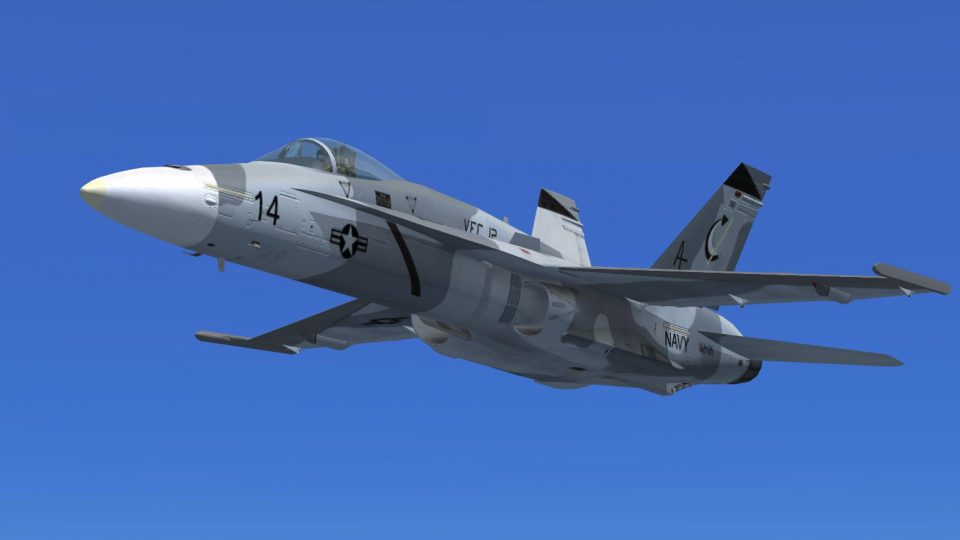
US Navy FA-18 Fighting Omars Blue
This new texture set offers a distinctive “Fighting Omars” livery for the def…
US Navy VFC-12 “Fighting Omars” Shades of Grey repaint transforms the default F/A-18 Hornet with authentic adversary camouflage and squadron markings, ideal for carrier operations and dissimilar air combat training scenarios in Microsoft Flight Simulator X. Requires the FSX Acceleration F/A-18 base aircraft for full compatibility.
 Rate
Rate
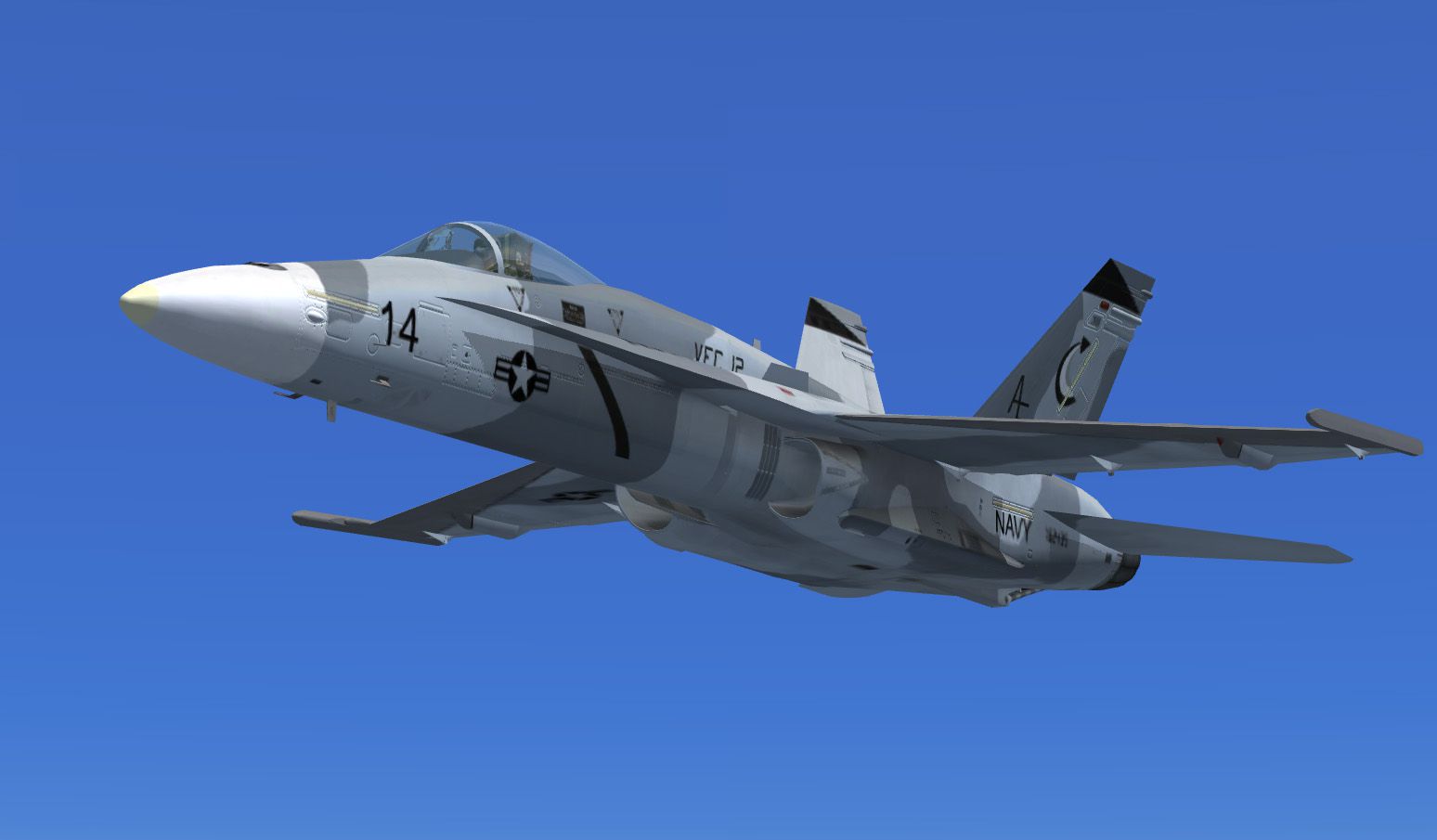
This specialized repaint package features the famous “Shades of Grey” adversary scheme for the default F/A-18 Hornet in Microsoft Flight Simulator X (Acceleration). It replicates the authentic camouflage used by the US Navy’s Fighter Squadron Composite 12 (VFC-12), also referred to as the Fighting Omars, and offers an immersive visual experience for those interested in carrier-based operations and detailed naval aviation training scenarios.
F/A-18 Hornet Background: The real-world F/A-18 Hornet is recognized as a supersonic, twin-engine, all-weather, carrier-capable multirole combat aircraft that was originally designed by McDonnell Douglas (now Boeing). The Hornet’s versatility makes it a standout jet in various operational contexts, from fleet defense to enemy force training.
Adversary Role: In this livery, VFC-12 simulates the performance profile of fourth-generation fighters like the MiG-29. Operators within VFC-12 deliver realistic enemy tactics and engagements to sharpen pilot skills for both US Navy and Marine Corps aviation units. Their distinct “Shades of Grey” scheme highlights one of the advanced camouflage options used during adversary drills.
VFC-12 is a Reserve squadron, part of Reserve Carrier Air Wing 20, but it remains on station rather than deploying with carrier groups. Alongside VFC-13, it stands among the last dedicated US Navy squadrons providing full-scale air combat training. VFC-13 primarily uses the F-5 family to mirror MiG-21 performance, whereas VFC-12 opts for the Hornet to mimic more advanced threats.
Shows the Fighting Omars’ grey adversary pattern in action.
texture.OmarsG folder into the FA-18 directory.aircraft.cfg file, and add the provided [fltsim.xx] block at the correct sequential index. Replace “xx” with the next available number in your configuration.Ensure you have the default FSX Acceleration Boeing F/A-18 Hornet base package before installing this repaint. It is a freeware repaint by Cronan Doyle and requires the freeware model available in the Fly Away Simulation mod library.
[fltsim.xx]
title=FA-18 Fighting Omars
sim=FA-18
model=
panel=
sound=
texture=OmarsG
kb_checklists=boeing_FA18_check
kb_reference=boeing_FA18_ref
atc_id=014
atc_airline=NAVY
atc_flight_number=014
ui_manufacturer="Boeing"
ui_type="F/A-18"
ui_variation="Fighting Omars"
ui_typerole="Twin Engine Jet"
ui_createdby="Microsoft Corporation"
description="This repaint showcases the grey adversary scheme operated by VFC-12 (Fighting Omars). The unit provides dissimilar air combat training for US Navy and Marine Corps units. Repaint by Cronan Doyle."
The “Shades of Grey” paint job accurately reflects the real VFC-12 markings in service today. Both the F-5E/F/N from VFC-13 and the F/A-18 from VFC-12 play critical roles in emulating potential adversaries. By installing this repaint, virtual aviators can experience high-fidelity US Navy adversary training scenarios in Microsoft Flight Simulator X. Repaint developed by Cronan Doyle.
Free for all simmers · 4.18 MB · Scanned clean Oct 2026
Download speed: Free tier is capped at 0.5 Mbps (this file takes approximately 1 min at the cap). PRO members download at full line speed.
texture.{airline}) inside FSX\SimObjects\Airplanes\{base-aircraft}\.aircraft.cfg in Notepad. Add a new [fltsim.X] section per the readme.readme.txt or README file. It tells you exactly where files go, what dependencies are needed, and any quirks specific to this add-on.The archive fa18omarsgrey.zip has 13 files and directories contained within it.
This list displays the first 500 files in the package. If the package has more, you will need to download it to view them.
| Filename/Directory | File Date | File Size |
|---|---|---|
| F-18_Main01_T.dds | 09.17.11 | 1.33 MB |
| F-18_Main02_T.dds | 09.17.11 | 1.33 MB |
| F-18_Main03_T.dds | 09.16.11 | 682.80 kB |
| F-18_Main04_T.dds | 09.17.11 | 1.33 MB |
| F-18_Wingl_T.dds | 09.17.11 | 1.33 MB |
| F-18_WingR_T.dds | 09.17.11 | 1.33 MB |
| texture.cfg | 08.22.07 | 162 B |
| thumbnail.jpg | 09.17.11 | 111.16 kB |
| thumbnail.jpg | 09.17.11 | 111.16 kB |
| FIELD_ID.DZ.txt | 09.17.11 | 714 B |
| Readme.txt | 09.17.11 | 2.25 kB |
| flyawaysimulation.txt | 10.29.13 | 959 B |
| Go to Fly Away Simulation.url | 01.22.16 | 52 B |
Only PRO members can place votes.
More FSX & P3D add-ons hand-picked based on this download.
FSX Military Aircraft
This new texture set offers a distinctive “Fighting Omars” livery for the def…
 FSX Military Aircraft
This repaint brings the distinctive “Fighting Omars” markings to the default …
 FSX Military Aircraft
VFA-192 Dambusters CAG bird, BuNo. 164905 for the default Acceleration F/A-18…
 FSX Military Aircraft
Textures for Casa C-212 Aviocar. Ala 37 based in Villanubla, Valladolid. Nume…
 FSX Military Aircraft
US Marines F/A-18 Super Hornet, VMFA-323 Death Rattlers 2013 CAG. A VMFA323 D…
 FSX Military Aircraft
This is an update for the FA-18E recently posted. That file revealed problems…
 FSX Military Aircraft
New line version for VFA-137 Kestrels. Repaint for the payware VRS F/A-18E Su…
 FSX Military Aircraft
This repaint set provides a distinctive VAQ-132 “Scorpions” CAG livery for th…
Be the first to leave a comment on this download.
Be the first to share your thoughts on this download.